Control
This module contains plotting functions for some of the common plots used in control system. It works with transfer functions from SymPy, SciPy and the control module. To achieve this seamlessly user experience, the control module must be installed, which solves some critical issues related to SymPy but also comes with it’s own quirks.
In particular, impulse_response, step_response and ramp_response
provide two modes of operation:
control=True(default value): the symbolic transfer function is converted to a transfer function of the control module. The responses are computed with numerical integration.control=Falsethe responses are computed with the inverse Laplace transform of the symbolic output signal. This step is not trivial: sometimes it works fine, other times it produces wrong results, other times it consumes too much memory, potentially crashing the machine.
These functions exposes the lower_limit=0 keyword argument, which is the
lower value of the time axis. If the default value (zero) is used, the
responses from the two modes of operation are identical. On the other hand,
if the value is different from zero, then results are different, with the
second mode of operation being correct. The first mode of operation is wrong
because the integration starts with a zero initial condition.
from sympy import *
from spb import *
x = symbols("x")
s = symbols("s")
G = (8*s**2 + 18*s + 32) / (s**3 + 6*s**2 + 14*s + 24)
p1 = graphics(
   step_response(G, upper_limit=10, label="G1 - control", control=True, rendering_kw={"linestyle": "--"}),
   step_response(G, upper_limit=10, label="G1 - sympy", control=False, scatter=True, n=20),
   xlabel="Time [s]", ylabel="Amplitude", xlim=(0, 10), show=False
)
p2 = graphics(
   step_response(G, upper_limit=10, label="G1 - control", control=True, rendering_kw={"linestyle": "--"}, lower_limit=2),
   step_response(G, upper_limit=10, label="G1 - sympy", control=False, scatter=True, n=20, lower_limit=2),
   xlabel="Time [s]", ylabel="Amplitude", xlim=(0, 10), show=False
)
plotgrid(p1, p2)
(Source code, png)
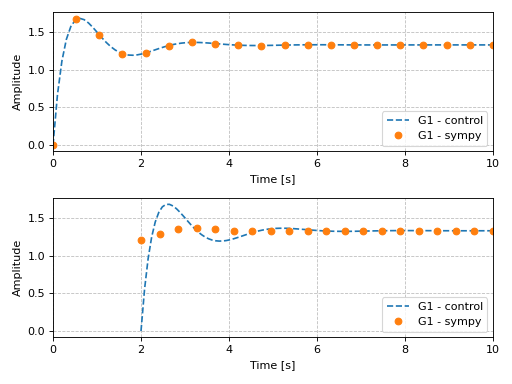
The plotting module will warn the user if the first mode of operation is being
used with a lower_limit different than zero.
NOTES:
All the following examples are generated using Matplotlib. However, Bokeh can be used too, which allows for a better data exploration thanks to useful tooltips. Set
backend=BBin the function call to use Bokeh.For technical reasons, all interactive-widgets plots in this documentation are created using Holoviz’s Panel. Often, they will ran just fine with ipywidgets too. However, if a specific example uses the
paramlibrary, or widgets from thepanelmodule, then users will have to modify theparamsdictionary in order to make it work with ipywidgets. Refer to Interactive module for more information.
- spb.graphics.control.pole_zero(system, pole_markersize=10, zero_markersize=7, show_axes=False, label=None, sgrid=False, zgrid=False, control=True, input=None, output=None, **kwargs)[source]
Computes the [Pole-Zero] plot (also known as PZ Plot or PZ Map) of a system.
A Pole-Zero plot is a graphical representation of a system’s poles and zeros. It is plotted on a complex plane, with circular markers representing the system’s zeros and ‘x’ shaped markers representing the system’s poles.
- Parameters:
- systemLTI system type
The system for which the pole-zero plot is to be computed. It can be:
an instance of
control.TransferFunctionan instance of
scipy.signal.TransferFunction- a symbolic expression in rational form, which will be converted to
an object of type
sympy.physics.control.lti.TransferFunction.
- a tuple of two or three elements:
(num, den, generator [opt]), which will be converted to an object of type
sympy.physics.control.lti.TransferFunction.
- a tuple of two or three elements:
- pole_markersizeint
The size of the markers used to mark the poles in the plot. It must be: 1 ≤ pole_markersize < ∞. Default value: 10.
- zero_markersizeint
The size of the markers used to mark the zeros in the plot. It must be: 1 ≤ zero_markersize < ∞. Default value: 10.
- labelstr
Set the label associated to this series, which will be eventually shown on the legend or colorbar.
- sgridbool, optional
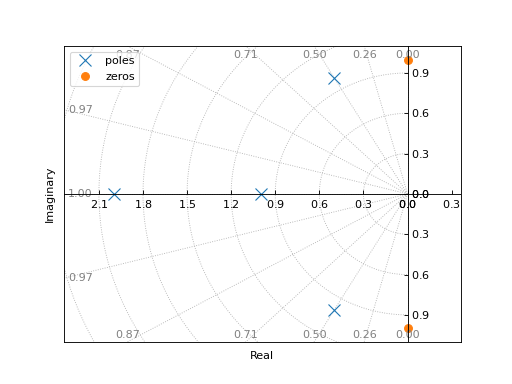
Generates a grid of constant damping ratios and natural frequencies on the s-plane. Default to False.
- zgridbool, optional
Generates a grid of constant damping ratios and natural frequencies on the z-plane. Default to False.
- controlbool, optional
If True, computes the poles/zeros with the
controlmodule, which uses numerical integration. If False, computes them withsympy. Default to True.- inputint, optional
Only compute the poles/zeros for the listed input. If not specified, the poles/zeros for each independent input are computed (as separate traces).
- outputint, optional
Only compute the poles/zeros for the listed output. If not specified, all outputs are reported.
- colorbar_ticks_formattertick_formatter_multiples_of
An object of type
tick_formatter_multiples_ofwhich will be used to place tick values on the colorbar at each multiple of a specified quantity. This only works when use_cm=True.- control_kwdict
A dictionary of keyword arguments to be passed to the function of the
controlmodule that will generate numerical data starting from the transfer function stored insystem.- is_filledbool
Whether scatter’s markers are filled or void. Default value: True.
- is_scatterbool
If True it represent a scatter plot, otherwise a continuous line. Default value: False.
- paramsdict, optional
A dictionary mapping symbols to parameters. If provided, this dictionary enables the interactive-widgets plot.
When calling a plotting function, the parameter can be specified with:
a widget from the
ipywidgetsmodule.a widget from the
panelmodule.- a tuple of the form:
(default, min, max, N, tick_format, label, spacing), which will instantiate a
ipywidgets.widgets.widget_float.FloatSlideror aipywidgets.widgets.widget_float.FloatLogSlider, depending on the spacing strategy. In particular:- default, min, maxfloat
Default value, minimum value and maximum value of the slider, respectively. Must be finite numbers. The order of these 3 numbers is not important: the module will figure it out which is what.
- Nint, optional
Number of steps of the slider.
- tick_formatstr or None, optional
Provide a formatter for the tick value of the slider. Default to
".2f".
- label: str, optional
Custom text associated to the slider.
- spacingstr, optional
Specify the discretization spacing. Default to
"linear", can be changed to"log".
Notes:
parameters cannot be linked together (ie, one parameter cannot depend on another one).
If a widget returns multiple numerical values (like
panel.widgets.slider.RangeSlideroripywidgets.widgets.widget_float.FloatRangeSlider), then a corresponding number of symbols must be provided.
Here follows a couple of examples. If
imodule="panel":import panel as pn params = { a: (1, 0, 5), # slider from 0 to 5, with default value of 1 b: pn.widgets.FloatSlider(value=1, start=0, end=5), # same slider as above (c, d): pn.widgets.RangeSlider(value=(-1, 1), start=-3, end=3, step=0.1) }
Or with
imodule="ipywidgets":import ipywidgets as w params = { a: (1, 0, 5), # slider from 0 to 5, with default value of 1 b: w.FloatSlider(value=1, min=0, max=5), # same slider as above (c, d): w.FloatRangeSlider(value=(-1, 1), min=-3, max=3, step=0.1) }
When instantiating a data series directly,
paramsmust be a dictionary mapping symbols to numerical values.Let
seriesbe any data series. Thenseries.paramsreturns a dictionary mapping symbols to numerical values.- pole_colorstr, list, tuple
The color of the pole points on the plot.
- rendering_kwdict
A dictionary of keyword arguments to be passed to the renderers in order to further customize the appearance of the line. Here are some useful links for the supported plotting libraries:
Matplotlib:
for solid lines: https://matplotlib.org/stable/api/_as_gen/matplotlib.pyplot.plot.html
for colormap-based lines: https://matplotlib.org/stable/api/collections_api.html#matplotlib.collections.LineCollection
for scatters: https://matplotlib.org/stable/api/_as_gen/matplotlib.pyplot.scatter.html
Bokeh:
- return_polesbool
If True returns the poles of the transfer function, otherwise it returns the zeros. Default value: True.
- show_in_legendbool
Toggle the visibility of the data series on the legend. Default value: True.
- txcallable
Numerical transformation function to be applied to the data on the x-axis.
- tycallable
Numerical transformation function to be applied to the data on the y-axis.
- zero_colorstr, list, tuple
The color of the zero points on the plot.
- Returns:
- A list containing:
- one instance of
SGridLineSeriesifsgrid=True.
- one instance of
- one instance of
ZGridLineSeriesifzgrid=True.
- one instance of
- one or more instances of
PoleZeroWithSympySeriesifcontrol=False.
- one or more instances of
- one or more instances of
PoleZeroSeriesifcontrol=True.
- one or more instances of
See also
References
Examples
from sympy.abc import s
from sympy import I
from sympy.physics.control.lti import TransferFunction
from spb import *
tf1 = TransferFunction(
    s**2 + 1, s**4 + 4*s**3 + 6*s**2 + 5*s + 2, s)
graphics(
    pole_zero(tf1, sgrid=True),
    grid=False, xlabel="Real", ylabel="Imaginary"
)
(
Source code,png)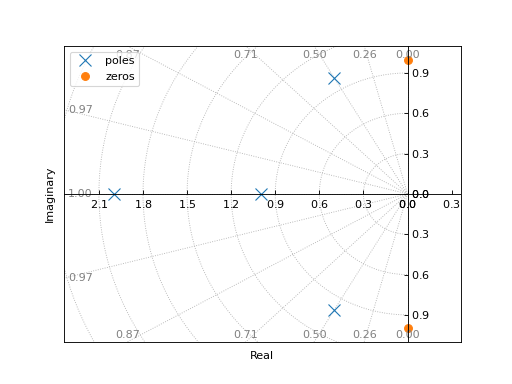
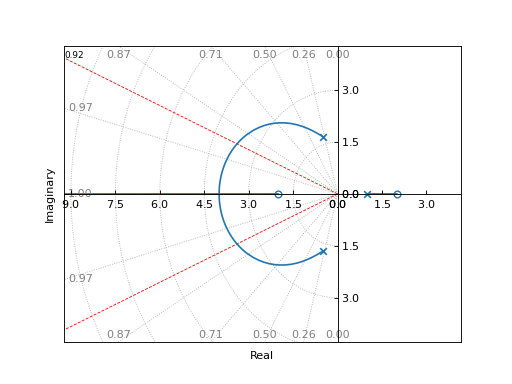
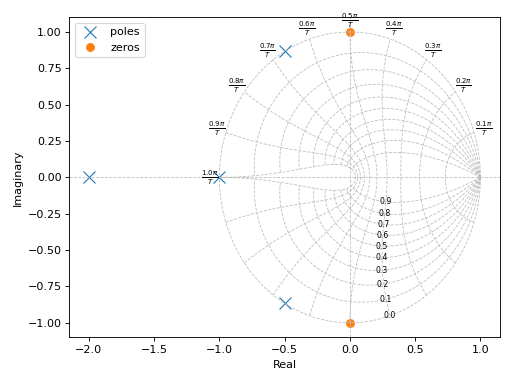
Plotting poles and zeros on the z-plane:
graphics(
    pole_zero(tf1, zgrid=True),
    grid=False, xlabel="Real", ylabel="Imaginary"
)
(
Source code,png)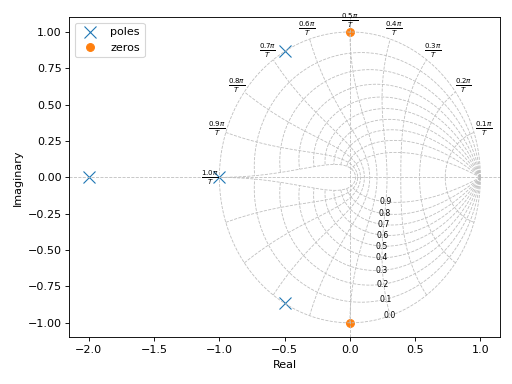
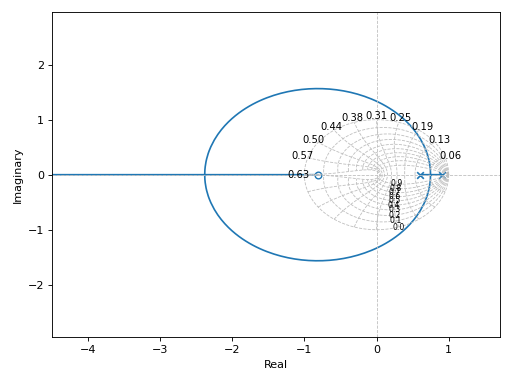
If a transfer function has complex coefficients, make sure to request the evaluation using
sympyinstead of thecontrolmodule:tf = TransferFunction(s + 2, s**2 + (2+I)*s + 10, s) graphics( control_axis(), pole_zero(tf, control=False), grid=False, xlabel="Real", ylabel="Imaginary" )
(
Source code,png)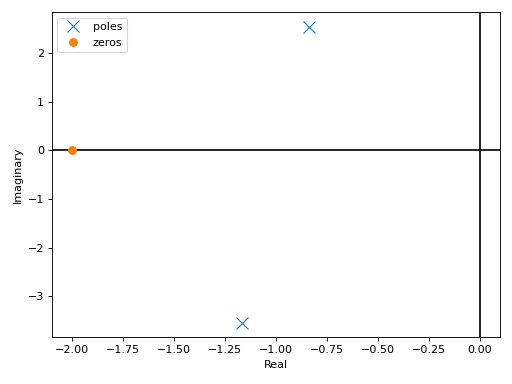
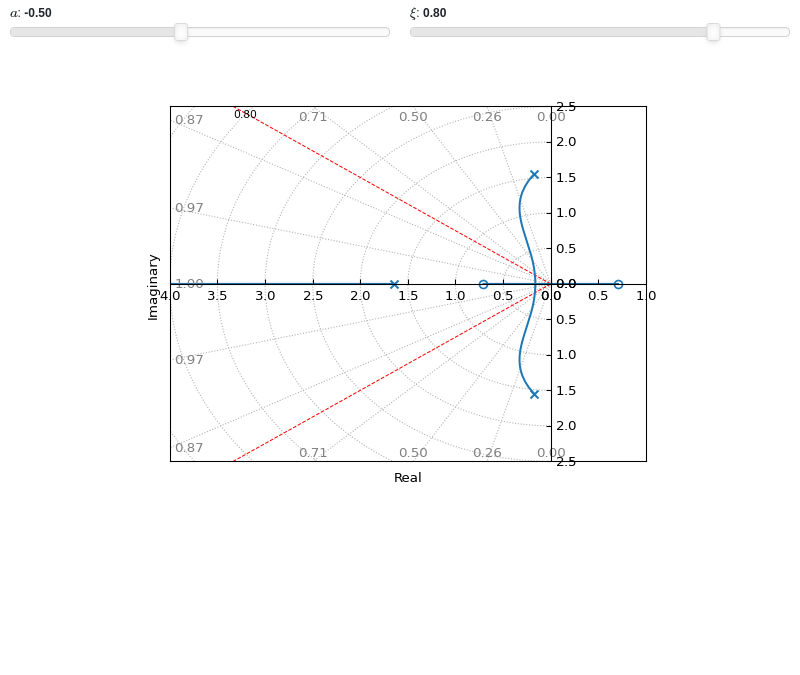
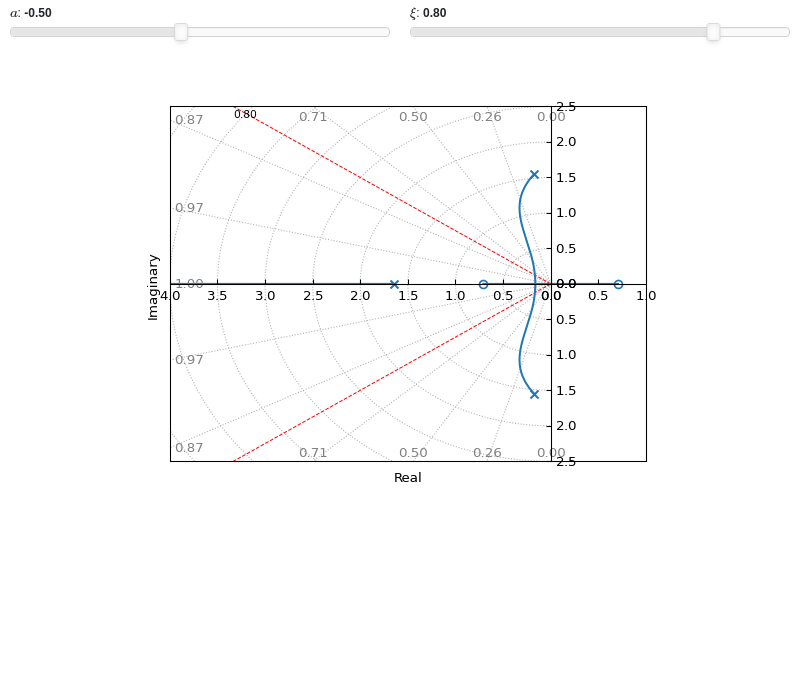
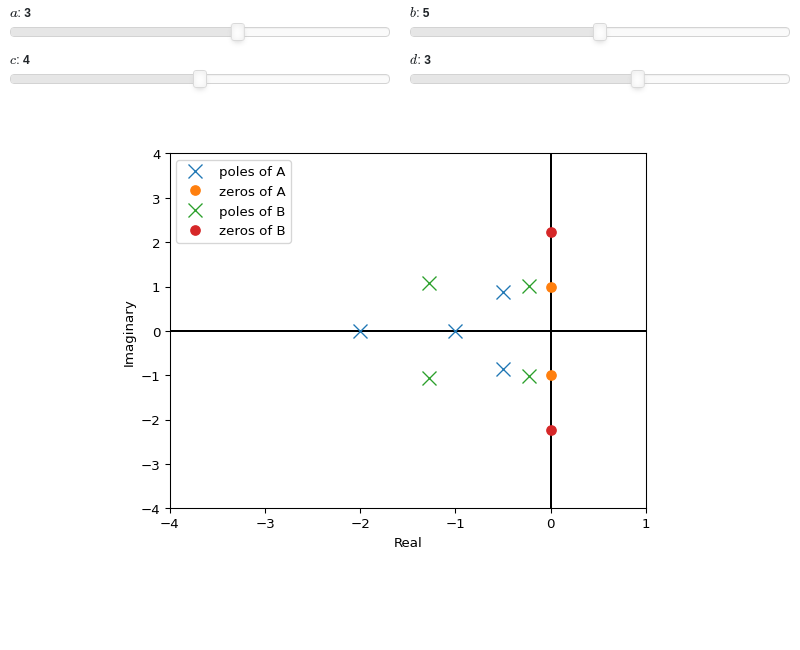
Interactive-widgets plot of multiple systems, one of which is parametric:
from sympy.abc import a, b, c, d, s
from sympy.physics.control.lti import TransferFunction
from spb import *
tf1 = TransferFunction(s**2 + 1, s**4 + 4*s**3 + 6*s**2 + 5*s + 2, s)
tf2 = TransferFunction(s**2 + b, s**4 + a*s**3 + b*s**2 + c*s + d, s)
params = {
    a: (3, 0, 5),
    b: (5, 0, 10),
    c: (4, 0, 8),
    d: (3, 0, 5),
}
graphics(
    control_axis(),
    pole_zero(tf1, label="A"),
    pole_zero(tf2, label="B", params=params),
    grid=False, xlim=(-4, 1), ylim=(-4, 4),
    xlabel="Real", ylabel="Imaginary")
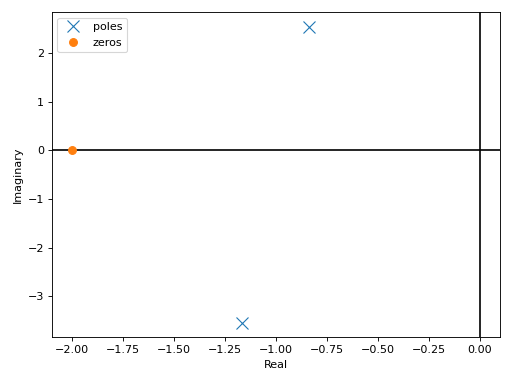
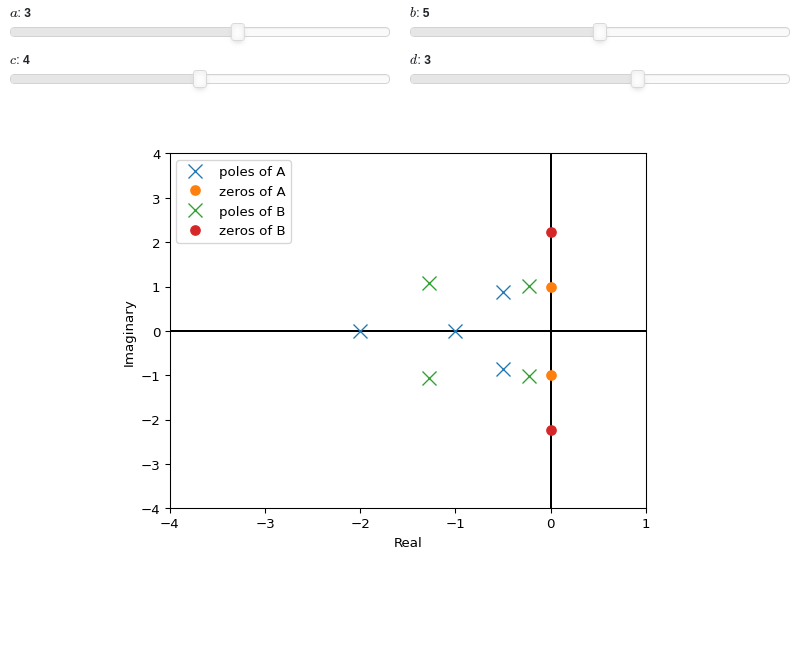
- spb.graphics.control.impulse_response(system, prec=8, lower_limit=None, upper_limit=None, label=None, rendering_kw=None, control=True, input=None, output=None, **kwargs)[source]
Returns the unit impulse response (Input is the Dirac-Delta Function) of a continuous-time system
- Parameters:
- systemLTI system type
The system for which the pole-zero plot is to be computed. It can be:
an instance of
control.TransferFunctionan instance of
scipy.signal.TransferFunction- a symbolic expression in rational form, which will be converted to
an object of type
sympy.physics.control.lti.TransferFunction.
- a tuple of two or three elements:
(num, den, generator [opt]), which will be converted to an object of type
sympy.physics.control.lti.TransferFunction.
- a tuple of two or three elements:
- precint, optional
The decimal point precision for the point coordinate values. Defaults to 8.
- labelstr
Set the label associated to this series, which will be eventually shown on the legend or colorbar.
- rendering_kwdict
A dictionary of keyword arguments to be passed to the renderers in order to further customize the appearance of the line. Here are some useful links for the supported plotting libraries:
Matplotlib:
for solid lines: https://matplotlib.org/stable/api/_as_gen/matplotlib.pyplot.plot.html
for colormap-based lines: https://matplotlib.org/stable/api/collections_api.html#matplotlib.collections.LineCollection
for scatters: https://matplotlib.org/stable/api/_as_gen/matplotlib.pyplot.scatter.html
Bokeh:
- controlbool, optional
If True, computes the impulse response with the
controlmodule, which uses numerical integration. If False, computes the impulse response withsympy, which uses the inverse Laplace transform. Default to True.- inputint, optional
Only compute the impulse response for the listed input. If not specified, the impulse responses for each independent input are computed (as separate traces).
- outputint, optional
Only compute the impulse response for the listed output. If not specified, all outputs are reported.
- colorbar_ticks_formattertick_formatter_multiples_of
An object of type
tick_formatter_multiples_ofwhich will be used to place tick values on the colorbar at each multiple of a specified quantity. This only works when use_cm=True.- control_kwdict, optional
A dictionary of keyword arguments passed to
control.impulse_response()- is_filledbool
Whether scatter’s markers are filled or void. Default value: True.
- is_scatterbool
If True it represent a scatter plot, otherwise a continuous line. Default value: False.
- line_color
For back-compatibility with old sympy.plotting. Use
rendering_kwin order to fully customize the appearance of the line/scatter.- n1int
Number of discretization points along the time axis to be used in the evaluation. It must be: 2 ≤ n1 < ∞. Default value: 100.
- only_integersbool
Discretize the domain using only integer numbers. Default value: False.
- paramsdict, optional
A dictionary mapping symbols to parameters. If provided, this dictionary enables the interactive-widgets plot.
When calling a plotting function, the parameter can be specified with:
a widget from the
ipywidgetsmodule.a widget from the
panelmodule.- a tuple of the form:
(default, min, max, N, tick_format, label, spacing), which will instantiate a
ipywidgets.widgets.widget_float.FloatSlideror aipywidgets.widgets.widget_float.FloatLogSlider, depending on the spacing strategy. In particular:- default, min, maxfloat
Default value, minimum value and maximum value of the slider, respectively. Must be finite numbers. The order of these 3 numbers is not important: the module will figure it out which is what.
- Nint, optional
Number of steps of the slider.
- tick_formatstr or None, optional
Provide a formatter for the tick value of the slider. Default to
".2f".
- label: str, optional
Custom text associated to the slider.
- spacingstr, optional
Specify the discretization spacing. Default to
"linear", can be changed to"log".
Notes:
parameters cannot be linked together (ie, one parameter cannot depend on another one).
If a widget returns multiple numerical values (like
panel.widgets.slider.RangeSlideroripywidgets.widgets.widget_float.FloatRangeSlider), then a corresponding number of symbols must be provided.
Here follows a couple of examples. If
imodule="panel":import panel as pn params = { a: (1, 0, 5), # slider from 0 to 5, with default value of 1 b: pn.widgets.FloatSlider(value=1, start=0, end=5), # same slider as above (c, d): pn.widgets.RangeSlider(value=(-1, 1), start=-3, end=3, step=0.1) }
Or with
imodule="ipywidgets":import ipywidgets as w params = { a: (1, 0, 5), # slider from 0 to 5, with default value of 1 b: w.FloatSlider(value=1, min=0, max=5), # same slider as above (c, d): w.FloatRangeSlider(value=(-1, 1), min=-3, max=3, step=0.1) }
When instantiating a data series directly,
paramsmust be a dictionary mapping symbols to numerical values.Let
seriesbe any data series. Thenseries.paramsreturns a dictionary mapping symbols to numerical values.- show_in_legendbool
Toggle the visibility of the data series on the legend. Default value: True.
- stepsNoneType, bool, str
If set, it connects consecutive points with steps rather than straight segments. Possible options: [‘pre’, ‘post’, ‘mid’, True, False, None] Default value: False.
- txcallable
Numerical transformation function to be applied to the data on the x-axis.
- tycallable
Numerical transformation function to be applied to the data on the y-axis.
- Returns:
- A list containing one or more instances of:
LineOver1DRangeSeriesifcontrol=False.
SystemResponseSeriesifcontrol=True.
See also
References
Examples
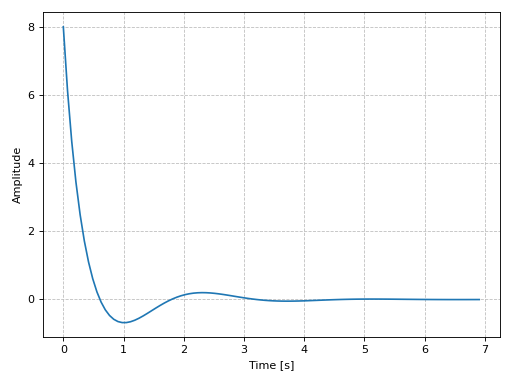
Plotting a SISO system:
from sympy.abc import s
from sympy.physics.control.lti import TransferFunction
from spb import *
tf1 = TransferFunction(
    8*s**2 + 18*s + 32, s**3 + 6*s**2 + 14*s + 24, s)
graphics(
    impulse_response(tf1),
    xlabel="Time [s]", ylabel="Amplitude"
)
(
Source code,png)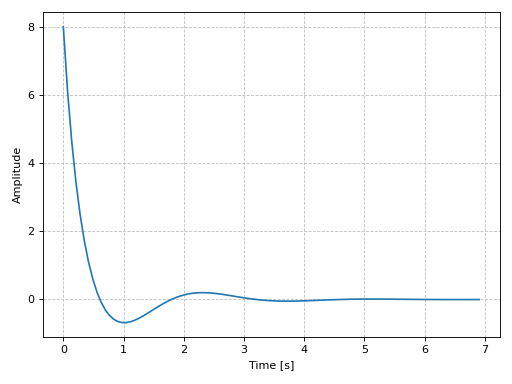
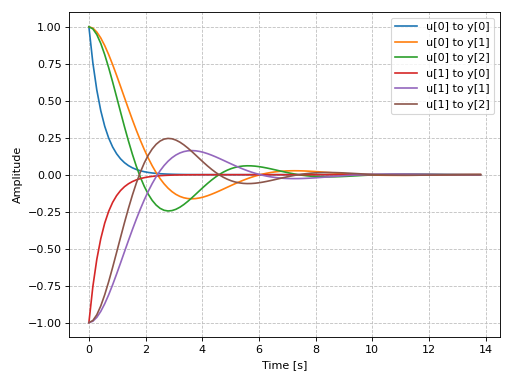
Plotting a MIMO system:
from sympy.physics.control.lti import TransferFunctionMatrix
tf1 = TransferFunction(1, s + 2, s)
tf2 = TransferFunction(s + 1, s**2 + s + 1, s)
tf3 = TransferFunction(s + 1, s**2 + s + 1.5, s)
tfm = TransferFunctionMatrix(
    [[tf1, -tf1], [tf2, -tf2], [tf3, -tf3]])
graphics(
    impulse_response(tfm),
    xlabel="Time [s]", ylabel="Amplitude"
)
(
Source code,png)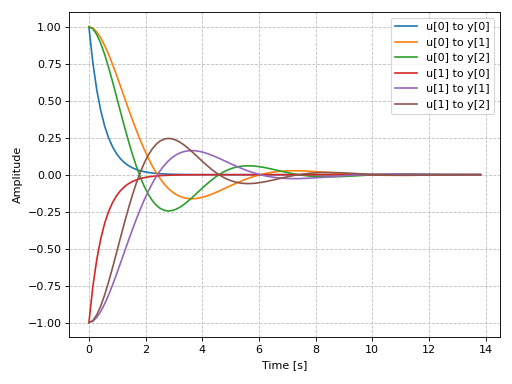
Plotting a discrete-time system:
import control as ct
G = ct.tf([0.0244, 0.0236], [1.1052, -2.0807, 1.0236], dt=0.2)
graphics(
    impulse_response(G, upper_limit=15),
    xlabel="Time [s]", ylabel="Amplitude"
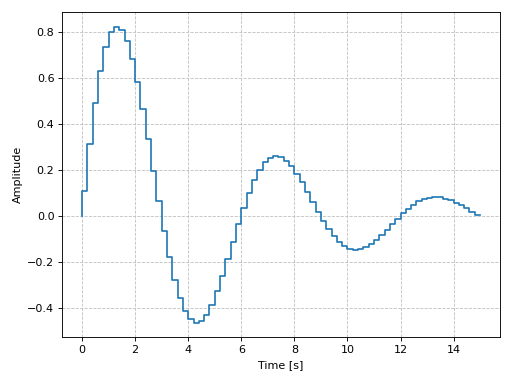
)
(
Source code,png)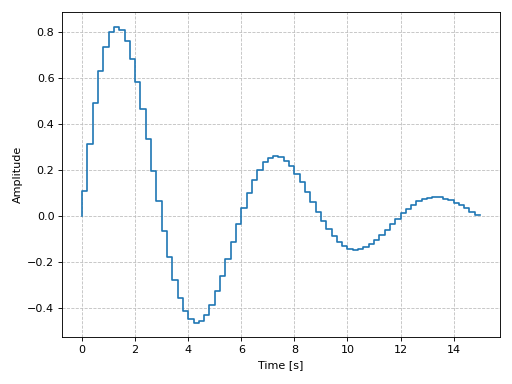
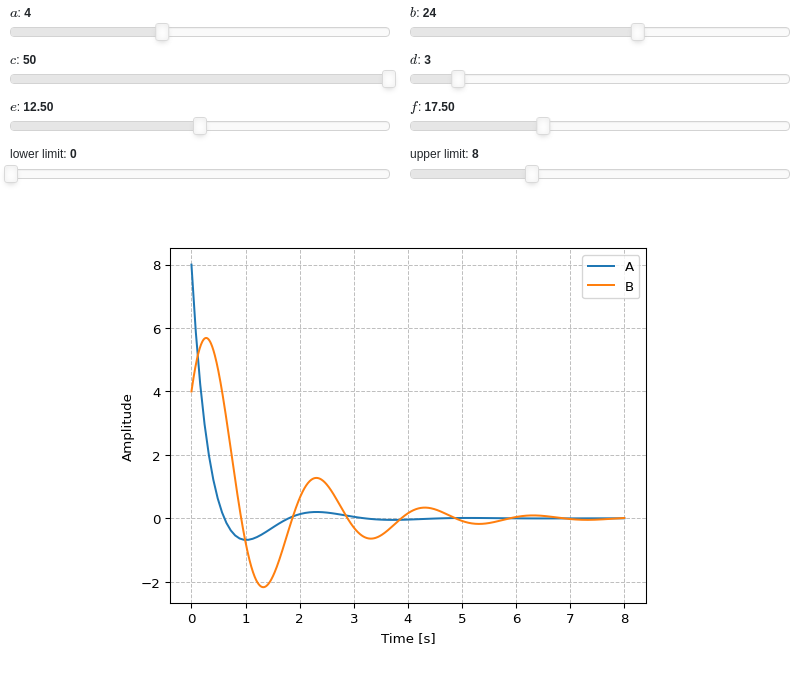
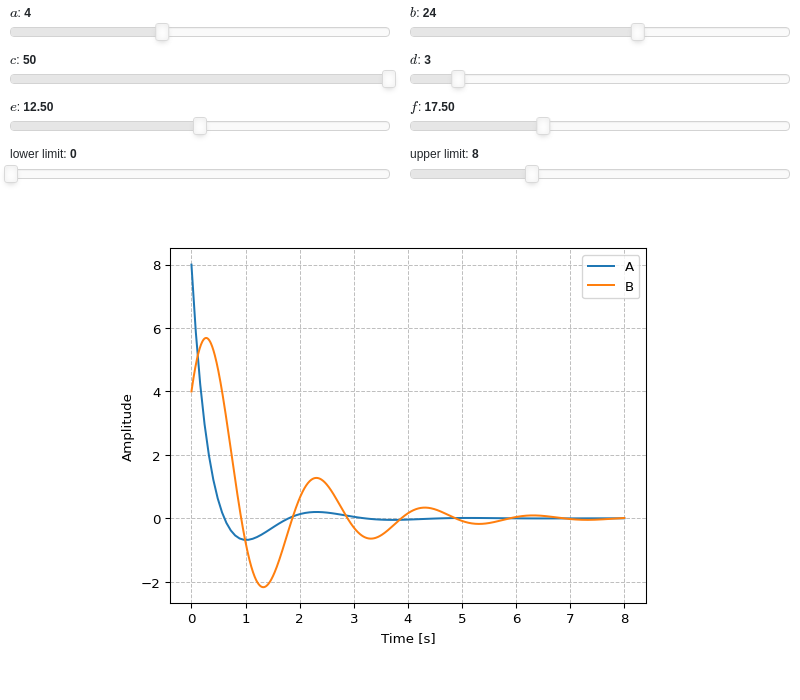
Interactive-widgets plot of multiple systems, one of which is parametric. A few observations:
The first system’s response will be computed with SymPy because
control=Falsewas set.The second system’s response will be computed with the
controlmodule, becausecontrol=Truewas set.Note the use of parametric
lower_limitandupper_limit.By moving the “lower limit” slider, the first system (evaluated with SymPy) will start from some amplitude value. However, on the second system (evaluated with the
controlmodule), the amplitude always starts from 0. That’s because the numerical integration’s initial condition is 0. Hence, iflower_limitis to be used, please setcontrol=False.
from sympy.abc import a, b, c, d, e, f, g, h, s
from sympy.physics.control.lti import TransferFunction
from spb import *
tf1 = TransferFunction(8*s**2 + 18*s + 32, s**3 + 6*s**2 + 14*s + 24, s)
tf2 = TransferFunction(a*s**2 + b*s + c, s**3 + d*s**2 + e*s + f, s)
params = {
    a: (4, 0, 10),
    b: (24, 0, 40),
    c: (50, 0, 50),
    d: (3, 0, 25),
    e: (12.5, 0, 25),
    f: (17.5, 0, 50),
    g: (0, 0, 10, 50, "lower limit"),
    h: (8, 0, 25, 50, "upper limit"),
}
graphics(
    impulse_response(
        tf1, label="A", lower_limit=g, upper_limit=h, params=params,
        control=True),
    impulse_response(
        tf2, label="B", lower_limit=g, upper_limit=h, params=params,
        control=False),
    xlabel="Time [s]", ylabel="Amplitude"
)
- spb.graphics.control.step_response(system, lower_limit=None, upper_limit=None, prec=8, label=None, rendering_kw=None, control=True, input=None, output=None, **kwargs)[source]
Returns the unit step response of a continuous-time system. It is the response of the system when the input signal is a step function.
- Parameters:
- systemLTI system type
The system for which the pole-zero plot is to be computed. It can be:
an instance of
control.TransferFunctionan instance of
scipy.signal.TransferFunction- a symbolic expression in rational form, which will be converted to
an object of type
sympy.physics.control.lti.TransferFunction.
- a tuple of two or three elements:
(num, den, generator [opt]), which will be converted to an object of type
sympy.physics.control.lti.TransferFunction.
- a tuple of two or three elements:
- lower_limitNumber or None, optional
The lower time limit of the plot range. Defaults to 0. If a different value is to be used, also set
control=False(see examples in order to understand why).- upper_limitNumber or None, optional
The upper time limit of the plot range. If not provided, an appropriate value will be computed. If a interactive widget plot is being created, it defaults to 10.
- precint, optional
The decimal point precision for the point coordinate values. Defaults to 8.
- labelstr
Set the label associated to this series, which will be eventually shown on the legend or colorbar.
- rendering_kwdict
A dictionary of keyword arguments to be passed to the renderers in order to further customize the appearance of the line. Here are some useful links for the supported plotting libraries:
Matplotlib:
for solid lines: https://matplotlib.org/stable/api/_as_gen/matplotlib.pyplot.plot.html
for colormap-based lines: https://matplotlib.org/stable/api/collections_api.html#matplotlib.collections.LineCollection
for scatters: https://matplotlib.org/stable/api/_as_gen/matplotlib.pyplot.scatter.html
Bokeh:
- controlbool, optional
If True, computes the step response with the
controlmodule, which uses numerical integration. If False, computes the step response withsympy, which uses the inverse Laplace transform. Default to True.- inputint, optional
Only compute the step response for the listed input. If not specified, the step responses for each independent input are computed (as separate traces).
- outputint, optional
Only compute the step response for the listed output. If not specified, all outputs are reported.
- colorbar_ticks_formattertick_formatter_multiples_of
An object of type
tick_formatter_multiples_ofwhich will be used to place tick values on the colorbar at each multiple of a specified quantity. This only works when use_cm=True.- control_kwdict, optional
A dictionary of keyword arguments passed to
control.step_response()- is_filledbool
Whether scatter’s markers are filled or void. Default value: True.
- is_scatterbool
If True it represent a scatter plot, otherwise a continuous line. Default value: False.
- line_color
For back-compatibility with old sympy.plotting. Use
rendering_kwin order to fully customize the appearance of the line/scatter.- n1int
Number of discretization points along the time axis to be used in the evaluation. It must be: 2 ≤ n1 < ∞. Default value: 100.
- only_integersbool
Discretize the domain using only integer numbers. Default value: False.
- paramsdict, optional
A dictionary mapping symbols to parameters. If provided, this dictionary enables the interactive-widgets plot.
When calling a plotting function, the parameter can be specified with:
a widget from the
ipywidgetsmodule.a widget from the
panelmodule.- a tuple of the form:
(default, min, max, N, tick_format, label, spacing), which will instantiate a
ipywidgets.widgets.widget_float.FloatSlideror aipywidgets.widgets.widget_float.FloatLogSlider, depending on the spacing strategy. In particular:- default, min, maxfloat
Default value, minimum value and maximum value of the slider, respectively. Must be finite numbers. The order of these 3 numbers is not important: the module will figure it out which is what.
- Nint, optional
Number of steps of the slider.
- tick_formatstr or None, optional
Provide a formatter for the tick value of the slider. Default to
".2f".
- label: str, optional
Custom text associated to the slider.
- spacingstr, optional
Specify the discretization spacing. Default to
"linear", can be changed to"log".
Notes:
parameters cannot be linked together (ie, one parameter cannot depend on another one).
If a widget returns multiple numerical values (like
panel.widgets.slider.RangeSlideroripywidgets.widgets.widget_float.FloatRangeSlider), then a corresponding number of symbols must be provided.
Here follows a couple of examples. If
imodule="panel":import panel as pn params = { a: (1, 0, 5), # slider from 0 to 5, with default value of 1 b: pn.widgets.FloatSlider(value=1, start=0, end=5), # same slider as above (c, d): pn.widgets.RangeSlider(value=(-1, 1), start=-3, end=3, step=0.1) }
Or with
imodule="ipywidgets":import ipywidgets as w params = { a: (1, 0, 5), # slider from 0 to 5, with default value of 1 b: w.FloatSlider(value=1, min=0, max=5), # same slider as above (c, d): w.FloatRangeSlider(value=(-1, 1), min=-3, max=3, step=0.1) }
When instantiating a data series directly,
paramsmust be a dictionary mapping symbols to numerical values.Let
seriesbe any data series. Thenseries.paramsreturns a dictionary mapping symbols to numerical values.- show_in_legendbool
Toggle the visibility of the data series on the legend. Default value: True.
- stepsNoneType, bool, str
If set, it connects consecutive points with steps rather than straight segments. Possible options: [‘pre’, ‘post’, ‘mid’, True, False, None] Default value: False.
- txcallable
Numerical transformation function to be applied to the data on the x-axis.
- tycallable
Numerical transformation function to be applied to the data on the y-axis.
- Returns:
- A list containing one or more instances of:
LineOver1DRangeSeriesifcontrol=False.
SystemResponseSeriesifcontrol=True.
See also
References
Examples
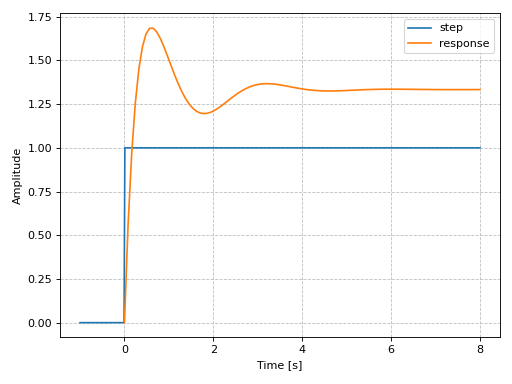
Plotting a SISO system:
from sympy.abc import s, t
from sympy import Heaviside
from sympy.physics.control.lti import TransferFunction
from spb import *
tf1 = TransferFunction(
    8*s**2 + 18*s + 32, s**3 + 6*s**2 + 14*s + 24, s)
graphics(
    line(Heaviside(t), (t, -1, 8), label="step"),
    step_response(tf1, label="response", upper_limit=8),
    xlabel="Time [s]", ylabel="Amplitude"
)
(
Source code,png)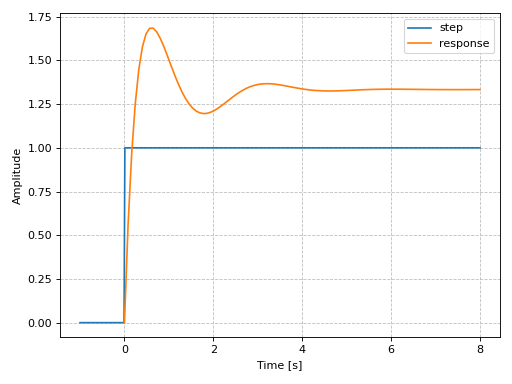
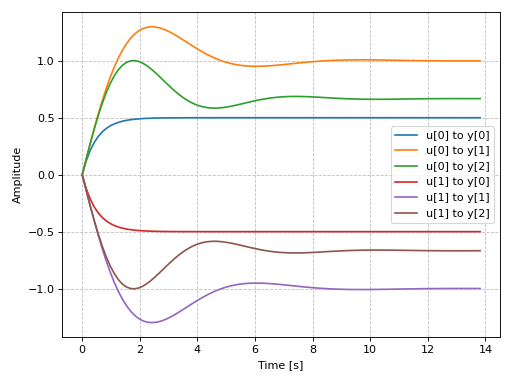
Plotting a MIMO system:
from sympy.physics.control.lti import TransferFunctionMatrix
tf1 = TransferFunction(1, s + 2, s)
tf2 = TransferFunction(s + 1, s**2 + s + 1, s)
tf3 = TransferFunction(s + 1, s**2 + s + 1.5, s)
tfm = TransferFunctionMatrix(
    [[tf1, -tf1], [tf2, -tf2], [tf3, -tf3]])
graphics(
    step_response(tfm),
    xlabel="Time [s]", ylabel="Amplitude"
)
(
Source code,png)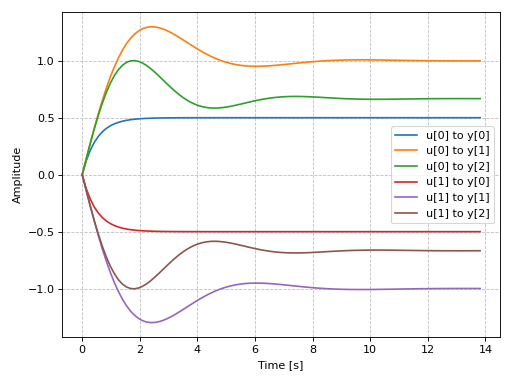
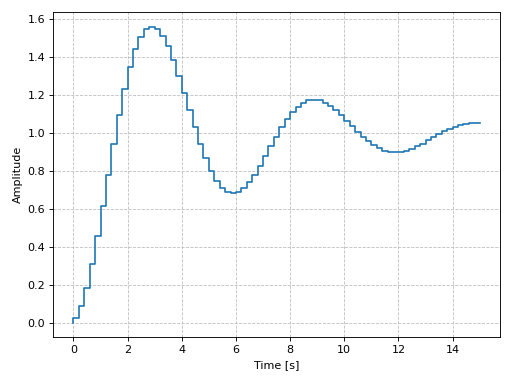
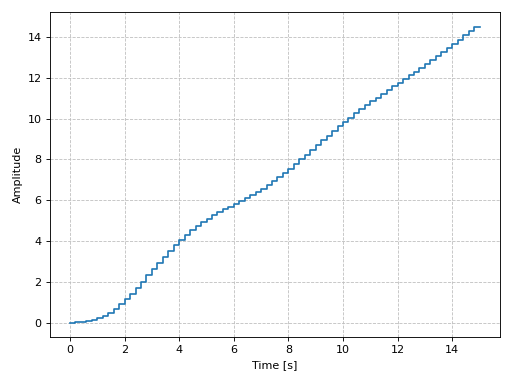
Plotting a discrete-time system:
import control as ct
G = ct.tf([0.0244, 0.0236], [1.1052, -2.0807, 1.0236], dt=0.2)
graphics(
    step_response(G, upper_limit=15),
    xlabel="Time [s]", ylabel="Amplitude"
)
(
Source code,png)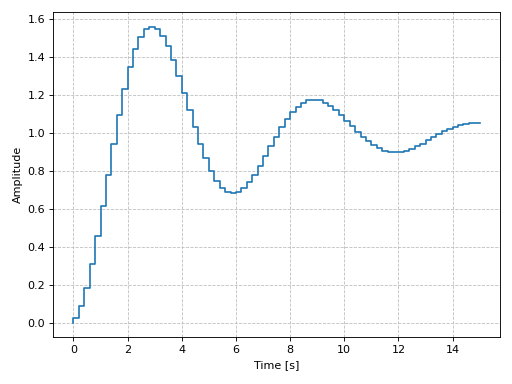
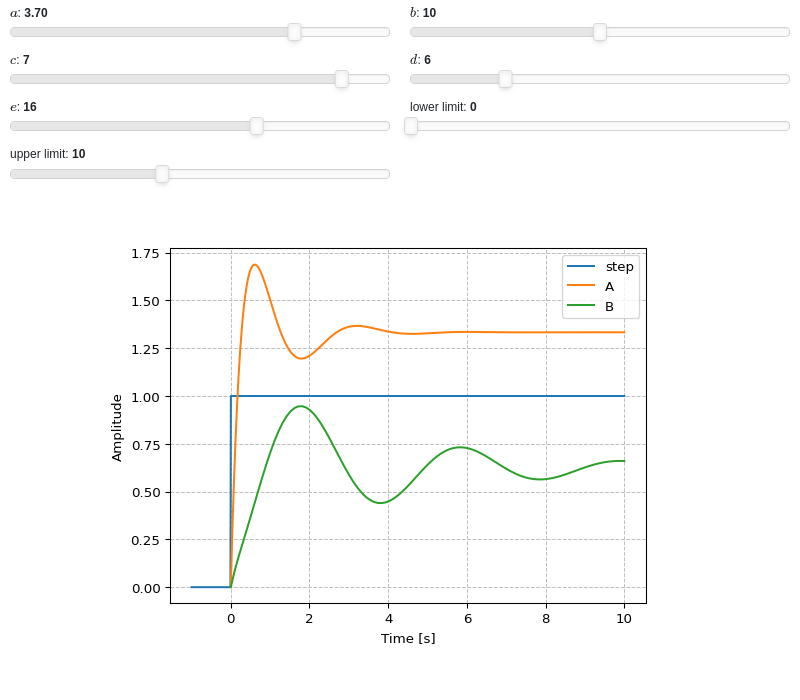
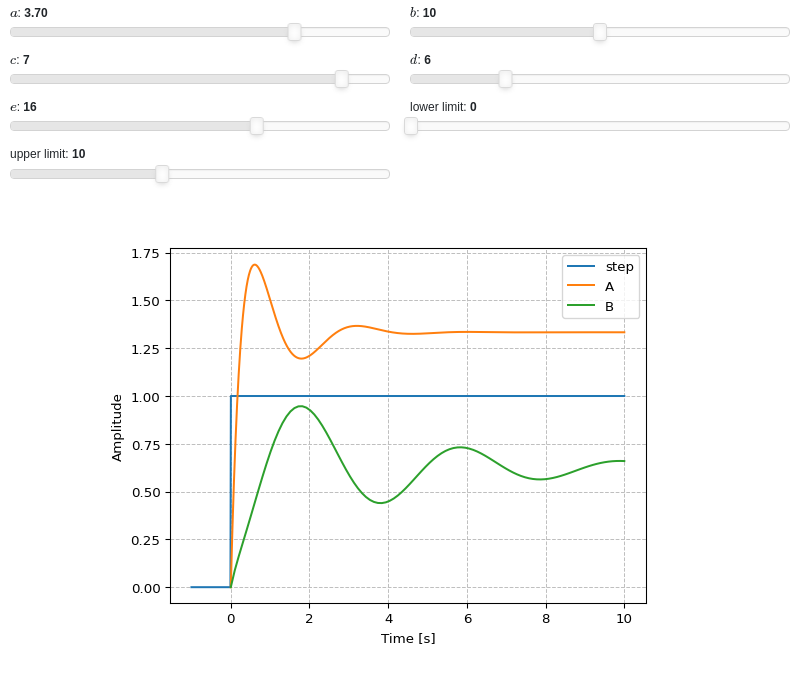
Interactive-widgets plot of multiple systems, one of which is parametric. A few observations:
The first system’s response will be computed with SymPy because
control=Falsewas set.The second system’s response will be computed with the
controlmodule, becausecontrol=Truewas set.Note the use of parametric
lower_limitandupper_limit.By moving the “lower limit” slider, the first system (evaluated with SymPy) will start from some amplitude value. However, on the second system (evaluated with the
controlmodule), the amplitude always starts from 0. That’s because the numerical integration’s initial condition is 0. Hence, iflower_limitis to be used, please setcontrol=False.
from sympy.abc import a, b, c, d, e, f, g, s, t
from sympy import Heaviside
from sympy.physics.control.lti import TransferFunction
from spb import *
tf1 = TransferFunction(8*s**2 + 18*s + 32, s**3 + 6*s**2 + 14*s + 24, s)
tf2 = TransferFunction(s**2 + a*s + b, s**3 + c*s**2 + d*s + e, s)
params = {
    a: (3.7, 0, 5),
    b: (10, 0, 20),
    c: (7, 0, 8),
    d: (6, 0, 25),
    e: (16, 0, 25),
    f: (0, 0, 10, 50, "lower limit"),
    g: (10, 0, 25, 50, "upper limit"),
}
graphics(
    line(Heaviside(t), (t, -1, 10), label="step"),
    step_response(
        tf1, label="A", lower_limit=f, upper_limit=g, params=params,
        control=False),
    step_response(
        tf2, label="B", lower_limit=f, upper_limit=g, params=params,
        control=True),
    xlabel="Time [s]", ylabel="Amplitude"
)
- spb.graphics.control.ramp_response(system, prec=8, slope=1, lower_limit=None, upper_limit=None, label=None, rendering_kw=None, control=True, input=None, output=None, **kwargs)[source]
Returns the ramp response of a continuous-time system.
Ramp function is defined as the straight line passing through origin (\(f(x) = mx\)). The slope of the ramp function can be varied by the user and the default value is 1.
- Parameters:
- systemLTI system type
The system for which the pole-zero plot is to be computed. It can be:
an instance of
control.TransferFunctionan instance of
scipy.signal.TransferFunction- a symbolic expression in rational form, which will be converted to
an object of type
sympy.physics.control.lti.TransferFunction.
- a tuple of two or three elements:
(num, den, generator [opt]), which will be converted to an object of type
sympy.physics.control.lti.TransferFunction.
- a tuple of two or three elements:
- precint, optional
The decimal point precision for the point coordinate values. Defaults to 8.
- slopeNumber, optional
The slope of the input ramp function. Defaults to 1.
- lower_limitNumber or None, optional
The lower time limit of the plot range. Defaults to 0. If a different value is to be used, also set
control=False(see examples in order to understand why).- upper_limitNumber or None, optional
The upper time limit of the plot range. If not provided, an appropriate value will be computed. If a interactive widget plot is being created, it defaults to 10.
- labelstr
Set the label associated to this series, which will be eventually shown on the legend or colorbar.
- rendering_kwdict
A dictionary of keyword arguments to be passed to the renderers in order to further customize the appearance of the line. Here are some useful links for the supported plotting libraries:
Matplotlib:
for solid lines: https://matplotlib.org/stable/api/_as_gen/matplotlib.pyplot.plot.html
for colormap-based lines: https://matplotlib.org/stable/api/collections_api.html#matplotlib.collections.LineCollection
for scatters: https://matplotlib.org/stable/api/_as_gen/matplotlib.pyplot.scatter.html
Bokeh:
- controlbool, optional
If True, computes the ramp response with the
controlmodule, which uses numerical integration. If False, computes the ramp response withsympy, which uses the inverse Laplace transform. Default to True.- inputint, optional
Only compute the ramp response for the listed input. If not specified, the ramp responses for each independent input are computed (as separate traces).
- outputint, optional
Only compute the ramp response for the listed output. If not specified, all outputs are reported.
- colorbar_ticks_formattertick_formatter_multiples_of
An object of type
tick_formatter_multiples_ofwhich will be used to place tick values on the colorbar at each multiple of a specified quantity. This only works when use_cm=True.- control_kwdict, optional
A dictionary of keyword arguments passed to
control.forced_response()- is_filledbool
Whether scatter’s markers are filled or void. Default value: True.
- is_scatterbool
If True it represent a scatter plot, otherwise a continuous line. Default value: False.
- line_color
For back-compatibility with old sympy.plotting. Use
rendering_kwin order to fully customize the appearance of the line/scatter.- n1int
Number of discretization points along the time axis to be used in the evaluation. It must be: 2 ≤ n1 < ∞. Default value: 100.
- only_integersbool
Discretize the domain using only integer numbers. Default value: False.
- paramsdict, optional
A dictionary mapping symbols to parameters. If provided, this dictionary enables the interactive-widgets plot.
When calling a plotting function, the parameter can be specified with:
a widget from the
ipywidgetsmodule.a widget from the
panelmodule.- a tuple of the form:
(default, min, max, N, tick_format, label, spacing), which will instantiate a
ipywidgets.widgets.widget_float.FloatSlideror aipywidgets.widgets.widget_float.FloatLogSlider, depending on the spacing strategy. In particular:- default, min, maxfloat
Default value, minimum value and maximum value of the slider, respectively. Must be finite numbers. The order of these 3 numbers is not important: the module will figure it out which is what.
- Nint, optional
Number of steps of the slider.
- tick_formatstr or None, optional
Provide a formatter for the tick value of the slider. Default to
".2f".
- label: str, optional
Custom text associated to the slider.
- spacingstr, optional
Specify the discretization spacing. Default to
"linear", can be changed to"log".
Notes:
parameters cannot be linked together (ie, one parameter cannot depend on another one).
If a widget returns multiple numerical values (like
panel.widgets.slider.RangeSlideroripywidgets.widgets.widget_float.FloatRangeSlider), then a corresponding number of symbols must be provided.
Here follows a couple of examples. If
imodule="panel":import panel as pn params = { a: (1, 0, 5), # slider from 0 to 5, with default value of 1 b: pn.widgets.FloatSlider(value=1, start=0, end=5), # same slider as above (c, d): pn.widgets.RangeSlider(value=(-1, 1), start=-3, end=3, step=0.1) }
Or with
imodule="ipywidgets":import ipywidgets as w params = { a: (1, 0, 5), # slider from 0 to 5, with default value of 1 b: w.FloatSlider(value=1, min=0, max=5), # same slider as above (c, d): w.FloatRangeSlider(value=(-1, 1), min=-3, max=3, step=0.1) }
When instantiating a data series directly,
paramsmust be a dictionary mapping symbols to numerical values.Let
seriesbe any data series. Thenseries.paramsreturns a dictionary mapping symbols to numerical values.- show_in_legendbool
Toggle the visibility of the data series on the legend. Default value: True.
- stepsNoneType, bool, str
If set, it connects consecutive points with steps rather than straight segments. Possible options: [‘pre’, ‘post’, ‘mid’, True, False, None] Default value: False.
- txcallable
Numerical transformation function to be applied to the data on the x-axis.
- tycallable
Numerical transformation function to be applied to the data on the y-axis.
- Returns:
- A list containing one or more instances of:
LineOver1DRangeSeriesifcontrol=False.
SystemResponseSeriesifcontrol=True.
See also
plot_step_response,plot_impulse_response
References
Examples
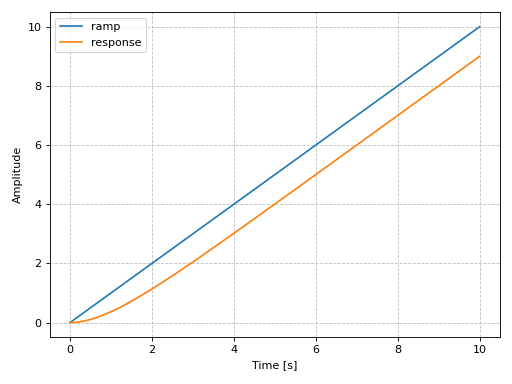
Plotting a SISO system:
from sympy.abc import s, t
from sympy.physics.control.lti import TransferFunction
from spb import *
tf1 = TransferFunction(1, (s+1), s)
ul = 10
graphics(
    line(t, (t, 0, ul), label="ramp"),
    ramp_response(tf1, upper_limit=ul, label="response"),
    xlabel="Time [s]", ylabel="Amplitude"
)
(
Source code,png)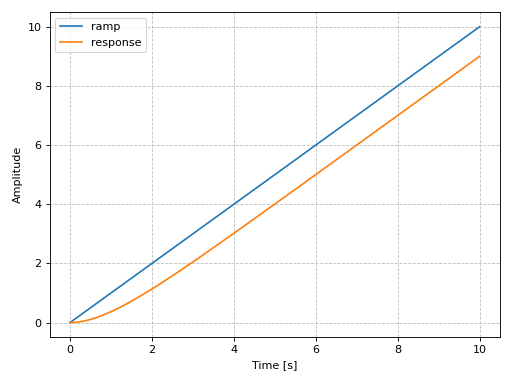
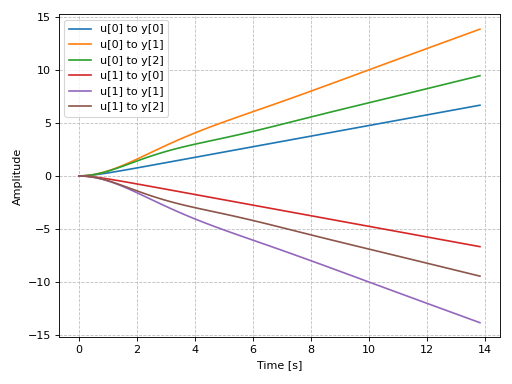
Plotting a MIMO system:
from sympy.physics.control.lti import TransferFunctionMatrix
tf1 = TransferFunction(1, s + 2, s)
tf2 = TransferFunction(s + 1, s**2 + s + 1, s)
tf3 = TransferFunction(s + 1, s**2 + s + 1.5, s)
tfm = TransferFunctionMatrix(
    [[tf1, -tf1], [tf2, -tf2], [tf3, -tf3]])
graphics(
    ramp_response(tfm),
    xlabel="Time [s]", ylabel="Amplitude"
)
(
Source code,png)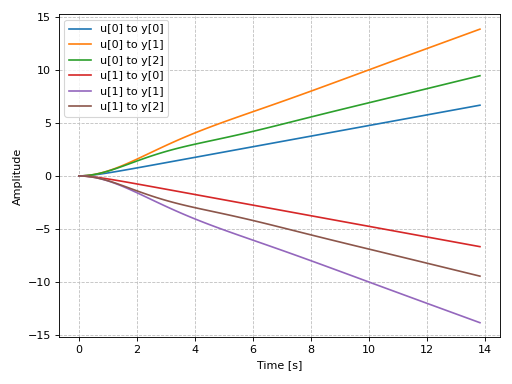
Plotting a discrete-time system:
import control as ct
G = ct.tf([0.0244, 0.0236], [1.1052, -2.0807, 1.0236], dt=0.2)
graphics(
    ramp_response(G, upper_limit=15),
    xlabel="Time [s]", ylabel="Amplitude"
)
(
Source code,png)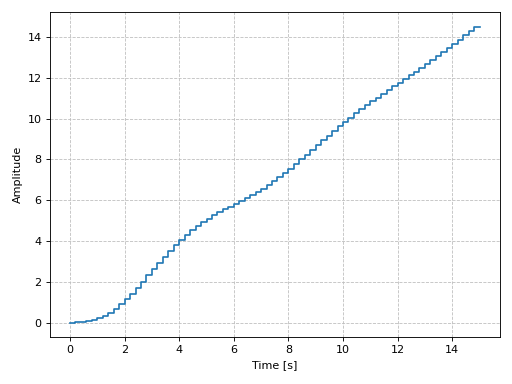
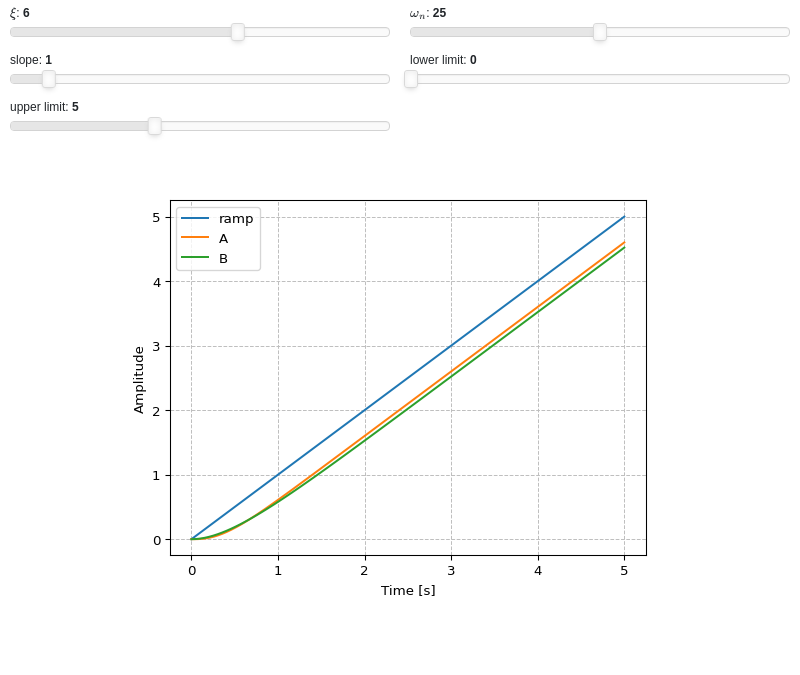
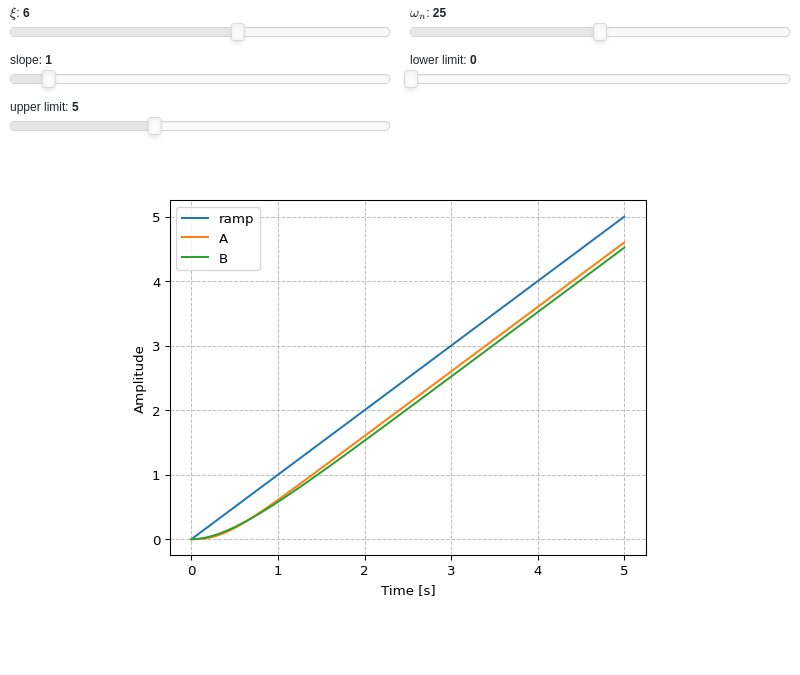
Interactive-widgets plot of multiple systems, one of which is parametric. A few observations:
The first system’s response will be computed with SymPy because
control=Falsewas set.The second system’s response will be computed with the
controlmodule, becausecontrol=Truewas set.Note the use of parametric
lower_limitandupper_limit.By moving the “lower limit” slider, the first system (evaluated with SymPy) will start from some amplitude value. However, on the second system (evaluated with the
controlmodule), the amplitude always starts from 0. That’s because the numerical integration’s initial condition is 0. Hence, iflower_limitis to be used, please setcontrol=False.
from sympy import symbols
from sympy.physics.control.lti import TransferFunction
from spb import *
a, b, c, xi, wn, s, t = symbols("a, b, c, xi, omega_n, s, t")
tf1 = TransferFunction(25, s**2 + 10*s + 25, s)
tf2 = TransferFunction(wn**2, s**2 + 2*xi*wn*s + wn**2, s)
params = {
    xi: (6, 0, 10),
    wn: (25, 0, 50),
    a: (1, 0, 10, 50, "slope"),
    b: (0, 0, 5, 50, "lower limit"),
    c: (5, 2, 10, 50, "upper limit"),
}
graphics(
    line(a*t, (t, 0, c), params=params, label="ramp"),
    ramp_response(
        tf1, label="A", slope=a, lower_limit=b, upper_limit=c,
        params=params, control=False),
    ramp_response(
        tf2, label="B", slope=a, lower_limit=b, upper_limit=c,
        params=params, control=True),
    xlabel="Time [s]", ylabel="Amplitude")
- spb.graphics.control.bode_magnitude(system, initial_exp=None, final_exp=None, freq_unit='rad/sec', phase_unit='rad', label=None, rendering_kw=None, input=None, output=None, **kwargs)[source]
Returns the Bode magnitude plot of a continuous-time system.
- Parameters:
- systemLTI system type
The system for which the pole-zero plot is to be computed. It can be:
an instance of
control.TransferFunctionan instance of
scipy.signal.TransferFunction- a symbolic expression in rational form, which will be converted to
an object of type
sympy.physics.control.lti.TransferFunction.
- a tuple of two or three elements:
(num, den, generator [opt]), which will be converted to an object of type
sympy.physics.control.lti.TransferFunction.
- a tuple of two or three elements:
- initial_expNumber, optional
The initial exponent of 10 of the semilog plot. Default to None, which will autocompute the appropriate value.
- final_expNumber, optional
The final exponent of 10 of the semilog plot. Default to None, which will autocompute the appropriate value.
- freq_unitstring, optional
User can choose between
'rad/sec'(radians/second) and'Hz'(Hertz) as frequency units.- labelstr
Set the label associated to this series, which will be eventually shown on the legend or colorbar.
- rendering_kwdict
A dictionary of keyword arguments to be passed to the renderers in order to further customize the appearance of the line. Here are some useful links for the supported plotting libraries:
Matplotlib:
for solid lines: https://matplotlib.org/stable/api/_as_gen/matplotlib.pyplot.plot.html
for colormap-based lines: https://matplotlib.org/stable/api/collections_api.html#matplotlib.collections.LineCollection
for scatters: https://matplotlib.org/stable/api/_as_gen/matplotlib.pyplot.scatter.html
Bokeh:
- inputint, optional
Only compute the poles/zeros for the listed input. If not specified, the poles/zeros for each independent input are computed (as separate traces).
- outputint, optional
Only compute the poles/zeros for the listed output. If not specified, all outputs are reported.
- color_func
A color function to be applied to the numerical data. It can be:
A numerical function of 2 variables, x, y (the points computed by the internal algorithm) supporting vectorization.
A symbolic expression having at most as many free symbols as
expr.None: the default value (no color mapping).
- colorbarbool
Toggle the visibility of the colorbar associated to the current data series. Note that a colorbar is only visible if
use_cm=Trueandcolor_funcis not None. Default value: True.- colorbar_ticks_formattertick_formatter_multiples_of
An object of type
tick_formatter_multiples_ofwhich will be used to place tick values on the colorbar at each multiple of a specified quantity. This only works when use_cm=True.- detect_polesbool, str
Chose whether to detect and correctly plot the roots of the denominator. There are two algorithms at work:
based on the gradient of the numerical data, it introduces NaN values at locations where the steepness is greater than some threshold. This splits the line into multiple segments. To improve detection, increase the number of discretization points
nand/or change the value ofeps. This algorithm can be used to visualize jump discontinuities as well as essential discontinuities.a symbolic approach based on the
continuous_domainfunction from thesympy.calculus.utilmodule, which computes the locations of essential discontinuities. If any are found, vertical lines will be shown.
Possible options:
False: No poles detection
True: Poles detection with the numerical algorithm
‘symbolic’: Poles detection with numerical and symbolic algorithms
Default value: False.
- epsfloat
An arbitrary small value used by the
detect_polesnumerical algorithm. Before changing this value, it is recommended to increase the number of discretization points. Related parameters:detect_poles. It must be: 0 ≤ eps < ∞. Default value: 0.01.- excludelist
List of x-coordinates to be excluded from evaluation. In practice, it introduces discontinuities in the resulting line.
- expr
It can either be a symbolic expression representing the function of one variable to be plotted, or a numerical function of one variable, supporting vectorization. In the latter case the following keyword arguments are not supported:
params,sum_bound.- force_real_evalbool
By default, numerical evaluation is performed over complex numbers, which is slower but produces correct results. However, when the symbolic expression is converted to a numerical function with lambdify, the resulting function may not like to be evaluated over complex numbers. In such cases, forcing the evaluation to be performed over real numbers might be a good choice. The plotting module should be able to detect such occurences and automatically activate this option. If that is not the case, or evaluation performance is of paramount importance, set this parameter to True, but be aware that it might produce wrong results. Default value: False.
- is_filledbool
Whether scatter’s markers are filled or void. Default value: True.
- is_scatterbool
If True it represent a scatter plot, otherwise a continuous line. Default value: False.
- line_color
For back-compatibility with old sympy.plotting. Use
rendering_kwin order to fully customize the appearance of the line/scatter.- modules
Specify the evaluation modules to be used by lambdify. If not specified, the evaluation will be done with NumPy/SciPy.
- n1int
Number of discretization points along the parameter to be used in the numerical evaluation. An alias of this parameter is
n. Related parameters:xscale. It must be: 2 ≤ n1 < ∞. Default value: 1000.- only_integersbool
Discretize the domain using only integer numbers. When this parameter is True, the number of discretization points is choosen by the algorithm. Default value: False.
- paramsdict, optional
A dictionary mapping symbols to parameters. If provided, this dictionary enables the interactive-widgets plot.
When calling a plotting function, the parameter can be specified with:
a widget from the
ipywidgetsmodule.a widget from the
panelmodule.- a tuple of the form:
(default, min, max, N, tick_format, label, spacing), which will instantiate a
ipywidgets.widgets.widget_float.FloatSlideror aipywidgets.widgets.widget_float.FloatLogSlider, depending on the spacing strategy. In particular:- default, min, maxfloat
Default value, minimum value and maximum value of the slider, respectively. Must be finite numbers. The order of these 3 numbers is not important: the module will figure it out which is what.
- Nint, optional
Number of steps of the slider.
- tick_formatstr or None, optional
Provide a formatter for the tick value of the slider. Default to
".2f".
- label: str, optional
Custom text associated to the slider.
- spacingstr, optional
Specify the discretization spacing. Default to
"linear", can be changed to"log".
Notes:
parameters cannot be linked together (ie, one parameter cannot depend on another one).
If a widget returns multiple numerical values (like
panel.widgets.slider.RangeSlideroripywidgets.widgets.widget_float.FloatRangeSlider), then a corresponding number of symbols must be provided.
Here follows a couple of examples. If
imodule="panel":import panel as pn params = { a: (1, 0, 5), # slider from 0 to 5, with default value of 1 b: pn.widgets.FloatSlider(value=1, start=0, end=5), # same slider as above (c, d): pn.widgets.RangeSlider(value=(-1, 1), start=-3, end=3, step=0.1) }
Or with
imodule="ipywidgets":import ipywidgets as w params = { a: (1, 0, 5), # slider from 0 to 5, with default value of 1 b: w.FloatSlider(value=1, min=0, max=5), # same slider as above (c, d): w.FloatRangeSlider(value=(-1, 1), min=-3, max=3, step=0.1) }
When instantiating a data series directly,
paramsmust be a dictionary mapping symbols to numerical values.Let
seriesbe any data series. Thenseries.paramsreturns a dictionary mapping symbols to numerical values.- poles_locationslist
When
detect_poles="symbolic", stores the location of the computed poles (essential discontinuities) so that they can be appropriately rendered.- poles_rendering_kwdict
Rendering kw used to customize the appearance of vertical lines representing essential discontinuities. Related parameters:
poles_locations.- range_xtuple, Tuple
A 3-tuple (symb, min, max) denoting the range of the x variable. Default values: min=-10 and max=10.
- show_in_legendbool
Toggle the visibility of the data series on the legend. Default value: True.
- stepsNoneType, bool, str
If set, it connects consecutive points with steps rather than straight segments. Possible options: [‘pre’, ‘post’, ‘mid’, True, False, None] Default value: False.
- sum_boundint
When plotting sums, the expression will be pre-processed in order to replace lower/upper bounds set to +/- infinity with this +/- numerical value. Note: the higher this number, the slower the evaluation, but the more accurate the plot. It must be: 0 ≤ sum_bound < ∞. Default value: 1000.
- txcallable
Numerical transformation function to be applied to the data on the x-axis.
- tycallable
Numerical transformation function to be applied to the data on the y-axis.
- unwrapbool, dict
Whether to use numpy.unwrap() on the computed coordinates in order to get rid of discontinuities. It can be:
False: do not use
np.unwrap().True: use
np.unwrap()with default keyword arguments.dictionary of keyword arguments passed to
np.unwrap().
- use_cmbool
Toggle the use of a colormap. By default, some series might use a colormap to display the necessary data. Setting this attribute to False will inform the associated renderer to use solid color. Related parameters:
color_func. Default value: False.- xscalestr
Discretization strategy along the x-direction. Related parameters:
n1. Possible options: [‘linear’, ‘log’] Default value: ‘linear’.
- Returns:
- A list containing one instance of
LineOver1DRangeSeries.
- A list containing one instance of
See also
Notes
plot_bode()returns aplotgrid()of two visualizations, one with the Bode magnitude, the other with the Bode phase.Examples
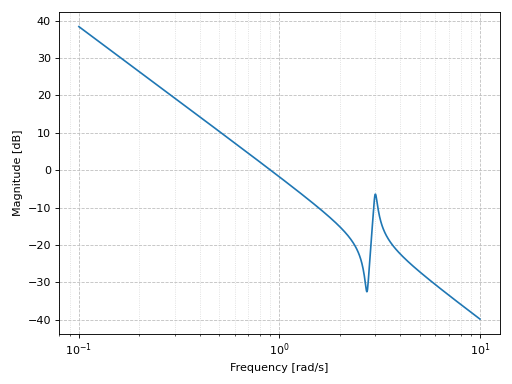
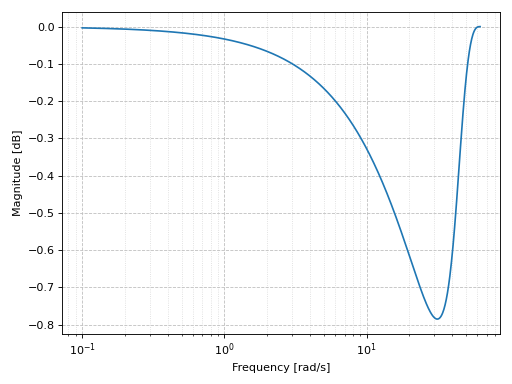
Bode magnitude plot of a continuous-time system:
from sympy.abc import s
from sympy.physics.control.lti import TransferFunction
from spb import *
tf1 = TransferFunction(
    1*s**2 + 0.1*s + 7.5, 1*s**4 + 0.12*s**3 + 9*s**2, s)
graphics(
    bode_magnitude(tf1),
    xscale="log", xlabel="Frequency [rad/s]",
    ylabel="Magnitude [dB]"
)
(
Source code,png)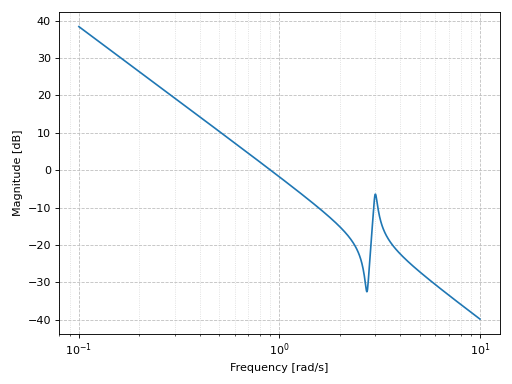
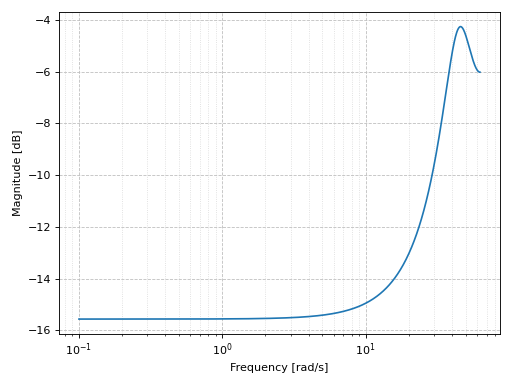
Bode magnitude plot of a discrete-time system:
import control as ct
tf2 = ct.tf([1], [1, 2, 3], dt=0.05)
graphics(
    bode_magnitude(tf2),
    xscale="log", xlabel="Frequency [rad/s]",
    ylabel="Magnitude [dB]"
)
(
Source code,png)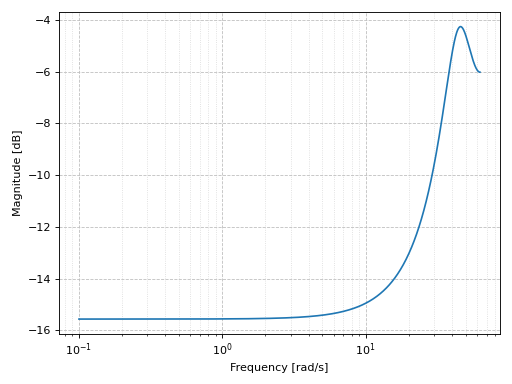
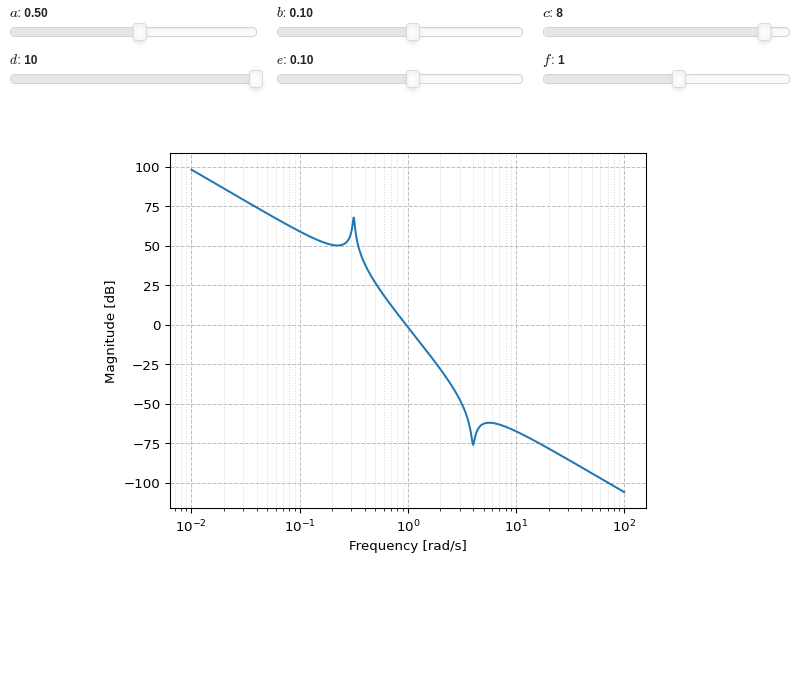
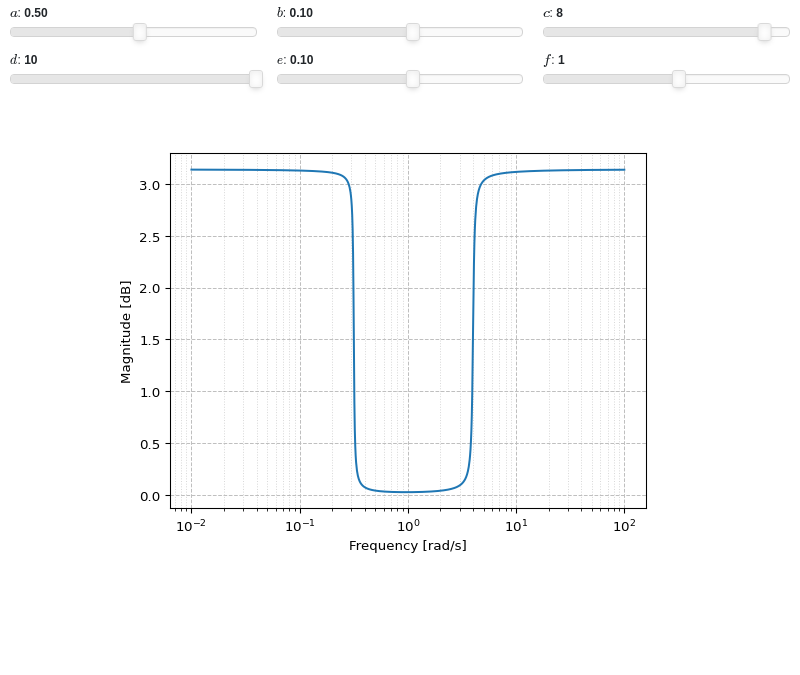
Interactive-widget plot:
from sympy.abc import a, b, c, d, e, f, s
from sympy.physics.control.lti import TransferFunction
from spb import *
tf1 = TransferFunction(a*s**2 + b*s + c, d*s**4 + e*s**3 + f*s**2, s)
params = {
    a: (0.5, -10, 10),
    b: (0.1, -1, 1),
    c: (8, -10, 10),
    d: (10, -10, 10),
    e: (0.1, -1, 1),
    f: (1, -10, 10),
}
graphics(
    bode_magnitude(tf1, initial_exp=-2, final_exp=2, params=params),
    imodule="panel", ncols=3,
    xscale="log", xlabel="Frequency [rad/s]", ylabel="Magnitude [dB]"
)
- spb.graphics.control.bode_phase(system, initial_exp=None, final_exp=None, freq_unit='rad/sec', phase_unit='rad', label=None, rendering_kw=None, unwrap=True, input=None, output=None, **kwargs)[source]
Returns the Bode phase plot of a continuous-time system.
- Parameters:
- systemLTI system type
The system for which the pole-zero plot is to be computed. It can be:
an instance of
control.TransferFunctionan instance of
scipy.signal.TransferFunction- a symbolic expression in rational form, which will be converted to
an object of type
sympy.physics.control.lti.TransferFunction.
- a tuple of two or three elements:
(num, den, generator [opt]), which will be converted to an object of type
sympy.physics.control.lti.TransferFunction.
- a tuple of two or three elements:
- initial_expNumber, optional
The initial exponent of 10 of the semilog plot. Default to None, which will autocompute the appropriate value.
- final_expNumber, optional
The final exponent of 10 of the semilog plot. Default to None, which will autocompute the appropriate value.
- freq_unitstring, optional
User can choose between
'rad/sec'(radians/second) and'Hz'(Hertz) as frequency units.- phase_unitstring, optional
User can choose between
'rad'(radians) and'deg'(degree) as phase units.- labelstr
Set the label associated to this series, which will be eventually shown on the legend or colorbar.
- rendering_kwdict
A dictionary of keyword arguments to be passed to the renderers in order to further customize the appearance of the line. Here are some useful links for the supported plotting libraries:
Matplotlib:
for solid lines: https://matplotlib.org/stable/api/_as_gen/matplotlib.pyplot.plot.html
for colormap-based lines: https://matplotlib.org/stable/api/collections_api.html#matplotlib.collections.LineCollection
for scatters: https://matplotlib.org/stable/api/_as_gen/matplotlib.pyplot.scatter.html
Bokeh:
- unwrapbool, dict
Whether to use numpy.unwrap() on the computed coordinates in order to get rid of discontinuities. It can be:
False: do not use
np.unwrap().True: use
np.unwrap()with default keyword arguments.dictionary of keyword arguments passed to
np.unwrap().
- inputint, optional
Only compute the poles/zeros for the listed input. If not specified, the poles/zeros for each independent input are computed (as separate traces).
- outputint, optional
Only compute the poles/zeros for the listed output. If not specified, all outputs are reported.
- color_func
A color function to be applied to the numerical data. It can be:
A numerical function of 2 variables, x, y (the points computed by the internal algorithm) supporting vectorization.
A symbolic expression having at most as many free symbols as
expr.None: the default value (no color mapping).
- colorbarbool
Toggle the visibility of the colorbar associated to the current data series. Note that a colorbar is only visible if
use_cm=Trueandcolor_funcis not None. Default value: True.- colorbar_ticks_formattertick_formatter_multiples_of
An object of type
tick_formatter_multiples_ofwhich will be used to place tick values on the colorbar at each multiple of a specified quantity. This only works when use_cm=True.- detect_polesbool, str
Chose whether to detect and correctly plot the roots of the denominator. There are two algorithms at work:
based on the gradient of the numerical data, it introduces NaN values at locations where the steepness is greater than some threshold. This splits the line into multiple segments. To improve detection, increase the number of discretization points
nand/or change the value ofeps. This algorithm can be used to visualize jump discontinuities as well as essential discontinuities.a symbolic approach based on the
continuous_domainfunction from thesympy.calculus.utilmodule, which computes the locations of essential discontinuities. If any are found, vertical lines will be shown.
Possible options:
False: No poles detection
True: Poles detection with the numerical algorithm
‘symbolic’: Poles detection with numerical and symbolic algorithms
Default value: False.
- epsfloat
An arbitrary small value used by the
detect_polesnumerical algorithm. Before changing this value, it is recommended to increase the number of discretization points. Related parameters:detect_poles. It must be: 0 ≤ eps < ∞. Default value: 0.01.- excludelist
List of x-coordinates to be excluded from evaluation. In practice, it introduces discontinuities in the resulting line.
- expr
It can either be a symbolic expression representing the function of one variable to be plotted, or a numerical function of one variable, supporting vectorization. In the latter case the following keyword arguments are not supported:
params,sum_bound.- force_real_evalbool
By default, numerical evaluation is performed over complex numbers, which is slower but produces correct results. However, when the symbolic expression is converted to a numerical function with lambdify, the resulting function may not like to be evaluated over complex numbers. In such cases, forcing the evaluation to be performed over real numbers might be a good choice. The plotting module should be able to detect such occurences and automatically activate this option. If that is not the case, or evaluation performance is of paramount importance, set this parameter to True, but be aware that it might produce wrong results. Default value: False.
- is_filledbool
Whether scatter’s markers are filled or void. Default value: True.
- is_scatterbool
If True it represent a scatter plot, otherwise a continuous line. Default value: False.
- line_color
For back-compatibility with old sympy.plotting. Use
rendering_kwin order to fully customize the appearance of the line/scatter.- modules
Specify the evaluation modules to be used by lambdify. If not specified, the evaluation will be done with NumPy/SciPy.
- n1int
Number of discretization points along the parameter to be used in the numerical evaluation. An alias of this parameter is
n. Related parameters:xscale. It must be: 2 ≤ n1 < ∞. Default value: 1000.- only_integersbool
Discretize the domain using only integer numbers. When this parameter is True, the number of discretization points is choosen by the algorithm. Default value: False.
- paramsdict, optional
A dictionary mapping symbols to parameters. If provided, this dictionary enables the interactive-widgets plot.
When calling a plotting function, the parameter can be specified with:
a widget from the
ipywidgetsmodule.a widget from the
panelmodule.- a tuple of the form:
(default, min, max, N, tick_format, label, spacing), which will instantiate a
ipywidgets.widgets.widget_float.FloatSlideror aipywidgets.widgets.widget_float.FloatLogSlider, depending on the spacing strategy. In particular:- default, min, maxfloat
Default value, minimum value and maximum value of the slider, respectively. Must be finite numbers. The order of these 3 numbers is not important: the module will figure it out which is what.
- Nint, optional
Number of steps of the slider.
- tick_formatstr or None, optional
Provide a formatter for the tick value of the slider. Default to
".2f".
- label: str, optional
Custom text associated to the slider.
- spacingstr, optional
Specify the discretization spacing. Default to
"linear", can be changed to"log".
Notes:
parameters cannot be linked together (ie, one parameter cannot depend on another one).
If a widget returns multiple numerical values (like
panel.widgets.slider.RangeSlideroripywidgets.widgets.widget_float.FloatRangeSlider), then a corresponding number of symbols must be provided.
Here follows a couple of examples. If
imodule="panel":import panel as pn params = { a: (1, 0, 5), # slider from 0 to 5, with default value of 1 b: pn.widgets.FloatSlider(value=1, start=0, end=5), # same slider as above (c, d): pn.widgets.RangeSlider(value=(-1, 1), start=-3, end=3, step=0.1) }
Or with
imodule="ipywidgets":import ipywidgets as w params = { a: (1, 0, 5), # slider from 0 to 5, with default value of 1 b: w.FloatSlider(value=1, min=0, max=5), # same slider as above (c, d): w.FloatRangeSlider(value=(-1, 1), min=-3, max=3, step=0.1) }
When instantiating a data series directly,
paramsmust be a dictionary mapping symbols to numerical values.Let
seriesbe any data series. Thenseries.paramsreturns a dictionary mapping symbols to numerical values.- poles_locationslist
When
detect_poles="symbolic", stores the location of the computed poles (essential discontinuities) so that they can be appropriately rendered.- poles_rendering_kwdict
Rendering kw used to customize the appearance of vertical lines representing essential discontinuities. Related parameters:
poles_locations.- range_xtuple, Tuple
A 3-tuple (symb, min, max) denoting the range of the x variable. Default values: min=-10 and max=10.
- show_in_legendbool
Toggle the visibility of the data series on the legend. Default value: True.
- stepsNoneType, bool, str
If set, it connects consecutive points with steps rather than straight segments. Possible options: [‘pre’, ‘post’, ‘mid’, True, False, None] Default value: False.
- sum_boundint
When plotting sums, the expression will be pre-processed in order to replace lower/upper bounds set to +/- infinity with this +/- numerical value. Note: the higher this number, the slower the evaluation, but the more accurate the plot. It must be: 0 ≤ sum_bound < ∞. Default value: 1000.
- txcallable
Numerical transformation function to be applied to the data on the x-axis.
- tycallable
Numerical transformation function to be applied to the data on the y-axis.
- use_cmbool
Toggle the use of a colormap. By default, some series might use a colormap to display the necessary data. Setting this attribute to False will inform the associated renderer to use solid color. Related parameters:
color_func. Default value: False.- xscalestr
Discretization strategy along the x-direction. Related parameters:
n1. Possible options: [‘linear’, ‘log’] Default value: ‘linear’.
- Returns:
- A list containing one instance of
LineOver1DRangeSeries.
- A list containing one instance of
See also
Notes
plot_bode()returns aplotgrid()of two visualizations, one with the Bode magnitude, the other with the Bode phase.Examples
Bode phase plot of a continuous-time system:
from sympy.abc import s
from sympy.physics.control.lti import TransferFunction
from spb import *
tf1 = TransferFunction(
    1*s**2 + 0.1*s + 7.5, 1*s**4 + 0.12*s**3 + 9*s**2, s)
graphics(
    bode_phase(tf1, initial_exp=0.2, final_exp=0.7),
    xscale="log", xlabel="Frequency [rad/s]",
    ylabel="Magnitude [dB]"
)
(
Source code,png)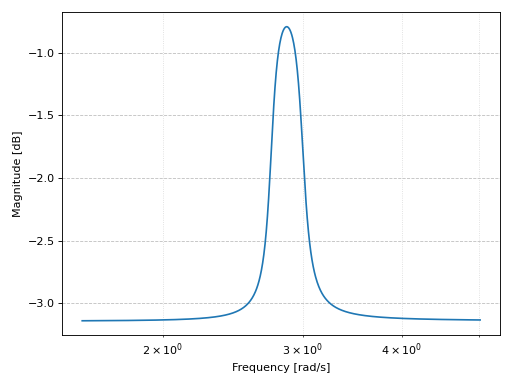
Bode phase plot of a discrete-time system:
import control as ct
tf2 = ct.tf([1], [1, 2, 3], dt=0.05)
graphics(
    bode_phase(tf2),
    xscale="log", xlabel="Frequency [rad/s]",
    ylabel="Magnitude [dB]"
)
(
Source code,png)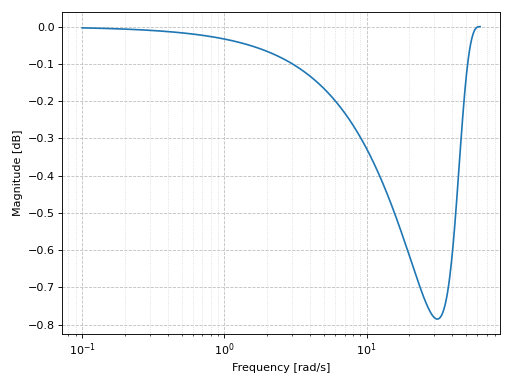
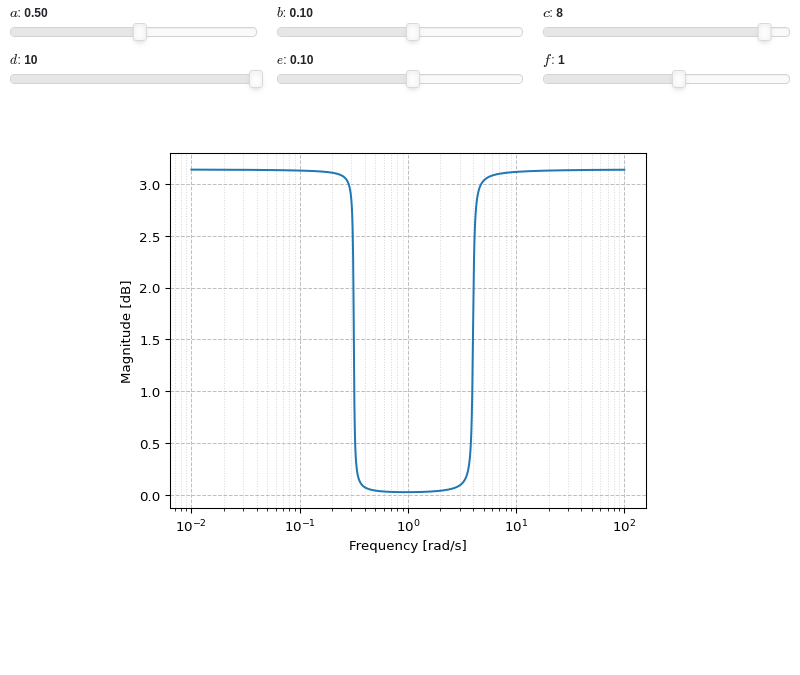
Interactive-widget plot:
from sympy.abc import a, b, c, d, e, f, s
from sympy.physics.control.lti import TransferFunction
from spb import *
tf1 = TransferFunction(a*s**2 + b*s + c, d*s**4 + e*s**3 + f*s**2, s)
params = {
    a: (0.5, -10, 10),
    b: (0.1, -1, 1),
    c: (8, -10, 10),
    d: (10, -10, 10),
    e: (0.1, -1, 1),
    f: (1, -10, 10),
}
graphics(
    bode_phase(tf1, initial_exp=-2, final_exp=2, params=params),
    imodule="panel", ncols=3,
    xscale="log", xlabel="Frequency [rad/s]", ylabel="Magnitude [dB]"
)
- spb.graphics.control.nyquist(system, omega_limits=None, input=None, output=None, label=None, rendering_kw=None, m_circles=False, **kwargs)[source]
Plots a Nyquist plot for the system over a (optional) frequency range. The curve is computed by evaluating the Nyquist segment along the positive imaginary axis, with a mirror image generated to reflect the negative imaginary axis. Poles on or near the imaginary axis are avoided using a small indentation. The portion of the Nyquist contour at infinity is not explicitly computed (since it maps to a constant value for any system with a proper transfer function).
- Parameters:
- systemLTI system type
The system for which the pole-zero plot is to be computed. It can be:
an instance of
control.TransferFunctionan instance of
scipy.signal.TransferFunction- a symbolic expression in rational form, which will be converted to
an object of type
sympy.physics.control.lti.TransferFunction.
- a tuple of two or three elements:
(num, den, generator [opt]), which will be converted to an object of type
sympy.physics.control.lti.TransferFunction.
- a tuple of two or three elements:
- omega_limitsarray_like of two values, optional
Limits to the range of frequencies.
- labelstr
Set the label associated to this series, which will be eventually shown on the legend or colorbar.
- rendering_kwdict
A dictionary of keyword arguments to be passed to the renderers in order to further customize the appearance of the line. Here are some useful links for the supported plotting libraries:
Matplotlib:
for solid lines: https://matplotlib.org/stable/api/_as_gen/matplotlib.pyplot.plot.html
for colormap-based lines: https://matplotlib.org/stable/api/collections_api.html#matplotlib.collections.LineCollection
for scatters: https://matplotlib.org/stable/api/_as_gen/matplotlib.pyplot.scatter.html
Bokeh:
- m_circlesbool or float or iterable, optional
Turn on/off M-circles, which are circles of constant closed loop magnitude. If float or iterable (of floats), represents specific magnitudes in dB.
- arrows
Specify the number of arrows to plot on the Nyquist/Nichols curve. It can be:
an integer, representing the number of equally spaced arrows that will be plotted on each of the primary segment and the mirror image.
If a 1D array is passed, it should consist of a sorted list of floats between 0 and 1, indicating the location along the curve to plot an arrow.
- colorbar_ticks_formattertick_formatter_multiples_of
An object of type
tick_formatter_multiples_ofwhich will be used to place tick values on the colorbar at each multiple of a specified quantity. This only works when use_cm=True.- control_kwdict
A dictionary of keyword arguments passed to
control.nyquist_response()- is_filledbool
Whether scatter’s markers are filled or void. Default value: True.
- is_scatterbool
If True it represent a scatter plot, otherwise a continuous line. Default value: False.
- max_curve_magnitudefloat
Restrict the maximum magnitude of the Nyquist plot to this value. Portions of the Nyquist plot whose magnitude is restricted are plotted using a different line style. It must be: 0 ≤ max_curve_magnitude < ∞. Default value: 20.
- max_curve_offsetfloat
When plotting scaled portion of the Nyquist plot, increase/decrease the magnitude by this fraction of the max_curve_magnitude to allow any overlaps between the primary and mirror curves to be avoided. Default value: 0.02.
- mirror_style
Linestyles for mirror image of the Nyquist curve. It can be: [str, str] or [dict, dict] or dict. If a list is given, the first element is used for unscaled portions of the Nyquist curve, the second element is used for portions that are scaled (using max_curve_magnitude). dict is a dictionary of keyword arguments to be passed to the plotting function, for example to plt.plot. If False then omit completely. Default linestyle is [’–’, ‘:’].
- paramsdict, optional
A dictionary mapping symbols to parameters. If provided, this dictionary enables the interactive-widgets plot.
When calling a plotting function, the parameter can be specified with:
a widget from the
ipywidgetsmodule.a widget from the
panelmodule.- a tuple of the form:
(default, min, max, N, tick_format, label, spacing), which will instantiate a
ipywidgets.widgets.widget_float.FloatSlideror aipywidgets.widgets.widget_float.FloatLogSlider, depending on the spacing strategy. In particular:- default, min, maxfloat
Default value, minimum value and maximum value of the slider, respectively. Must be finite numbers. The order of these 3 numbers is not important: the module will figure it out which is what.
- Nint, optional
Number of steps of the slider.
- tick_formatstr or None, optional
Provide a formatter for the tick value of the slider. Default to
".2f".
- label: str, optional
Custom text associated to the slider.
- spacingstr, optional
Specify the discretization spacing. Default to
"linear", can be changed to"log".
Notes:
parameters cannot be linked together (ie, one parameter cannot depend on another one).
If a widget returns multiple numerical values (like
panel.widgets.slider.RangeSlideroripywidgets.widgets.widget_float.FloatRangeSlider), then a corresponding number of symbols must be provided.
Here follows a couple of examples. If
imodule="panel":import panel as pn params = { a: (1, 0, 5), # slider from 0 to 5, with default value of 1 b: pn.widgets.FloatSlider(value=1, start=0, end=5), # same slider as above (c, d): pn.widgets.RangeSlider(value=(-1, 1), start=-3, end=3, step=0.1) }
Or with
imodule="ipywidgets":import ipywidgets as w params = { a: (1, 0, 5), # slider from 0 to 5, with default value of 1 b: w.FloatSlider(value=1, min=0, max=5), # same slider as above (c, d): w.FloatRangeSlider(value=(-1, 1), min=-3, max=3, step=0.1) }
When instantiating a data series directly,
paramsmust be a dictionary mapping symbols to numerical values.Let
seriesbe any data series. Thenseries.paramsreturns a dictionary mapping symbols to numerical values.- primary_style
Linestyles for primary image of the Nyquist curve. It can be: [str, str] or [dict, dict] or dict. If a list is given, the first element is used for unscaled portions of the Nyquist curve, the second element is used for portions that are scaled (using max_curve_magnitude). dict is a dictionary of keyword arguments to be passed to the plotting function, for example to Matplotlib’s plt.plot. Default linestyle is [‘-’, ‘-.’].
- range_omegatuple, Tuple
A 3-tuple (symb, min, max) denoting the range of the frequencies.
- show_in_legendbool
Toggle the visibility of the data series on the legend. Default value: True.
- start_markerbool, str, dict, NoneType
Marker to use to mark the starting point of the Nyquist plot. If dict is provided, it must containts keyword arguments to be passed to the plot function, for example to Matplotlib’s plt.plot.
- stepsNoneType, bool, str
If set, it connects consecutive points with steps rather than straight segments. Possible options: [‘pre’, ‘post’, ‘mid’, True, False, None] Default value: False.
- txcallable
Numerical transformation function to be applied to the data on the x-axis.
- tycallable
Numerical transformation function to be applied to the data on the y-axis.
- unwrapbool, dict
Whether to use numpy.unwrap() on the computed coordinates in order to get rid of discontinuities. It can be:
False: do not use
np.unwrap().True: use
np.unwrap()with default keyword arguments.dictionary of keyword arguments passed to
np.unwrap().
- Returns:
- A list containing:
- one instance of
MCirclesSeriesifmcircles=True.
- one instance of
- one instance of
NyquistLineSeries.
- one instance of
Notes
If a continuous-time system contains poles on or near the imaginary axis, a small indentation will be used to avoid the pole. The radius of the indentation is given by indent_radius and it is taken to the right of stable poles and the left of unstable poles. If a pole is exactly on the imaginary axis, the indent_direction parameter can be used to set the direction of indentation. Setting indent_direction to none will turn off indentation. If return_contour is True, the exact contour used for evaluation is returned.
For those portions of the Nyquist plot in which the contour is indented to avoid poles, resuling in a scaling of the Nyquist plot, the line styles are according to the settings of the primary_style and mirror_style keywords. By default the scaled portions of the primary curve use a dotted line style and the scaled portion of the mirror image use a dashdot line style.
References
Examples
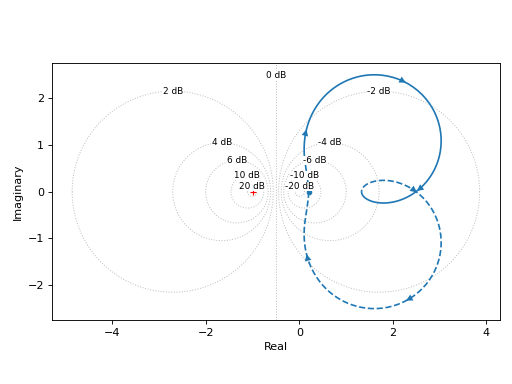
Plotting a single transfer function:
from sympy import Rational
from sympy.abc import s
from sympy.physics.control.lti import TransferFunction
from spb import *
tf1 = TransferFunction(
    4 * s**2 + 5 * s + 1, 3 * s**2 + 2 * s + 5, s)
graphics(
    nyquist(tf1, m_circles=True),
    xlabel="Real", ylabel="Imaginary",
    grid=False, aspect="equal"
)
(
Source code,png)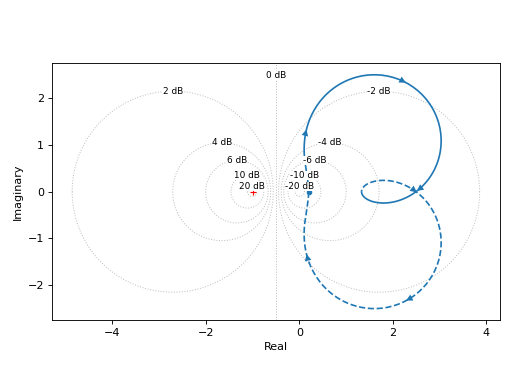
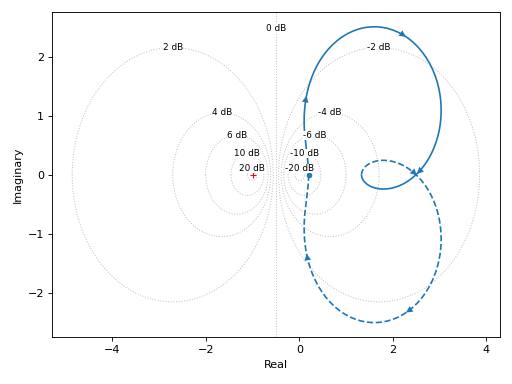
Visualizing M-circles:
graphics(
    nyquist(tf1, m_circles=True),
    grid=False, xlabel="Real", ylabel="Imaginary"
)
(
Source code,png)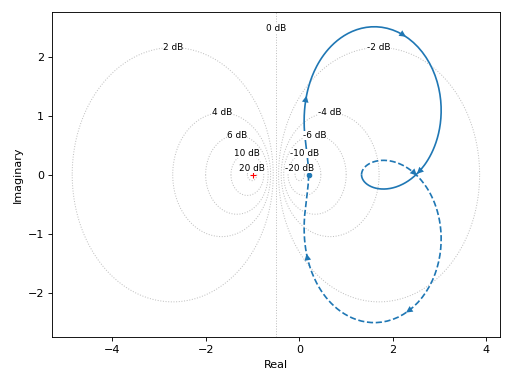
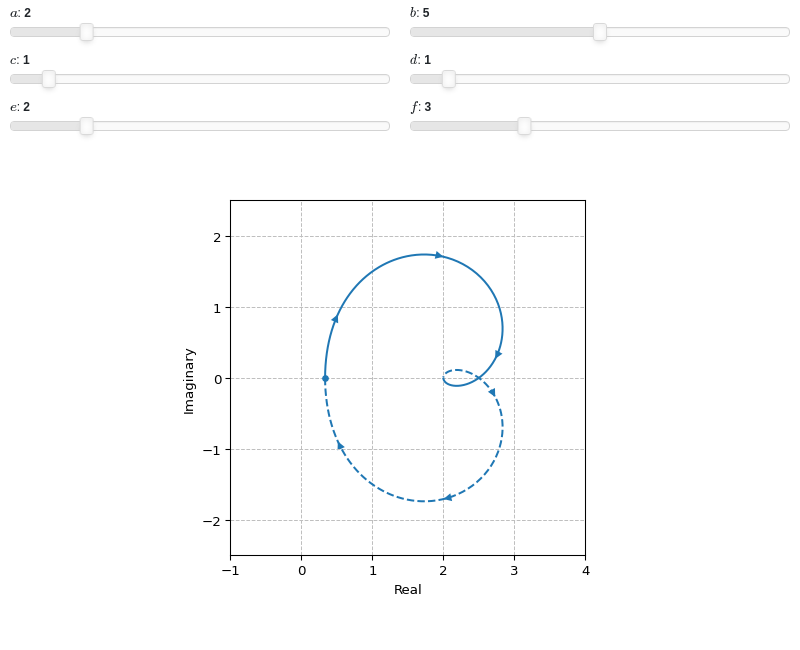
Interactive-widgets plot of a systems:
from sympy.abc import a, b, c, d, e, f, s
from sympy.physics.control.lti import TransferFunction
from spb import *
tf = TransferFunction(a * s**2 + b * s + c, d**2 * s**2 + e * s + f, s)
params = {
    a: (2, 0, 10),
    b: (5, 0, 10),
    c: (1, 0, 10),
    d: (1, 0, 10),
    e: (2, 0, 10),
    f: (3, 0, 10),
}
graphics(
    nyquist(tf, params=params),
    xlabel="Real", ylabel="Imaginary",
    xlim=(-1, 4), ylim=(-2.5, 2.5), aspect="equal"
)
- spb.graphics.control.ngrid(cl_mags=None, cl_phases=None, label_cl_phases=False, rendering_kw=None, **kwargs)[source]
Create the n-grid (Nichols grid) of constant closed-loop magnitudes and phases.
- Parameters:
- cl_magsndarray
Array of closed-loop magnitudes defining the iso-gain lines.
- cl_phasesndarray
Array of closed-loop phases defining the iso-phase lines. Must be in the range -360 < cl_phases < 0.
- label_cl_phasesbool
Toggle the visibility of the labels assciated to the closed-loop phase. Default value: True.
- rendering_kwdict
A dictionary of keyword arguments to be passed to the renderers in order to further customize the appearance of the line. Here are some useful links for the supported plotting libraries:
Matplotlib:
for solid lines: https://matplotlib.org/stable/api/_as_gen/matplotlib.pyplot.plot.html
for colormap-based lines: https://matplotlib.org/stable/api/collections_api.html#matplotlib.collections.LineCollection
for scatters: https://matplotlib.org/stable/api/_as_gen/matplotlib.pyplot.scatter.html
Bokeh:
- show_cl_magsbool
Toggle the visibility of the closed-loop magnitude grid lines. Default value: True.
- show_cl_phasesbool
Toggle the visibility of the closed-loop phase grid lines. Default value: True.
- xlimtuple
Axis limits along the x-direction.
- ylimtuple
Axis limits along the x-direction.
- Returns:
- A list containing one instance of
NGridLineSeries.
- A list containing one instance of
See also
Examples
Default N-grid:
from spb import *
graphics(
    ngrid(),
    grid=False
)
(
Source code,png)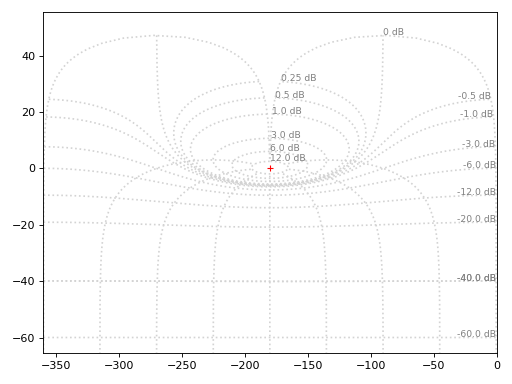
Highlight specific values of closed-loop magnitude and closed-loop phase:
graphics(
    ngrid(label_cl_phases=False),
    ngrid(cl_mags=-30, cl_phases=False, rendering_kw={"color": "r", "linestyle": "-"}),
    ngrid(cl_mags=False, cl_phases=-200, rendering_kw={"color": "g", "linestyle": "-"}),
    grid=False
)
(
Source code,png)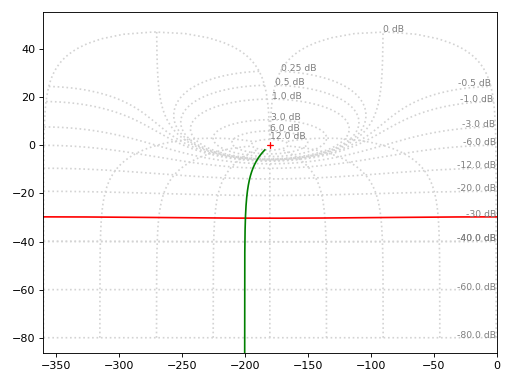
- spb.graphics.control.nichols(system, label=None, rendering_kw=None, ngrid=True, arrows=True, input=None, output=None, **kwargs)[source]
Nichols plot for a system over a (optional) frequency range.
- Parameters:
- systemLTI system type
The system for which the pole-zero plot is to be computed. It can be:
an instance of
control.TransferFunctionan instance of
scipy.signal.TransferFunction- a symbolic expression in rational form, which will be converted to
an object of type
sympy.physics.control.lti.TransferFunction.
- a tuple of two or three elements:
(num, den, generator [opt]), which will be converted to an object of type
sympy.physics.control.lti.TransferFunction.
- a tuple of two or three elements:
- labelstr
Set the label associated to this series, which will be eventually shown on the legend or colorbar.
- rendering_kwdict
A dictionary of keyword arguments to be passed to the renderers in order to further customize the appearance of the line. Here are some useful links for the supported plotting libraries:
Matplotlib:
for solid lines: https://matplotlib.org/stable/api/_as_gen/matplotlib.pyplot.plot.html
for colormap-based lines: https://matplotlib.org/stable/api/collections_api.html#matplotlib.collections.LineCollection
for scatters: https://matplotlib.org/stable/api/_as_gen/matplotlib.pyplot.scatter.html
Bokeh:
- ngridbool, optional
Turn on/off the [Nichols] grid lines.
- arrows
Specify the number of arrows to plot on the Nyquist/Nichols curve. It can be:
an integer, representing the number of equally spaced arrows that will be plotted on each of the primary segment and the mirror image.
If a 1D array is passed, it should consist of a sorted list of floats between 0 and 1, indicating the location along the curve to plot an arrow.
- inputint, optional
Only compute the poles/zeros for the listed input. If not specified, the poles/zeros for each independent input are computed (as separate traces).
- outputint, optional
Only compute the poles/zeros for the listed output. If not specified, all outputs are reported.
- colorbar_ticks_formattertick_formatter_multiples_of
An object of type
tick_formatter_multiples_ofwhich will be used to place tick values on the colorbar at each multiple of a specified quantity. This only works when use_cm=True.- is_filledbool
Whether scatter’s markers are filled or void. Default value: True.
- is_scatterbool
If True it represent a scatter plot, otherwise a continuous line. Default value: False.
- modules
Specify the evaluation modules to be used by lambdify. If not specified, the evaluation will be done with NumPy/SciPy.
- n1int
Number of discretization points along the pulsation to be used in the evaluation. Related parameters:
xscale. Default value: 100.- omega_limitsarray_like of two values, optional
Limits to the range of frequencies.
- only_integersbool
Discretize the domain using only integer numbers. When this parameter is True, the number of discretization points is choosen by the algorithm. Default value: False.
- paramsdict, optional
A dictionary mapping symbols to parameters. If provided, this dictionary enables the interactive-widgets plot.
When calling a plotting function, the parameter can be specified with:
a widget from the
ipywidgetsmodule.a widget from the
panelmodule.- a tuple of the form:
(default, min, max, N, tick_format, label, spacing), which will instantiate a
ipywidgets.widgets.widget_float.FloatSlideror aipywidgets.widgets.widget_float.FloatLogSlider, depending on the spacing strategy. In particular:- default, min, maxfloat
Default value, minimum value and maximum value of the slider, respectively. Must be finite numbers. The order of these 3 numbers is not important: the module will figure it out which is what.
- Nint, optional
Number of steps of the slider.
- tick_formatstr or None, optional
Provide a formatter for the tick value of the slider. Default to
".2f".
- label: str, optional
Custom text associated to the slider.
- spacingstr, optional
Specify the discretization spacing. Default to
"linear", can be changed to"log".
Notes:
parameters cannot be linked together (ie, one parameter cannot depend on another one).
If a widget returns multiple numerical values (like
panel.widgets.slider.RangeSlideroripywidgets.widgets.widget_float.FloatRangeSlider), then a corresponding number of symbols must be provided.
Here follows a couple of examples. If
imodule="panel":import panel as pn params = { a: (1, 0, 5), # slider from 0 to 5, with default value of 1 b: pn.widgets.FloatSlider(value=1, start=0, end=5), # same slider as above (c, d): pn.widgets.RangeSlider(value=(-1, 1), start=-3, end=3, step=0.1) }
Or with
imodule="ipywidgets":import ipywidgets as w params = { a: (1, 0, 5), # slider from 0 to 5, with default value of 1 b: w.FloatSlider(value=1, min=0, max=5), # same slider as above (c, d): w.FloatRangeSlider(value=(-1, 1), min=-3, max=3, step=0.1) }
When instantiating a data series directly,
paramsmust be a dictionary mapping symbols to numerical values.Let
seriesbe any data series. Thenseries.paramsreturns a dictionary mapping symbols to numerical values.- show_in_legendbool
Toggle the visibility of the data series on the legend. Default value: True.
- txcallable
Numerical transformation function to be applied to the data on the x-axis.
- tycallable
Numerical transformation function to be applied to the data on the y-axis.
- xscalestr
Discretization strategy along the pulsation. Related parameters:
n1. Possible options: [‘linear’, ‘log’] Default value: ‘log’.
- Returns:
- A list containing:
- one instance of
NGridLineSeriesifngrid=True.
- one instance of
- one instance of
NicholsLineSeries.
- one instance of
See also
References
Examples
Plotting a single transfer function:
from sympy.abc import s
from sympy.physics.control.lti import TransferFunction
from spb import *
tf = TransferFunction(50*s**2 - 20*s + 15, -10*s**2 + 40*s + 30, s)
graphics(
    nichols(tf),
    xlabel="Open-Loop Phase [deg]",
    ylabel="Open-Loop Magnitude [dB]",
    grid=False
)
(
Source code,png)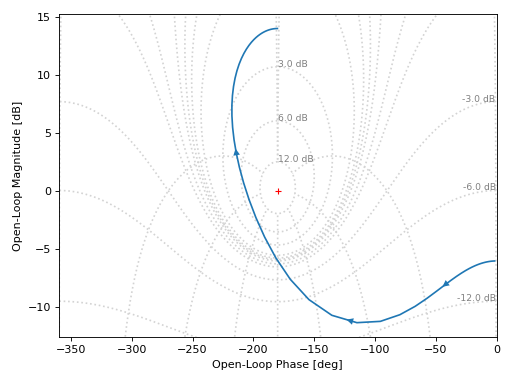
Turning off the Nichols grid lines:
graphics(
    nichols(tf, ngrid=False),
    xlabel="Open-Loop Phase [deg]",
    ylabel="Open-Loop Magnitude [dB]",
    grid=False
)
(
Source code,png)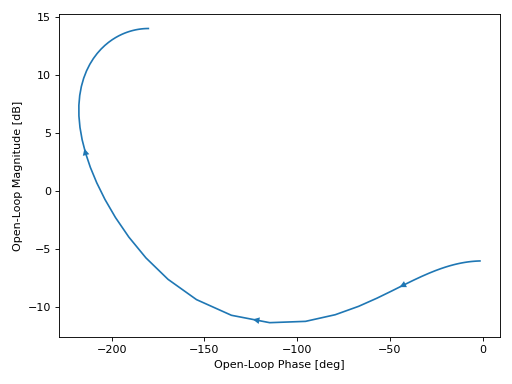
Interactive-widgets plot of a systems. For these kind of plots, it is recommended to set both
omega_limitsandxlim:from sympy.abc import a, b, c, s from spb import * from sympy.physics.control.lti import TransferFunction tf = TransferFunction(a*s**2 + b*s + c, s**3 + 10*s**2 + 5 * s + 1, s) params = { a: (-25, -100, 100), b: (60, -300, 300), c: (-100, -1000, 1000), } graphics( nichols(tf, omega_limits=[1e-03, 1e03], n=1e04, params=params), xlabel="Open-Loop Phase [deg]", ylabel="Open-Loop Magnitude [dB]", xlim=(-360, 360), grid=False, )
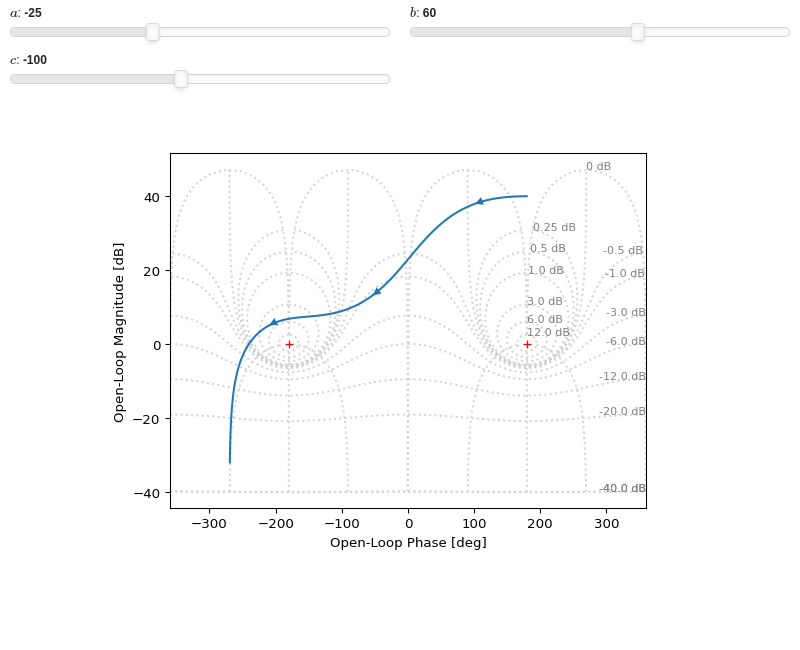
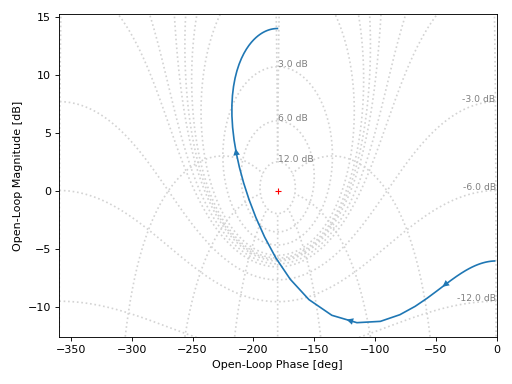
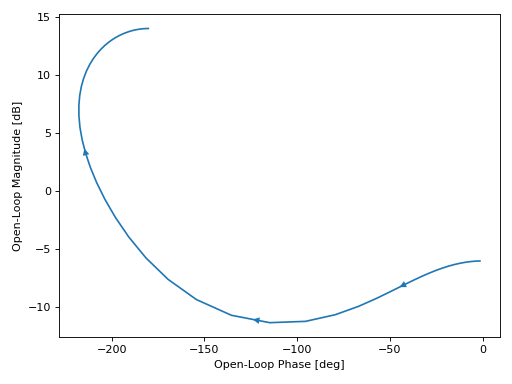
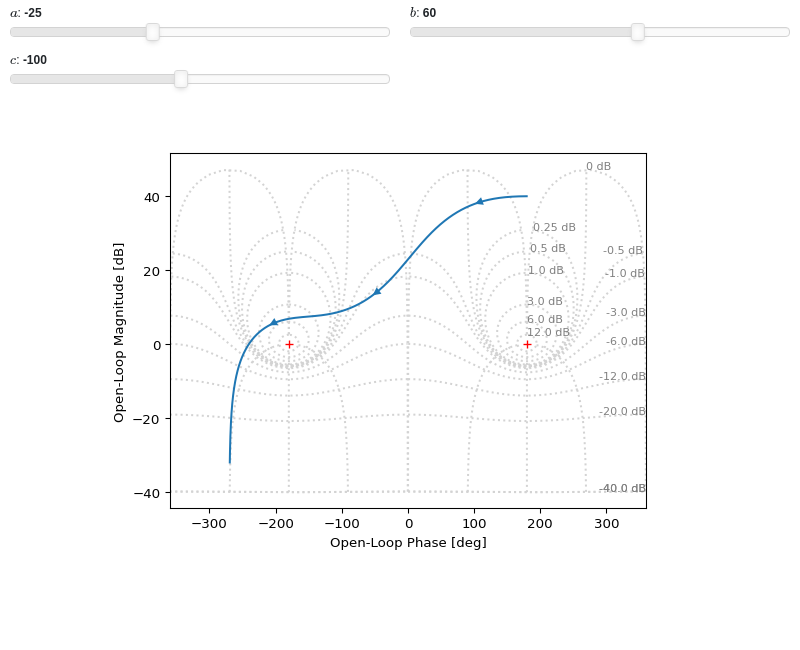
- spb.graphics.control.mcircles(magnitudes_db=None, rendering_kw=None, show_minus_one=True, **kwargs)[source]
Draw M-circles of constant closed-loop magnitude.
- Parameters:
- magnitudes_dbfloat, iterable or None
Specify the magnitudes in dB. If None, a list of default magnitudes will be used.
- rendering_kwdict
A dictionary of keyword arguments to be passed to the renderers in order to further customize the appearance of the line. Here are some useful links for the supported plotting libraries:
Matplotlib:
for solid lines: https://matplotlib.org/stable/api/_as_gen/matplotlib.pyplot.plot.html
for colormap-based lines: https://matplotlib.org/stable/api/collections_api.html#matplotlib.collections.LineCollection
for scatters: https://matplotlib.org/stable/api/_as_gen/matplotlib.pyplot.scatter.html
Bokeh:
- show_minus_onebool
Show a marker at (x, y) = (-1, 0). Default value: False.
- paramsdict, optional
A dictionary mapping symbols to parameters. If provided, this dictionary enables the interactive-widgets plot.
When calling a plotting function, the parameter can be specified with:
a widget from the
ipywidgetsmodule.a widget from the
panelmodule.- a tuple of the form:
(default, min, max, N, tick_format, label, spacing), which will instantiate a
ipywidgets.widgets.widget_float.FloatSlideror aipywidgets.widgets.widget_float.FloatLogSlider, depending on the spacing strategy. In particular:- default, min, maxfloat
Default value, minimum value and maximum value of the slider, respectively. Must be finite numbers. The order of these 3 numbers is not important: the module will figure it out which is what.
- Nint, optional
Number of steps of the slider.
- tick_formatstr or None, optional
Provide a formatter for the tick value of the slider. Default to
".2f".
- label: str, optional
Custom text associated to the slider.
- spacingstr, optional
Specify the discretization spacing. Default to
"linear", can be changed to"log".
Notes:
parameters cannot be linked together (ie, one parameter cannot depend on another one).
If a widget returns multiple numerical values (like
panel.widgets.slider.RangeSlideroripywidgets.widgets.widget_float.FloatRangeSlider), then a corresponding number of symbols must be provided.
Here follows a couple of examples. If
imodule="panel":import panel as pn params = { a: (1, 0, 5), # slider from 0 to 5, with default value of 1 b: pn.widgets.FloatSlider(value=1, start=0, end=5), # same slider as above (c, d): pn.widgets.RangeSlider(value=(-1, 1), start=-3, end=3, step=0.1) }
Or with
imodule="ipywidgets":import ipywidgets as w params = { a: (1, 0, 5), # slider from 0 to 5, with default value of 1 b: w.FloatSlider(value=1, min=0, max=5), # same slider as above (c, d): w.FloatRangeSlider(value=(-1, 1), min=-3, max=3, step=0.1) }
When instantiating a data series directly,
paramsmust be a dictionary mapping symbols to numerical values.Let
seriesbe any data series. Thenseries.paramsreturns a dictionary mapping symbols to numerical values.- xlimtuple
Axis limits along the x-direction.
- ylimtuple
Axis limits along the x-direction.
- Returns:
- A list containing one instance of
MCirclesSeries.
- A list containing one instance of
See also
Examples
from spb import *
graphics(
    mcircles(),
    mcircles(-3, rendering_kw={"color": "r"}),
    grid=False, aspect="equal")
(
Source code,png)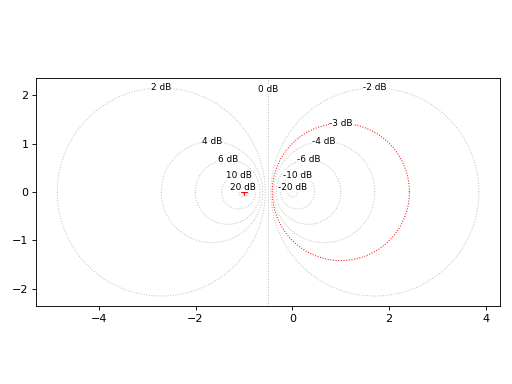
Interactive-widgets plot of m-circles:
from spb import *
from sympy.abc import m
graphics(
    mcircles(),
    mcircles(m, rendering_kw={"color": "r"}, params={m: (-3, -15, 15)}),
    grid=False, aspect="equal")
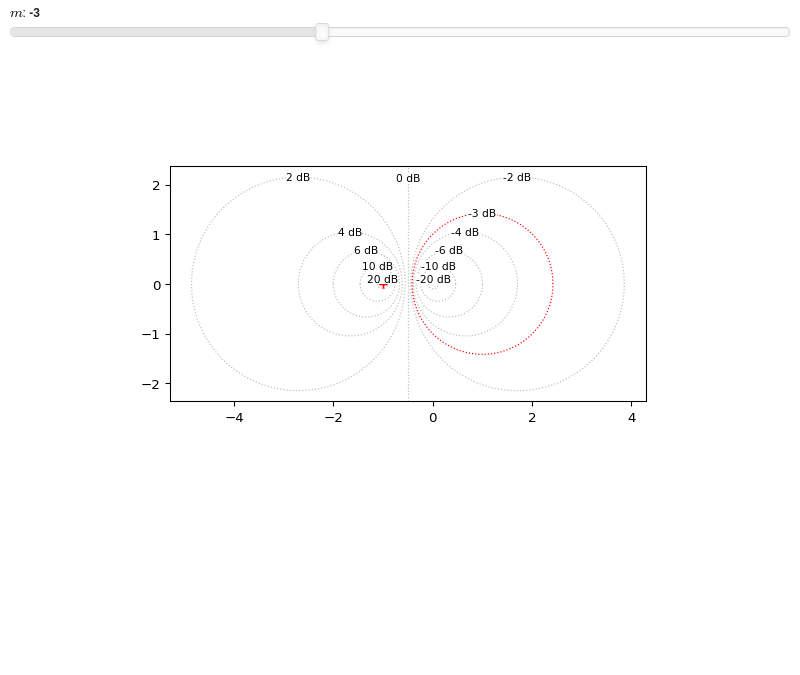
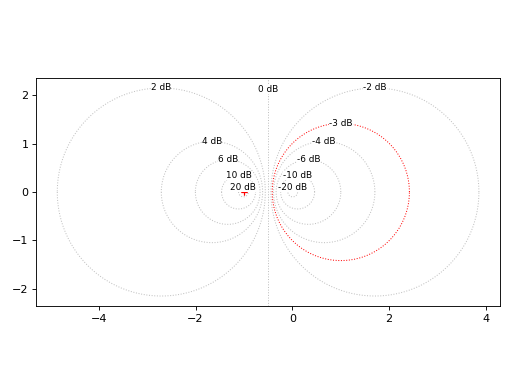
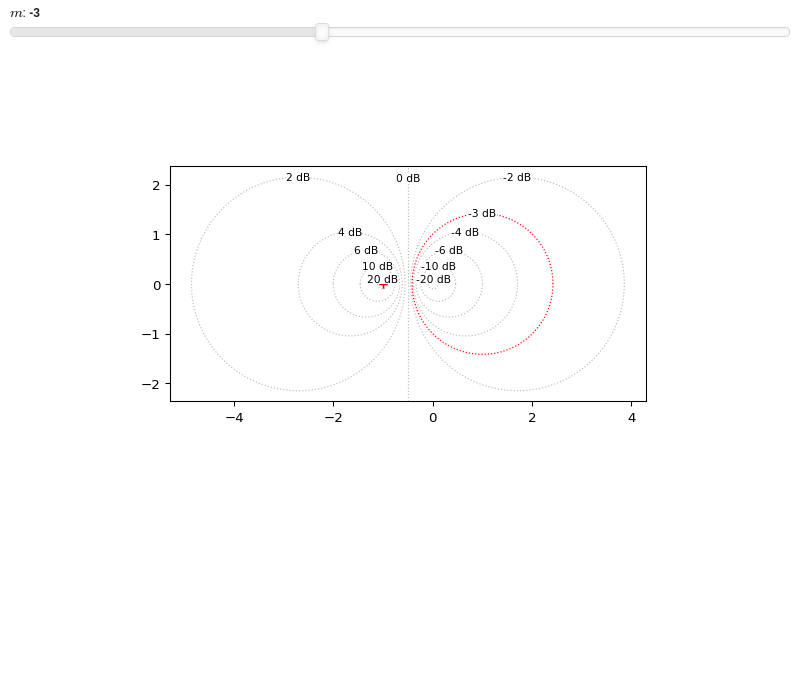
- spb.graphics.control.control_axis(hor=True, ver=True, rendering_kw=None, **kwargs)[source]
Create two axis lines to be used with control-plotting.
- Parameters:
- hor, verbool, optional
Wheter to add the horizontal and/or vertical axis.
- rendering_kwdict, optional
A dictionary of keyword arguments to be passed to the renderers in order to further customize the appearance of the line. Here are some useful links for the supported plotting libraries:
Matplotlib:
for solid lines: https://matplotlib.org/stable/api/_as_gen/matplotlib.pyplot.plot.html
for colormap-based lines: https://matplotlib.org/stable/api/collections_api.html#matplotlib.collections.LineCollection
for scatters: https://matplotlib.org/stable/api/_as_gen/matplotlib.pyplot.scatter.html
Bokeh:
- Returns:
- A list containing up to two instances of
HVLineSeries.
- A list containing up to two instances of
- spb.graphics.control.sgrid(xi=None, wn=None, tp=None, ts=None, xlim=None, ylim=None, show_control_axis=True, rendering_kw=None, auto=False, **kwargs)[source]
Create the s-grid of constant damping ratios and natural frequencies.
- Parameters:
- xilist
List of damping values where to draw a grid line.
- wnlist
List of natural frequencies where to draw a grid line.
- tplist
List of peak times where to draw a grid line.
- tslist
List of settling times where to draw a grid line.
- xlimtuple
Axis limits along the x-direction.
- ylimtuple
Axis limits along the x-direction.
- show_control_axisbool
Shows an horizontal and vertical grid lines crossing at the origin. Default value: True.
- rendering_kwdict
A dictionary of keyword arguments to be passed to the renderers in order to further customize the appearance of the line. Here are some useful links for the supported plotting libraries:
Matplotlib:
for solid lines: https://matplotlib.org/stable/api/_as_gen/matplotlib.pyplot.plot.html
for colormap-based lines: https://matplotlib.org/stable/api/collections_api.html#matplotlib.collections.LineCollection
for scatters: https://matplotlib.org/stable/api/_as_gen/matplotlib.pyplot.scatter.html
Bokeh:
- autobool
If True, automatically compute damping ratio and natural frequencies in order to obtain an “evenly” distributed grid. Default value: True.
- paramsdict, optional
A dictionary mapping symbols to parameters. If provided, this dictionary enables the interactive-widgets plot.
When calling a plotting function, the parameter can be specified with:
a widget from the
ipywidgetsmodule.a widget from the
panelmodule.- a tuple of the form:
(default, min, max, N, tick_format, label, spacing), which will instantiate a
ipywidgets.widgets.widget_float.FloatSlideror aipywidgets.widgets.widget_float.FloatLogSlider, depending on the spacing strategy. In particular:- default, min, maxfloat
Default value, minimum value and maximum value of the slider, respectively. Must be finite numbers. The order of these 3 numbers is not important: the module will figure it out which is what.
- Nint, optional
Number of steps of the slider.
- tick_formatstr or None, optional
Provide a formatter for the tick value of the slider. Default to
".2f".
- label: str, optional
Custom text associated to the slider.
- spacingstr, optional
Specify the discretization spacing. Default to
"linear", can be changed to"log".
Notes:
parameters cannot be linked together (ie, one parameter cannot depend on another one).
If a widget returns multiple numerical values (like
panel.widgets.slider.RangeSlideroripywidgets.widgets.widget_float.FloatRangeSlider), then a corresponding number of symbols must be provided.
Here follows a couple of examples. If
imodule="panel":import panel as pn params = { a: (1, 0, 5), # slider from 0 to 5, with default value of 1 b: pn.widgets.FloatSlider(value=1, start=0, end=5), # same slider as above (c, d): pn.widgets.RangeSlider(value=(-1, 1), start=-3, end=3, step=0.1) }
Or with
imodule="ipywidgets":import ipywidgets as w params = { a: (1, 0, 5), # slider from 0 to 5, with default value of 1 b: w.FloatSlider(value=1, min=0, max=5), # same slider as above (c, d): w.FloatRangeSlider(value=(-1, 1), min=-3, max=3, step=0.1) }
When instantiating a data series directly,
paramsmust be a dictionary mapping symbols to numerical values.Let
seriesbe any data series. Thenseries.paramsreturns a dictionary mapping symbols to numerical values.
See also
Examples
Shows the default grid lines, as well as a custom damping ratio line, a custom natural frequency line, a custom peak time line and a custom settling time line.
from spb import *
graphics(
    sgrid(),
    sgrid(xi=0.85, wn=False,
        rendering_kw={"color": "r", "linestyle": "-"},
        show_control_axis=False),
    sgrid(xi=False, wn=4.5,
        rendering_kw={"color": "g", "linestyle": "-"},
        show_control_axis=False),
    sgrid(xi=False, wn=False, tp=1,
        rendering_kw={"color": "b", "linestyle": "-"},
        show_control_axis=False),
    sgrid(xi=False, wn=False, ts=1,
        rendering_kw={"color": "m", "linestyle": "-"},
        show_control_axis=False),
    grid=False, xlim=(-8.5, 1), ylim=(-5, 5))
(
Source code,png)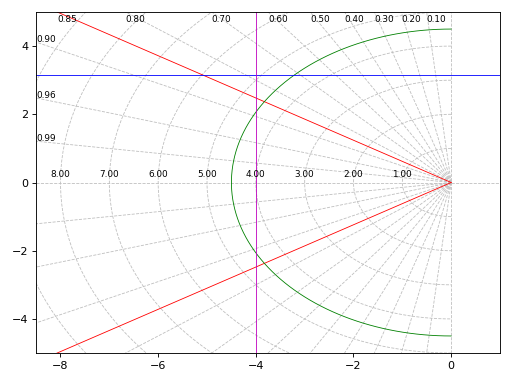
Auto-generate grid lines over a specified area of of the s-plane:
graphics(
    sgrid(auto=True)
)
(
Source code,png)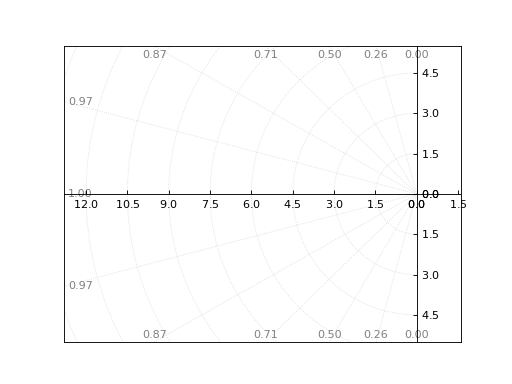
Interactive-widgets plot of custom s-grid lines:
from sympy import symbols
from spb import *
xi, wn, Tp, Ts = symbols("xi omega_n T_p T_s")
params = {
    xi: (0.85, 0, 1),
    wn: (6.5, 2, 8),
    Tp: (1, 0.2, 4),
    Ts: (1, 0.2, 4),
}
graphics(
    sgrid(auto=True),
    sgrid(xi=xi, wn=False, params=params,
        rendering_kw={"color": "r", "linestyle": "-"},
        show_control_axis=False),
    sgrid(xi=False, wn=wn, params=params,
        rendering_kw={"color": "g", "linestyle": "-"},
        show_control_axis=False),
    sgrid(xi=False, wn=False, tp=Tp, params=params,
        rendering_kw={"color": "b", "linestyle": "-"},
        show_control_axis=False),
    sgrid(xi=False, wn=False, ts=Ts, params=params,
        rendering_kw={"color": "m", "linestyle": "-"},
        show_control_axis=False),
    grid=False, xlim=(-8.5, 1), ylim=(-5, 5))
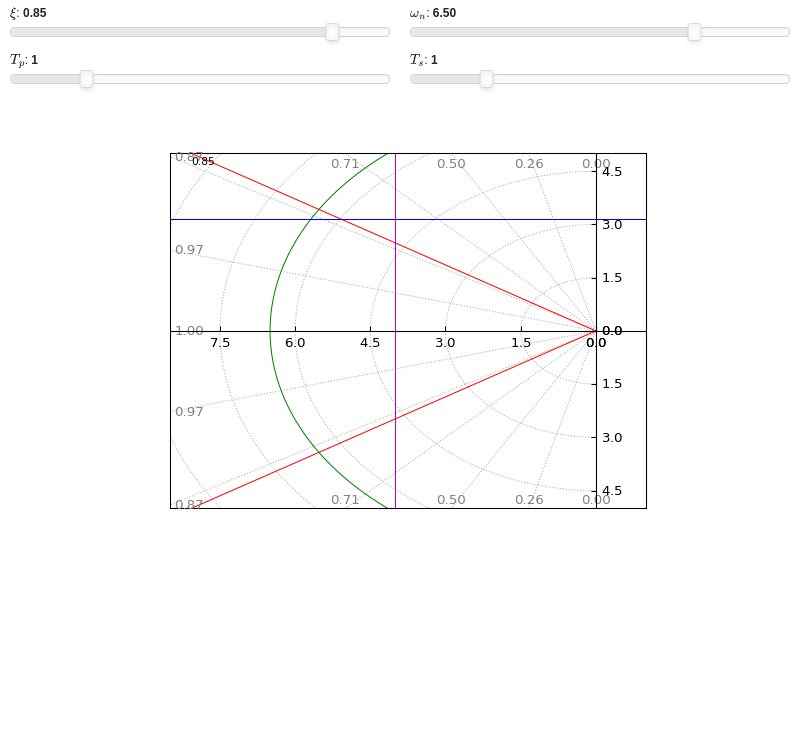
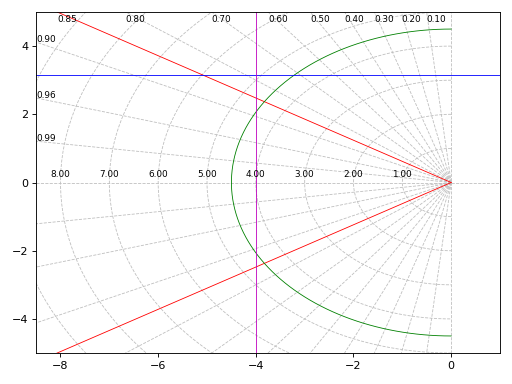
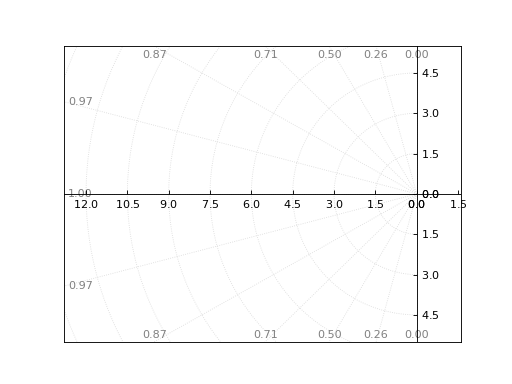
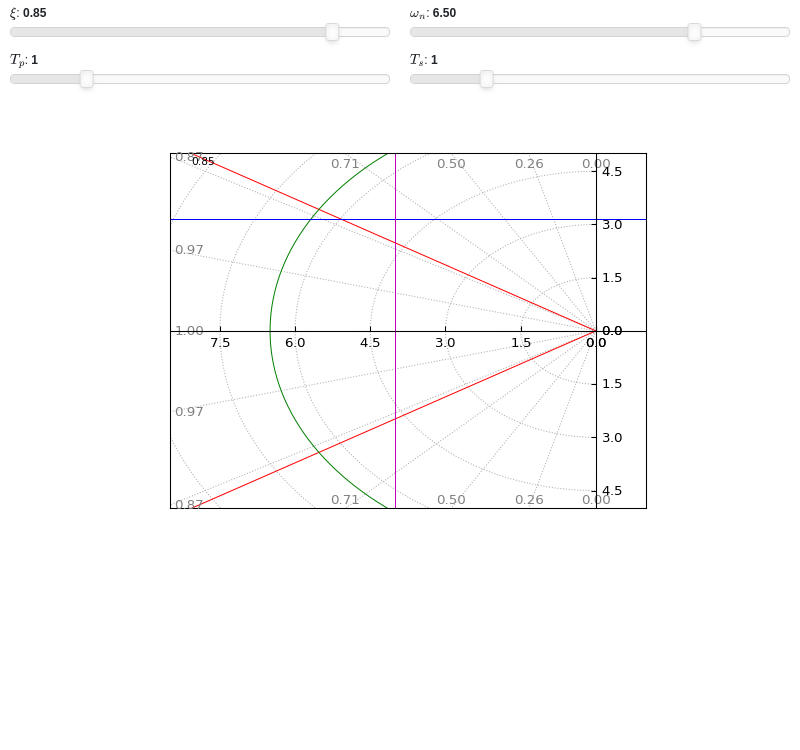
- spb.graphics.control.zgrid(xi=None, wn=None, tp=None, ts=None, T=None, show_control_axis=True, rendering_kw=None, **kwargs)[source]
Create the s-grid of constant damping ratios and natural frequencies.
- Parameters:
- xilist
List of damping values where to draw a grid line.
- wnlist
List of natural frequencies where to draw a grid line.
- tplist
List of peak times where to draw a grid line.
- tslist
List of settling times where to draw a grid line.
- Tfloat
Sampling period. Default value: None.
- show_control_axisbool
Shows an horizontal and vertical grid lines crossing at the origin. Default value: True.
- rendering_kwdict
A dictionary of keyword arguments to be passed to the renderers in order to further customize the appearance of the line. Here are some useful links for the supported plotting libraries:
Matplotlib:
for solid lines: https://matplotlib.org/stable/api/_as_gen/matplotlib.pyplot.plot.html
for colormap-based lines: https://matplotlib.org/stable/api/collections_api.html#matplotlib.collections.LineCollection
for scatters: https://matplotlib.org/stable/api/_as_gen/matplotlib.pyplot.scatter.html
Bokeh:
- autobool
If True, automatically compute damping ratio and natural frequencies in order to obtain an “evenly” distributed grid. Default value: True.
- paramsdict, optional
A dictionary mapping symbols to parameters. If provided, this dictionary enables the interactive-widgets plot.
When calling a plotting function, the parameter can be specified with:
a widget from the
ipywidgetsmodule.a widget from the
panelmodule.- a tuple of the form:
(default, min, max, N, tick_format, label, spacing), which will instantiate a
ipywidgets.widgets.widget_float.FloatSlideror aipywidgets.widgets.widget_float.FloatLogSlider, depending on the spacing strategy. In particular:- default, min, maxfloat
Default value, minimum value and maximum value of the slider, respectively. Must be finite numbers. The order of these 3 numbers is not important: the module will figure it out which is what.
- Nint, optional
Number of steps of the slider.
- tick_formatstr or None, optional
Provide a formatter for the tick value of the slider. Default to
".2f".
- label: str, optional
Custom text associated to the slider.
- spacingstr, optional
Specify the discretization spacing. Default to
"linear", can be changed to"log".
Notes:
parameters cannot be linked together (ie, one parameter cannot depend on another one).
If a widget returns multiple numerical values (like
panel.widgets.slider.RangeSlideroripywidgets.widgets.widget_float.FloatRangeSlider), then a corresponding number of symbols must be provided.
Here follows a couple of examples. If
imodule="panel":import panel as pn params = { a: (1, 0, 5), # slider from 0 to 5, with default value of 1 b: pn.widgets.FloatSlider(value=1, start=0, end=5), # same slider as above (c, d): pn.widgets.RangeSlider(value=(-1, 1), start=-3, end=3, step=0.1) }
Or with
imodule="ipywidgets":import ipywidgets as w params = { a: (1, 0, 5), # slider from 0 to 5, with default value of 1 b: w.FloatSlider(value=1, min=0, max=5), # same slider as above (c, d): w.FloatRangeSlider(value=(-1, 1), min=-3, max=3, step=0.1) }
When instantiating a data series directly,
paramsmust be a dictionary mapping symbols to numerical values.Let
seriesbe any data series. Thenseries.paramsreturns a dictionary mapping symbols to numerical values.- xlimtuple
Axis limits along the x-direction.
- ylimtuple
Axis limits along the x-direction.
See also
Examples
Shows the default grid lines, as well as a custom damping ratio line and natural frequency line.
from spb import *
graphics(
    zgrid(),
    zgrid(xi=0.05, wn=False, rendering_kw={"color": "r", "linestyle": "-"}),
    zgrid(xi=False, wn=0.25, rendering_kw={"color": "b", "linestyle": "-"}),
    grid=False, aspect="equal", xlim=(-1.2, 1.2), ylim=(-1.2, 1.2))
(
Source code,png)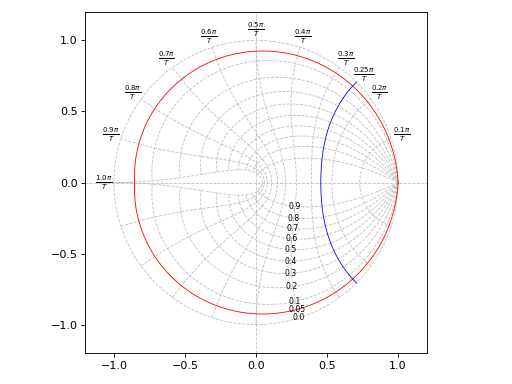
Shows a grid of settling times and peak times:
graphics(
    zgrid(xi=False, wn=False, tp=[3, 5, 7, 10, 20], ts=[2, 3, 5, 10, 20]),
    zgrid(xi=False, wn=False, tp=4, rendering_kw={"color": "r"}),
    zgrid(xi=False, wn=False, ts=7, rendering_kw={"color": "b"}),
    grid=False, aspect="equal", xlim=(-1.2, 1.2), ylim=(-1.2, 1.2))
(
Source code,png)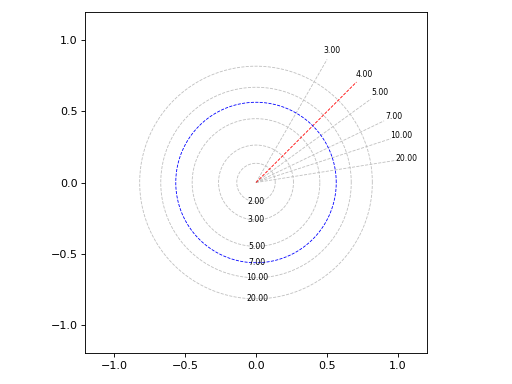
Interactive-widgets plot of z-grid lines:
from sympy import symbols
from spb import *
xi, wn, Tp, Ts = symbols("xi, omega_n, T_p, T_s")
graphics(
    zgrid(),
    zgrid(xi=xi, wn=False, rendering_kw={"color": "r", "linestyle": "-"}, params={xi: (0.05, 0, 1)}),
    zgrid(wn=wn, xi=False, rendering_kw={"color": "g", "linestyle": "-"}, params={wn: (0.45, 0, 1)}),
    zgrid(wn=False, xi=False, tp=Tp, rendering_kw={"color": "b", "linestyle": "-"}, params={Tp: (3, 0, 20)}),
    zgrid(wn=False, xi=False, ts=Ts, rendering_kw={"color": "m", "linestyle": "-"}, params={Ts: (5, 0, 20)}),
    grid=False, aspect="equal", xlabel="Real", ylabel="Imaginary")
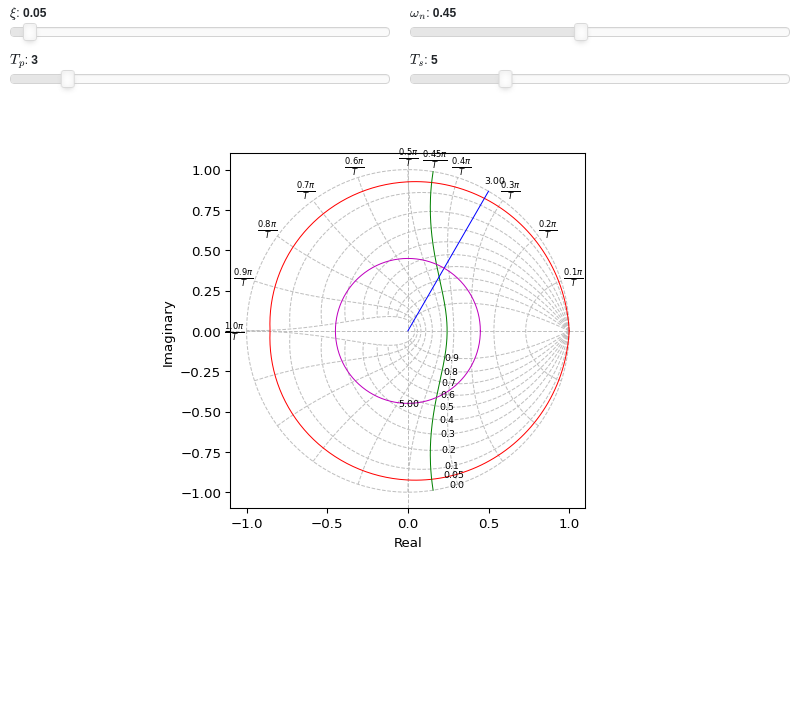
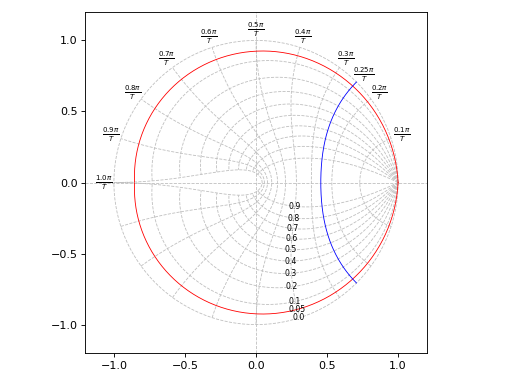
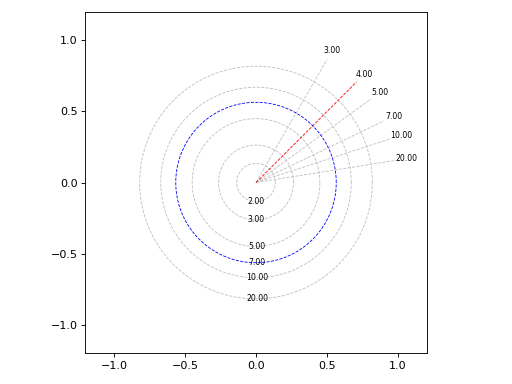
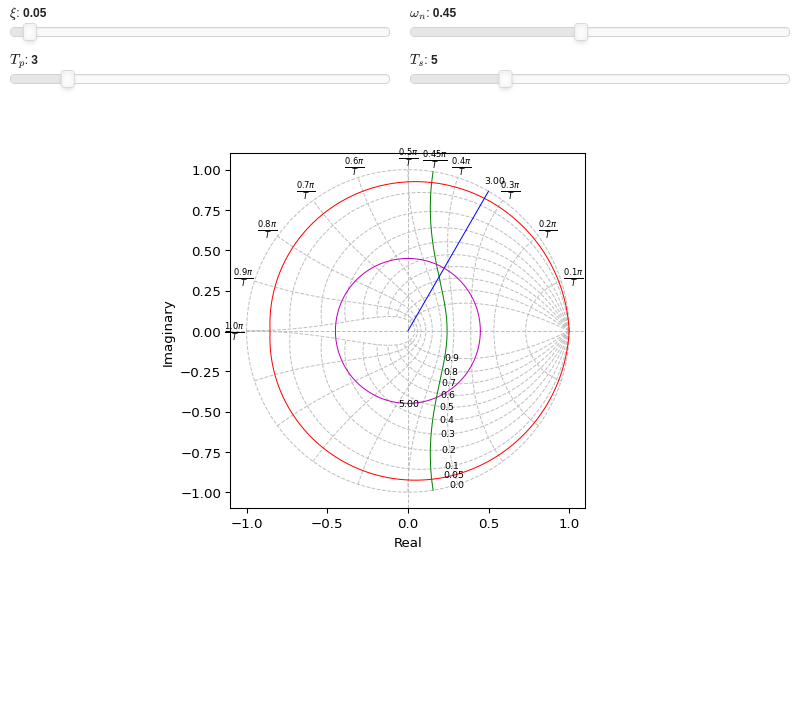
- spb.graphics.control.root_locus(system, label=None, rendering_kw=None, rl_kw={}, sgrid=True, zgrid=False, input=None, output=None, **kwargs)[source]
Root Locus plot for a system.
- Parameters:
- systemLTI system type
The system for which the pole-zero plot is to be computed. It can be:
an instance of
control.TransferFunctionan instance of
scipy.signal.TransferFunction- a symbolic expression in rational form, which will be converted to
an object of type
sympy.physics.control.lti.TransferFunction.
- a tuple of two or three elements:
(num, den, generator [opt]), which will be converted to an object of type
sympy.physics.control.lti.TransferFunction.
- a tuple of two or three elements:
- labelstr
Set the label associated to this series, which will be eventually shown on the legend or colorbar.
- rendering_kwdict
A dictionary of keyword arguments to be passed to the renderers in order to further customize the appearance of the line. Here are some useful links for the supported plotting libraries:
Matplotlib:
for solid lines: https://matplotlib.org/stable/api/_as_gen/matplotlib.pyplot.plot.html
for colormap-based lines: https://matplotlib.org/stable/api/collections_api.html#matplotlib.collections.LineCollection
for scatters: https://matplotlib.org/stable/api/_as_gen/matplotlib.pyplot.scatter.html
Bokeh:
- sgridbool, optional
Generates a grid of constant damping ratios and natural frequencies on the s-plane. Default to True.
- zgridbool, optional
Generates a grid of constant damping ratios and natural frequencies on the z-plane. Default to False. If
zgrid=True, then it will automatically setssgrid=False.- inputint, optional
Only compute the poles/zeros for the listed input. If not specified, the poles/zeros for each independent input are computed (as separate traces).
- outputint, optional
Only compute the poles/zeros for the listed output. If not specified, all outputs are reported.
- colorbar_ticks_formattertick_formatter_multiples_of
An object of type
tick_formatter_multiples_ofwhich will be used to place tick values on the colorbar at each multiple of a specified quantity. This only works when use_cm=True.- control_kwdict
A dictionary of keyword arguments to be passed to
control.root_locus_map().- is_filledbool
Whether scatter’s markers are filled or void. Default value: True.
- is_scatterbool
If True it represent a scatter plot, otherwise a continuous line. Default value: False.
- paramsdict, optional
A dictionary mapping symbols to parameters. If provided, this dictionary enables the interactive-widgets plot.
When calling a plotting function, the parameter can be specified with:
a widget from the
ipywidgetsmodule.a widget from the
panelmodule.- a tuple of the form:
(default, min, max, N, tick_format, label, spacing), which will instantiate a
ipywidgets.widgets.widget_float.FloatSlideror aipywidgets.widgets.widget_float.FloatLogSlider, depending on the spacing strategy. In particular:- default, min, maxfloat
Default value, minimum value and maximum value of the slider, respectively. Must be finite numbers. The order of these 3 numbers is not important: the module will figure it out which is what.
- Nint, optional
Number of steps of the slider.
- tick_formatstr or None, optional
Provide a formatter for the tick value of the slider. Default to
".2f".
- label: str, optional
Custom text associated to the slider.
- spacingstr, optional
Specify the discretization spacing. Default to
"linear", can be changed to"log".
Notes:
parameters cannot be linked together (ie, one parameter cannot depend on another one).
If a widget returns multiple numerical values (like
panel.widgets.slider.RangeSlideroripywidgets.widgets.widget_float.FloatRangeSlider), then a corresponding number of symbols must be provided.
Here follows a couple of examples. If
imodule="panel":import panel as pn params = { a: (1, 0, 5), # slider from 0 to 5, with default value of 1 b: pn.widgets.FloatSlider(value=1, start=0, end=5), # same slider as above (c, d): pn.widgets.RangeSlider(value=(-1, 1), start=-3, end=3, step=0.1) }
Or with
imodule="ipywidgets":import ipywidgets as w params = { a: (1, 0, 5), # slider from 0 to 5, with default value of 1 b: w.FloatSlider(value=1, min=0, max=5), # same slider as above (c, d): w.FloatRangeSlider(value=(-1, 1), min=-3, max=3, step=0.1) }
When instantiating a data series directly,
paramsmust be a dictionary mapping symbols to numerical values.Let
seriesbe any data series. Thenseries.paramsreturns a dictionary mapping symbols to numerical values.- show_in_legendbool
Toggle the visibility of the data series on the legend. Default value: True.
- stepsNoneType, bool, str
If set, it connects consecutive points with steps rather than straight segments. Possible options: [‘pre’, ‘post’, ‘mid’, True, False, None] Default value: False.
- txcallable
Numerical transformation function to be applied to the data on the x-axis.
- tycallable
Numerical transformation function to be applied to the data on the y-axis.
- unwrapbool, dict
Whether to use numpy.unwrap() on the computed coordinates in order to get rid of discontinuities. It can be:
False: do not use
np.unwrap().True: use
np.unwrap()with default keyword arguments.dictionary of keyword arguments passed to
np.unwrap().
- Returns:
- A list containing:
- one instance of
SGridLineSeriesifsgrid=True.
- one instance of
- one instance of
ZGridLineSeriesifzgrid=True.
- one instance of
- one or more instances of
RootLocusSeries.
- one or more instances of
Examples
Plot the root locus of a system on the s-plane, also showing a custom damping ratio line.
from sympy.abc import s, z
from spb import *
G = (s**2 - 4) / (s**3 + 2*s - 3)
graphics(
    root_locus(G),
    sgrid(xi=0.92, wn=False, rendering_kw={"color": "r"}),
    grid=False, xlabel="Real", ylabel="Imaginary")
(
Source code,png)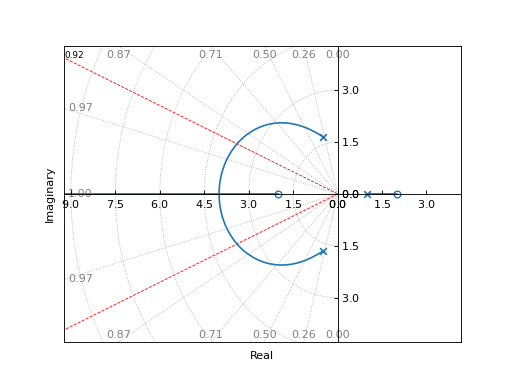
Plot the root locus of a discrete system on the z-plane:
G = (0.038*z + 0.031) / (9.11*z**2 - 13.77*z + 5.0)
graphics(
    root_locus(G, sgrid=False, aspect="equal"),
    zgrid(T=0.2),
    grid=False, xlabel="Real", ylabel="Imaginary")
(
Source code,png)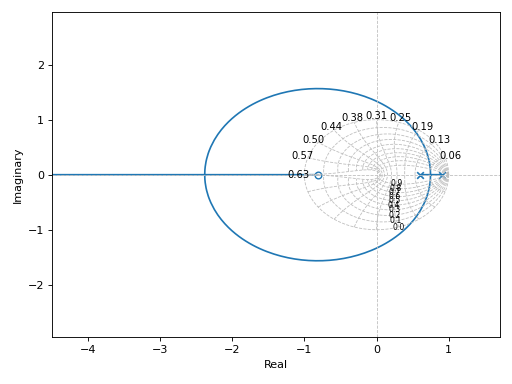
Interactive-widgets root locus plot:
from sympy import symbols
from spb import *
a, s, xi = symbols("a, s, xi")
G = (s**2 + a) / (s**3 + 2*s**2 + 3*s + 4)
params={a: (-0.5, -4, 4), xi: (0.8, 0, 1)}
graphics(
    sgrid(xi, wn=False, params=params, rendering_kw={"color": "r"}),
    root_locus(G, params=params),
    grid=False, xlim=(-4, 1), ylim=(-2.5, 2.5),
    xlabel="Real", ylabel="Imaginary")