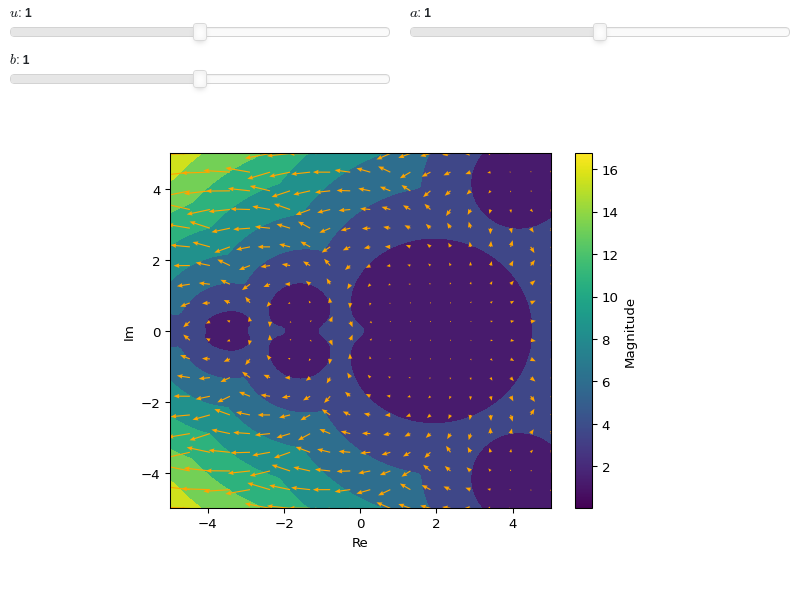
Complex Analysis
NOTE:
For technical reasons, all interactive-widgets plots in this documentation
are created using Holoviz’s Panel. Often, they will ran just fine with
ipywidgets too. However, if a specific example uses the param library,
or widgets from the panel module, then users will have to modify the
params dictionary in order to make it work with ipywidgets.
Refer to Interactive module for more information.
- spb.plot_functions.complex_analysis.plot_complex(*args, **kwargs)[source]
Plot the absolute value of a complex function colored by its argument. By default, the aspect ratio of 2D plots is set to
aspect="equal".Depending on the provided range, this function will produce different types of plots:
Line plot over the reals.
Image plot over the complex plane if
threed=False. This is also known as Domain Coloring. Use thecoloringkeyword argument to select a different coloring strategy andcmapto set a custom color map (default to HSV).If
threed=True, plot a 3D surface of the absolute value over the complex plane, colored by its argument. Use thecoloringkeyword argument to select a different coloring strategy andcmapto set a custom color map (default to HSV).
Typical usage examples are in the followings:
Plotting a single expression with a single range:
plot_complex(expr, range, **kwargs)
Plotting multiple expressions with different ranges, custom labels and rendering options:
plot_complex(
   (expr1, range1, label1 [opt], rendering_kw1 [opt]),
   (expr2, range2, label2 [opt], rendering_kw2 [opt]),
   ..., **kwargs)
- Parameters:
- expr
The expression representing the complex function to be plotted.
- range_ctuple, Tuple
A 3-tuple (symb, min, max) denoting the range of the complex variable. Default values: min=-10-10j and max=10+10j.
- labelstr
Set the label associated to this series, which will be eventually shown on the legend or colorbar.
- annotatebool
Turn on/off the annotations on the 2D projections of the Riemann sphere. They can only be visible when
riemann_mask=True. Default value: True.- aspectstr, tuple, list, dict
Set the aspect ratio.
Possible values for Matplotlib (only works for a 2D plot):
"auto": Matplotlib will fit the plot in the vibile area."equal": sets equal spacing.tuple containing 2 float numbers, from which the aspect ratio is computed. This only works for 2D plots.
Possible values for Plotly:
"equal": sets equal spacing on the axis of a 2D plot.For 3D plots:
"cube": fix the ratio to be a cube"data": draw axes in proportion of their ranges"auto": automatically produce something that is well proportioned using ‘data’ as the default.manually set the aspect ratio by providing a dictionary. For example:
dict(x=1, y=1, z=2)forces the z-axis to appear twice as big as the other two.
Possible values for Bokeh:
"equal": sets equal spacing.
- at_infinitybool
If False the visualization will be centered about the complex point zero. Otherwise, it will be centered at infinity. Default value: False.
- ax
An existing Matplotlib’s Axes over which the symbolic expressions will be plotted.
- axisbool
Show the axis in the figure. Default value: True.
- axis_centerstr, tuple
Set the location of the intersection between the horizontal and vertical axis in a 2D plot. It only works with Matplotlib and it can receive the following values:
None: traditional layout, with the horizontal axis fixed on the bottom and the vertical axis fixed on the left. This is the default value.a tuple
(x, y)specifying the exact intersection point.'center': center of the current plot area.'auto': the intersection point is automatically computed.
- blevel
Controls the black level of ehanced domain coloring plots. It must be 0 (black) <= blevel <= 1 (white). It must be: 0 ≤ blevel ≤ 1. Default value: 0.75.
- camera
Set the camera position for 3D plots.
For Matplotlib, it can be a dictionary of keyword arguments that will be passed to the
Axes3D.view_initmethod. Refer to the following link for more information: https://matplotlib.org/stable/api/_as_gen/mpl_toolkits.mplot3d.axes3d.Axes3D.html#mpl_toolkits.mplot3d.axes3d.Axes3D.view_initFor Plotly, it can be a dictionary of keyword arguments that will be passed to the layout’s
scene_camera. Refer to the following link for more information: https://plotly.com/python/3d-camera-controls/For K3D-Jupyter, it is list of 9 numbers, namely:
x_cam, y_cam, z_cam: the position of the camera in the scenex_tar, y_tar, z_tar: the position of the target of the camerax_up, y_up, z_up: components of the up vector
- cmapstr, list, tuple
Specify the colormap to be used on enhanced domain coloring plots (both images and 3d plots). Default to
"hsv". Can be any colormap from matplotlib or colorcet.- colorbarbool
Toggle the visibility of the colorbar associated to the current data series. Note that a colorbar is only visible if
use_cm=Trueandcolor_funcis not None. Default value: True.- colorbar_ticks_formattertick_formatter_multiples_of
An object of type
tick_formatter_multiples_ofwhich will be used to place tick values on the colorbar at each multiple of a specified quantity. This only works when use_cm=True.- coloringstr
Choose between different domain coloring options. Default to
"a". Refer to [Wegert] for more information."a": standard domain coloring showing the argument of the complex function."b": enhanced domain coloring showing iso-modulus and iso-phase lines."c": enhanced domain coloring showing iso-modulus lines."d": enhanced domain coloring showing iso-phase lines."e": alternating black and white stripes corresponding to modulus."f": alternating black and white stripes corresponding to phase."g": alternating black and white stripes corresponding to real part."h": alternating black and white stripes corresponding to imaginary part."i": cartesian chessboard on the complex points space. The result will hide zeros."j": polar Chessboard on the complex points space. The result will show conformality."k": black and white magnitude of the complex function. Zeros are black, poles are white."k+log": same as"k"but apply a base 10 logarithm to the magnitude, which improves the visibility of zeros of functions with steep poles."l":enhanced domain coloring showing iso-modulus and iso-phase lines, blended with the magnitude: white regions indicates greater magnitudes. Can be used to distinguish poles from zeros."m": enhanced domain coloring showing iso-modulus lines, blended with the magnitude: white regions indicates greater magnitudes. Can be used to distinguish poles from zeros."n": enhanced domain coloring showing iso-phase lines, blended with the magnitude: white regions indicates greater magnitudes. Can be used to distinguish poles from zeros."o": enhanced domain coloring showing iso-phase lines, blended with the magnitude: white regions indicates greater magnitudes. Can be used to distinguish poles from zeros.
The user can also provide a callable,
f(w), wherewis an [n x m] Numpy array (provided by the plotting module) containing the results (complex numbers) of the evaluation of the complex function. The callable should return:- imgndarray [n x m x 3]
An array of RGB colors (0 <= R,G,B <= 255)
- colorscalendarray [N x 3] or None
An array with N RGB colors, (0 <= R,G,B <= 255). If
colorscale=None, no color bar will be shown on the plot.
Possible options: [‘a’, ‘b’, ‘c’, ‘d’, ‘e’, ‘f’, ‘g’, ‘h’, ‘i’, ‘j’, ‘k’, ‘k+log’, ‘l’, ‘m’, ‘n’, ‘o’] Default value: ‘a’.
- colorlooplist, tuple
List of colors to be used in line plots or solid color surfaces.
- colormapslist, tuple
List of color maps to render surfaces.
- cyclic_colormapslist, tuple
List of cyclic color maps to render complex series (the phase/argument ranges over [-pi, pi]).
- fig
Get or set the figure where to plot into.
- force_real_evalbool
By default, numerical evaluation is performed over complex numbers, which is slower but produces correct results. However, when the symbolic expression is converted to a numerical function with lambdify, the resulting function may not like to be evaluated over complex numbers. In such cases, forcing the evaluation to be performed over real numbers might be a good choice. The plotting module should be able to detect such occurences and automatically activate this option. If that is not the case, or evaluation performance is of paramount importance, set this parameter to True, but be aware that it might produce wrong results. Default value: False.
- gridbool, dict
Toggle the visibility of major grid lines. A dictionary of keyword arguments can be passed to customized the appearance of the grid lines:
- hookslist
List of functions expecting one argument, the current plot object, which allows users to further customize the appearance of the plot before it is shown on the screen. The hooks are executed:
after the figure has been initialized and populated with numerical data.
after the existing renderers update the visualization because the user interacted with some widget.
Note: let
pbe the plot object. Then, the user can access the figure withp.fig. In case ofspb.backends.matplotlib.MatplotlibBackend, the user can also retrieve the axes in which data was added withp.ax.- legendbool
Toggle the visibility of the legend. If None, the backend will automatically determine if it is appropriate to show it. Default value: None.
- minor_gridbool, dict
Toggle the visibility of minor grid lines. A dictionary of keyword arguments can be passed to customized the appearance of the grid lines:
- modules
Specify the evaluation modules to be used by lambdify. If not specified, the evaluation will be done with NumPy/SciPy.
- n1int
Number of discretization points along the x-axis (real part) to be used in the evaluation. Related parameters:
xscale. It must be: 2 ≤ n1 < ∞. Default value: 300.- n2int
Number of discretization points along the y-axis (imaginary part) to be used in the evaluation. Related parameters:
yscale. It must be: 2 ≤ n2 < ∞. Default value: 300.- only_integersbool
Discretize the domain using only integer numbers. When this parameter is True, the number of discretization points is choosen by the algorithm. Default value: False.
- paramsdict, optional
A dictionary mapping symbols to parameters. If provided, this dictionary enables the interactive-widgets plot.
When calling a plotting function, the parameter can be specified with:
a widget from the
ipywidgetsmodule.a widget from the
panelmodule.- a tuple of the form:
(default, min, max, N, tick_format, label, spacing), which will instantiate a
ipywidgets.widgets.widget_float.FloatSlideror aipywidgets.widgets.widget_float.FloatLogSlider, depending on the spacing strategy. In particular:- default, min, maxfloat
Default value, minimum value and maximum value of the slider, respectively. Must be finite numbers. The order of these 3 numbers is not important: the module will figure it out which is what.
- Nint, optional
Number of steps of the slider.
- tick_formatstr or None, optional
Provide a formatter for the tick value of the slider. Default to
".2f".
- label: str, optional
Custom text associated to the slider.
- spacingstr, optional
Specify the discretization spacing. Default to
"linear", can be changed to"log".
Notes:
parameters cannot be linked together (ie, one parameter cannot depend on another one).
If a widget returns multiple numerical values (like
panel.widgets.slider.RangeSlideroripywidgets.widgets.widget_float.FloatRangeSlider), then a corresponding number of symbols must be provided.
Here follows a couple of examples. If
imodule="panel":import panel as pn params = { a: (1, 0, 5), # slider from 0 to 5, with default value of 1 b: pn.widgets.FloatSlider(value=1, start=0, end=5), # same slider as above (c, d): pn.widgets.RangeSlider(value=(-1, 1), start=-3, end=3, step=0.1) }
Or with
imodule="ipywidgets":import ipywidgets as w params = { a: (1, 0, 5), # slider from 0 to 5, with default value of 1 b: w.FloatSlider(value=1, min=0, max=5), # same slider as above (c, d): w.FloatRangeSlider(value=(-1, 1), min=-3, max=3, step=0.1) }
When instantiating a data series directly,
paramsmust be a dictionary mapping symbols to numerical values.Let
seriesbe any data series. Thenseries.paramsreturns a dictionary mapping symbols to numerical values.- phaseoffset
Controls the phase offset of the colormap in domain coloring plots. It must be: 0 ≤ phaseoffset ≤ 6.283185307179586. Default value: 0.
- phaseresint
It controls the number of iso-phase and/or iso-modulus lines in domain coloring plots. It must be: 1 ≤ phaseres ≤ 100. Default value: 20.
- polar_axisbool
If True, the backend will attempt to use polar axis, otherwise it uses cartesian axis. This is only supported for 2D plots. Default value: False.
- rendering_kwdict
A dictionary of keyword arguments to be passed to the renderers in order to further customize the appearance of the line. Here are some useful links for the supported plotting libraries:
- riemann_maskbool
Turn on/off the unit disk mask representing the Riemann sphere on the 2D projections. Default value: False.
- show_in_legendbool
Toggle the visibility of the data series on the legend. Default value: True.
- size
Set the size of the plot, (width, height). For Matplotlib, the size is measured in inches. For Bokeh, Plotly and K3D-Jupyter, the size is in pixel.
- sum_boundint
When plotting sums, the expression will be pre-processed in order to replace lower/upper bounds set to +/- infinity with this +/- numerical value. Note: the higher this number, the slower the evaluation, but the more accurate the plot. It must be: 0 ≤ sum_bound < ∞. Default value: 1000.
- surface_color
For back-compatibility with old sympy.plotting. Use
rendering_kwin order to fully customize the appearance of the surface.- themestr
Theme to be used to style the figure. Depending on the backend being used, several themes may be available.
- title
Title of the plot. It can be:
a string.
a callable receiving a single argument, use_latex, which must return a string.
a tuple of the form (format_str, symbol 1, symbol 2, etc.), which creates an output string when parameters symbol 1, symbol 2, etc. receive numerical values from the widgets. This operation mode only works when creating interactive data series (ie, specifying the
paramsdictionary).
- txcallable
Numerical transformation function to be applied to the data on the x-axis.
- tycallable
Numerical transformation function to be applied to the data on the y-axis.
- tzcallable
Numerical transformation function to be applied to the data on the z-axis.
- update_eventbool
If True and the backend supports such functionality, events like drag and zoom will trigger a recompute of the data series within the new axis limits. Default value: False.
- use_latexbool
Turn on/off the rendering of latex labels. If the backend doesn’t support latex, it will render the string representations instead. Default value: True.
- x_ticks_formattertick_formatter_multiples_of
An object of type
tick_formatter_multiples_ofwhich will be used to place tick values at each multiple of a specified quantity, along the x-axis.- xlabel
Label of the x-axis. It can be:
a string.
a callable receiving a single argument, use_latex, which must return a string.
a tuple of the form (format_str, symbol 1, symbol 2, etc.), which creates an output string when parameters symbol 1, symbol 2, etc. receive numerical values from the widgets. This operation mode only works when creating interactive data series (ie, specifying the
paramsdictionary).
- xlim
Limit the figure’s x-axis to the specified range. The tuple must be in the form (min_val, max_val).
- xscaleNoneType, str
If the backend supports it, the x-direction will use the specified scale. Note that none of the backends support logarithmic scale for 3D plots. Possible options: [‘linear’, ‘log’, None] Default value: ‘linear’.
- y_ticks_formattertick_formatter_multiples_of
An object of type
tick_formatter_multiples_ofwhich will be used to place tick values at each multiple of a specified quantity, along the y-axis.- ylabel
Label of the y-axis. It can be:
a string.
a callable receiving a single argument, use_latex, which must return a string.
a tuple of the form (format_str, symbol 1, symbol 2, etc.), which creates an output string when parameters symbol 1, symbol 2, etc. receive numerical values from the widgets. This operation mode only works when creating interactive data series (ie, specifying the
paramsdictionary).
- ylim
Limit the figure’s y-axis to the specified range. The tuple must be in the form (min_val, max_val).
- yscaleNoneType, str
If the backend supports it, the y-direction will use the specified scale. Note that none of the backends support logarithmic scale for 3D plots. Possible options: [‘linear’, ‘log’, None] Default value: ‘linear’.
- zlabel
Label of the z-axis. It can be:
a string.
a callable receiving a single argument, use_latex, which must return a string.
a tuple of the form (format_str, symbol 1, symbol 2, etc.), which creates an output string when parameters symbol 1, symbol 2, etc. receive numerical values from the widgets. This operation mode only works when creating interactive data series (ie, specifying the
paramsdictionary).
- zlim
Limit the figure’s z-axis to the specified range. The tuple must be in the form (min_val, max_val).
- zscaleNoneType, str
If the backend supports it, the z-direction will use the specified scale. Note that none of the backends support logarithmic scale for 3D plots. Possible options: [‘linear’, ‘log’, None] Default value: ‘linear’.
Examples
>>> from sympy import I, symbols, exp, sqrt, cos, sin, pi, gamma
>>> from spb import plot_complex
>>> x, y, z = symbols('x, y, z')
Plot the modulus of a complex function colored by its magnitude:
>>> plot_complex(cos(x) + sin(I * x), "f", (x, -2, 2))
Plot object containing:
[0]: cartesian abs-arg line: cos(x) + I*sinh(x) for x over (-2, 2)
(
Source code,png)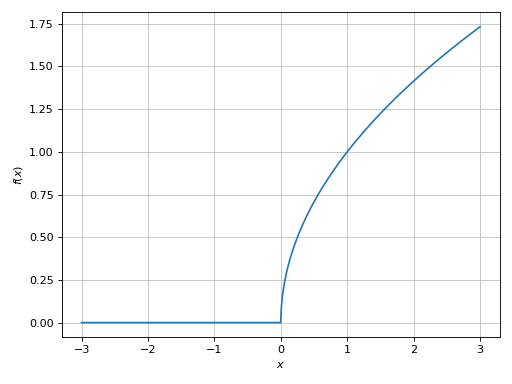
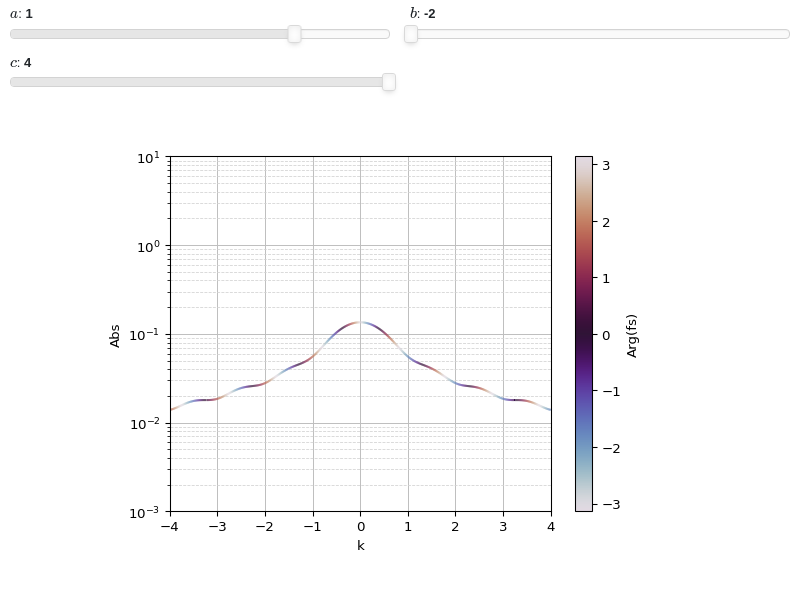
Interactive-widget plot of a Fourier Transform. Refer to the interactive sub-module documentation to learn more about the
paramsdictionary. This plot illustrates:the use of
prange(parametric plotting range).for
plot_complex, symbols going intoprangemust be real.the use of the
paramsdictionary to specify sliders in their basic form: (default, min, max).
from sympy import *
from spb import *
x, k, a, b = symbols("x, k, a, b")
c = symbols("c", real=True)
f = exp(-x**2) * (Heaviside(x + a) - Heaviside(x - b))
fs = fourier_transform(f, x, k)
plot_complex(fs, prange(k, -c, c),
        params={a: (1, -2, 2), b: (-2, -2, 2), c: (4, 0.5, 4)},
        label="Arg(fs)", xlabel="k", yscale="log", ylim=(1e-03, 10))
Domain coloring plot. To improve the smoothness of the results, increase the number of discretization points and/or apply an interpolation (if the backend supports it):
>>> plot_complex(gamma(z), (z, -3-3j, 3+3j),
...     coloring="b", n=500, grid=False)
Plot object containing:
[0]: complex domain coloring: gamma(z) for re(z) over (-3.0, 3.0) and im(z) over (-3.0, 3.0)
(
Source code,png)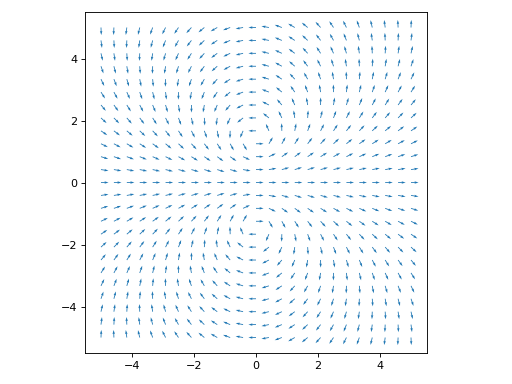
Domain coloring of the same function evaluated near the point \(z=\infty\):
>>> plot_complex(gamma(z), (z, -1-1j, 1+1j), coloring="b", n=500,
...     grid=False, at_infinity=True, axis=False)
Plot object containing:
[0]: complex domain coloring: gamma(1/z) for re(z) over (-1.0, 1.0) and im(z) over (-1.0, 1.0)
(
Source code,png)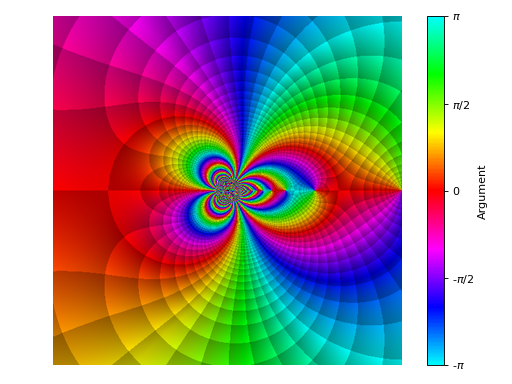
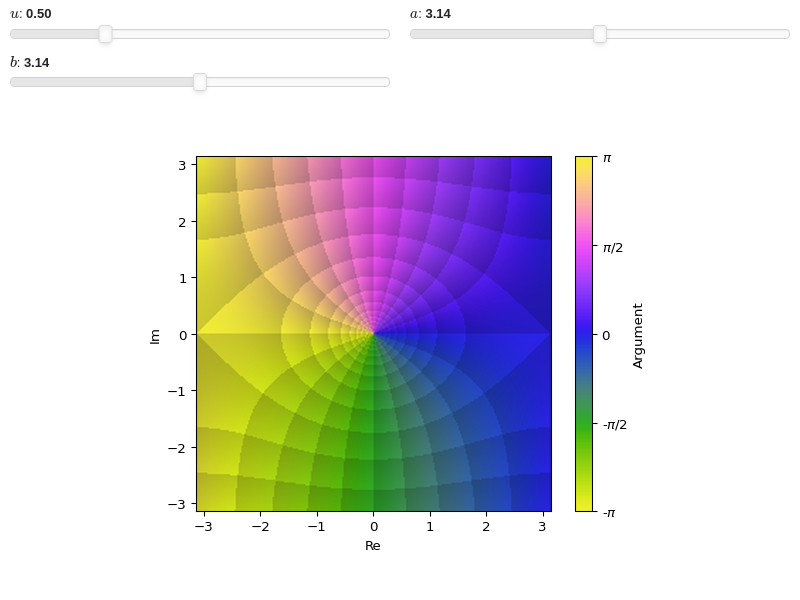
Interactive-widget domain coloring plot. Refer to the interactive sub-module documentation to learn more about the
paramsdictionary. This plot illustrates:setting a custom colormap and adjusting the black-level of the enhanced visualization.
the use of
prange(parametric plotting range).the use of the
paramsdictionary to specify sliders in their basic form: (default, min, max).
from sympy import *
from spb import *
import colorcet
z, u, a, b = symbols("z, u, a, b")
plot_complex(
    sin(u * z), prange(z, -a - b*I, a + b*I),
    cmap=colorcet.colorwheel, blevel=0.85,
    coloring="b", n=250, grid=False,
    params={
        u: (0.5, 0, 2),
        a: (pi, 0, 2*pi),
        b: (pi, 0, 2*pi),
    })
The analytic landscape is 3D plot of the absolute value of a complex function colored by its argument:
from sympy import symbols, gamma, I
from spb import plot_complex, PB
z = symbols('z')
plot_complex(gamma(z), (z, -3 - 3*I, 3 + 3*I), threed=True,
    backend=PB, zlim=(-1, 6), use_cm=True)
(Source code, png)
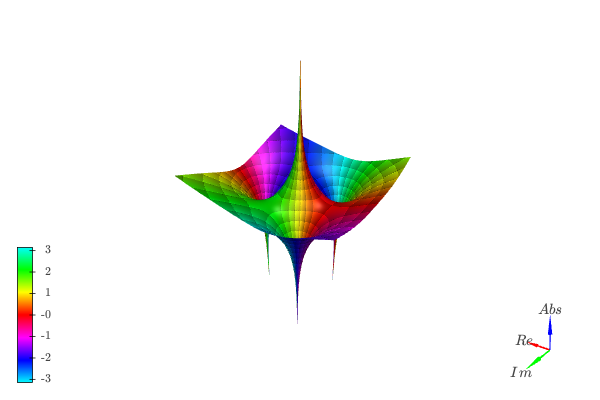
Because the function goes to infinity at poles, sometimes it might be beneficial to visualize the logarithm of the absolute value in order to easily identify zeros:
from sympy import symbols, I
from spb import plot_complex, KB
z = symbols("z")
expr = (z**3 - 5) / z
plot_complex(expr, (z, -3-3j, 3+3j), coloring="b", threed=True,
    use_cm=True, grid=False, n=500, backend=KB, tz=np.log)


- spb.plot_functions.complex_analysis.plot_riemann_sphere(expr, range=None, annotate=True, riemann_mask=True, **kwargs)[source]
Visualize stereographic projections of the Riemann sphere.
Note:
Differently from other plot functions that return instances of
BaseBackend, this function returns a Matplotlib figure.This function calls
plot_complex(): refer to its documentation for the full list of keyword arguments.
- Parameters:
- expr
The expression representing the complex function to be plotted.
- range_ctuple, Tuple
A 3-tuple (symb, min, max) denoting the range of the complex variable. Default values: min=-10-10j and max=10+10j.
- labelstr
Set the label associated to this series, which will be eventually shown on the legend or colorbar.
- annotateboolean, optional
Turn on/off the annotations on the 2D projections of the Riemann sphere. Default to True (annotations are visible). They can only be visible when
riemann_mask=True.- args
- exprExpr
Represent the complex function to be plotted.
- range3-element tuple, optional
Denotes the range of the variables. Only works for 2D plots. Default to
(z, -1.25 - 1.25*I, 1.25 + 1.25*I).
- aspectstr, tuple, list, dict
Set the aspect ratio.
Possible values for Matplotlib (only works for a 2D plot):
"auto": Matplotlib will fit the plot in the vibile area."equal": sets equal spacing.tuple containing 2 float numbers, from which the aspect ratio is computed. This only works for 2D plots.
Possible values for Plotly:
"equal": sets equal spacing on the axis of a 2D plot.For 3D plots:
"cube": fix the ratio to be a cube"data": draw axes in proportion of their ranges"auto": automatically produce something that is well proportioned using ‘data’ as the default.manually set the aspect ratio by providing a dictionary. For example:
dict(x=1, y=1, z=2)forces the z-axis to appear twice as big as the other two.
Possible values for Bokeh:
"equal": sets equal spacing.
- at_infinitybool
If False the visualization will be centered about the complex point zero. Otherwise, it will be centered at infinity. Default value: False.
- ax
An existing Matplotlib’s Axes over which the symbolic expressions will be plotted.
- axisboolean, optional
Turn on/off the axis of the 2D subplots. Default to False (axis not visible).
- size(width, height)
Specify the size of the resulting figure.
- axis_centerstr, tuple
Set the location of the intersection between the horizontal and vertical axis in a 2D plot. It only works with Matplotlib and it can receive the following values:
None: traditional layout, with the horizontal axis fixed on the bottom and the vertical axis fixed on the left. This is the default value.a tuple
(x, y)specifying the exact intersection point.'center': center of the current plot area.'auto': the intersection point is automatically computed.
- blevel
Controls the black level of ehanced domain coloring plots. It must be 0 (black) <= blevel <= 1 (white). It must be: 0 ≤ blevel ≤ 1. Default value: 0.75.
- camera
Set the camera position for 3D plots.
For Matplotlib, it can be a dictionary of keyword arguments that will be passed to the
Axes3D.view_initmethod. Refer to the following link for more information: https://matplotlib.org/stable/api/_as_gen/mpl_toolkits.mplot3d.axes3d.Axes3D.html#mpl_toolkits.mplot3d.axes3d.Axes3D.view_initFor Plotly, it can be a dictionary of keyword arguments that will be passed to the layout’s
scene_camera. Refer to the following link for more information: https://plotly.com/python/3d-camera-controls/For K3D-Jupyter, it is list of 9 numbers, namely:
x_cam, y_cam, z_cam: the position of the camera in the scenex_tar, y_tar, z_tar: the position of the target of the camerax_up, y_up, z_up: components of the up vector
- cmapstr, list, tuple
Specify the colormap to be used on enhanced domain coloring plots (both images and 3d plots). Default to
"hsv". Can be any colormap from matplotlib or colorcet.- colorbarbool
Toggle the visibility of the colorbar associated to the current data series. Note that a colorbar is only visible if
use_cm=Trueandcolor_funcis not None. Default value: True.- colorbar_ticks_formattertick_formatter_multiples_of
An object of type
tick_formatter_multiples_ofwhich will be used to place tick values on the colorbar at each multiple of a specified quantity. This only works when use_cm=True.- coloringstr
Choose between different domain coloring options. Default to
"a". Refer to [Wegert] for more information."a": standard domain coloring showing the argument of the complex function."b": enhanced domain coloring showing iso-modulus and iso-phase lines."c": enhanced domain coloring showing iso-modulus lines."d": enhanced domain coloring showing iso-phase lines."e": alternating black and white stripes corresponding to modulus."f": alternating black and white stripes corresponding to phase."g": alternating black and white stripes corresponding to real part."h": alternating black and white stripes corresponding to imaginary part."i": cartesian chessboard on the complex points space. The result will hide zeros."j": polar Chessboard on the complex points space. The result will show conformality."k": black and white magnitude of the complex function. Zeros are black, poles are white."k+log": same as"k"but apply a base 10 logarithm to the magnitude, which improves the visibility of zeros of functions with steep poles."l":enhanced domain coloring showing iso-modulus and iso-phase lines, blended with the magnitude: white regions indicates greater magnitudes. Can be used to distinguish poles from zeros."m": enhanced domain coloring showing iso-modulus lines, blended with the magnitude: white regions indicates greater magnitudes. Can be used to distinguish poles from zeros."n": enhanced domain coloring showing iso-phase lines, blended with the magnitude: white regions indicates greater magnitudes. Can be used to distinguish poles from zeros."o": enhanced domain coloring showing iso-phase lines, blended with the magnitude: white regions indicates greater magnitudes. Can be used to distinguish poles from zeros.
The user can also provide a callable,
f(w), wherewis an [n x m] Numpy array (provided by the plotting module) containing the results (complex numbers) of the evaluation of the complex function. The callable should return:- imgndarray [n x m x 3]
An array of RGB colors (0 <= R,G,B <= 255)
- colorscalendarray [N x 3] or None
An array with N RGB colors, (0 <= R,G,B <= 255). If
colorscale=None, no color bar will be shown on the plot.
Possible options: [‘a’, ‘b’, ‘c’, ‘d’, ‘e’, ‘f’, ‘g’, ‘h’, ‘i’, ‘j’, ‘k’, ‘k+log’, ‘l’, ‘m’, ‘n’, ‘o’] Default value: ‘a’.
- colorlooplist, tuple
List of colors to be used in line plots or solid color surfaces.
- colormapslist, tuple
List of color maps to render surfaces.
- cyclic_colormapslist, tuple
List of cyclic color maps to render complex series (the phase/argument ranges over [-pi, pi]).
- fig
Get or set the figure where to plot into.
- force_real_evalbool
By default, numerical evaluation is performed over complex numbers, which is slower but produces correct results. However, when the symbolic expression is converted to a numerical function with lambdify, the resulting function may not like to be evaluated over complex numbers. In such cases, forcing the evaluation to be performed over real numbers might be a good choice. The plotting module should be able to detect such occurences and automatically activate this option. If that is not the case, or evaluation performance is of paramount importance, set this parameter to True, but be aware that it might produce wrong results. Default value: False.
- gridbool, dict
Toggle the visibility of major grid lines. A dictionary of keyword arguments can be passed to customized the appearance of the grid lines:
- hookslist
List of functions expecting one argument, the current plot object, which allows users to further customize the appearance of the plot before it is shown on the screen. The hooks are executed:
after the figure has been initialized and populated with numerical data.
after the existing renderers update the visualization because the user interacted with some widget.
Note: let
pbe the plot object. Then, the user can access the figure withp.fig. In case ofspb.backends.matplotlib.MatplotlibBackend, the user can also retrieve the axes in which data was added withp.ax.- legendbool
Toggle the visibility of the legend. If None, the backend will automatically determine if it is appropriate to show it. Default value: None.
- minor_gridbool, dict
Toggle the visibility of minor grid lines. A dictionary of keyword arguments can be passed to customized the appearance of the grid lines:
- modules
Specify the evaluation modules to be used by lambdify. If not specified, the evaluation will be done with NumPy/SciPy.
- n1int
Number of discretization points along the x-axis (real part) to be used in the evaluation. Related parameters:
xscale. It must be: 2 ≤ n1 < ∞. Default value: 300.- n2int
Number of discretization points along the y-axis (imaginary part) to be used in the evaluation. Related parameters:
yscale. It must be: 2 ≤ n2 < ∞. Default value: 300.- only_integersbool
Discretize the domain using only integer numbers. When this parameter is True, the number of discretization points is choosen by the algorithm. Default value: False.
- paramsdict, optional
A dictionary mapping symbols to parameters. If provided, this dictionary enables the interactive-widgets plot.
When calling a plotting function, the parameter can be specified with:
a widget from the
ipywidgetsmodule.a widget from the
panelmodule.- a tuple of the form:
(default, min, max, N, tick_format, label, spacing), which will instantiate a
ipywidgets.widgets.widget_float.FloatSlideror aipywidgets.widgets.widget_float.FloatLogSlider, depending on the spacing strategy. In particular:- default, min, maxfloat
Default value, minimum value and maximum value of the slider, respectively. Must be finite numbers. The order of these 3 numbers is not important: the module will figure it out which is what.
- Nint, optional
Number of steps of the slider.
- tick_formatstr or None, optional
Provide a formatter for the tick value of the slider. Default to
".2f".
- label: str, optional
Custom text associated to the slider.
- spacingstr, optional
Specify the discretization spacing. Default to
"linear", can be changed to"log".
Notes:
parameters cannot be linked together (ie, one parameter cannot depend on another one).
If a widget returns multiple numerical values (like
panel.widgets.slider.RangeSlideroripywidgets.widgets.widget_float.FloatRangeSlider), then a corresponding number of symbols must be provided.
Here follows a couple of examples. If
imodule="panel":import panel as pn params = { a: (1, 0, 5), # slider from 0 to 5, with default value of 1 b: pn.widgets.FloatSlider(value=1, start=0, end=5), # same slider as above (c, d): pn.widgets.RangeSlider(value=(-1, 1), start=-3, end=3, step=0.1) }
Or with
imodule="ipywidgets":import ipywidgets as w params = { a: (1, 0, 5), # slider from 0 to 5, with default value of 1 b: w.FloatSlider(value=1, min=0, max=5), # same slider as above (c, d): w.FloatRangeSlider(value=(-1, 1), min=-3, max=3, step=0.1) }
When instantiating a data series directly,
paramsmust be a dictionary mapping symbols to numerical values.Let
seriesbe any data series. Thenseries.paramsreturns a dictionary mapping symbols to numerical values.- phaseoffset
Controls the phase offset of the colormap in domain coloring plots. It must be: 0 ≤ phaseoffset ≤ 6.283185307179586. Default value: 0.
- phaseresint
It controls the number of iso-phase and/or iso-modulus lines in domain coloring plots. It must be: 1 ≤ phaseres ≤ 100. Default value: 20.
- polar_axisbool
If True, the backend will attempt to use polar axis, otherwise it uses cartesian axis. This is only supported for 2D plots. Default value: False.
- rendering_kwdict
A dictionary of keyword arguments to be passed to the renderers in order to further customize the appearance of the line. Here are some useful links for the supported plotting libraries:
- riemann_maskboolean, optional
Turn on/off the unit disk mask representing the Riemann sphere on the 2D projections. Default to True (mask is active).
- show_in_legendbool
Toggle the visibility of the data series on the legend. Default value: True.
- size
Set the size of the plot, (width, height). For Matplotlib, the size is measured in inches. For Bokeh, Plotly and K3D-Jupyter, the size is in pixel.
- sum_boundint
When plotting sums, the expression will be pre-processed in order to replace lower/upper bounds set to +/- infinity with this +/- numerical value. Note: the higher this number, the slower the evaluation, but the more accurate the plot. It must be: 0 ≤ sum_bound < ∞. Default value: 1000.
- surface_color
For back-compatibility with old sympy.plotting. Use
rendering_kwin order to fully customize the appearance of the surface.- themestr
Theme to be used to style the figure. Depending on the backend being used, several themes may be available.
- titlestr, list, optional
A list of two strings representing the titles for the two plots.
- txcallable
Numerical transformation function to be applied to the data on the x-axis.
- tycallable
Numerical transformation function to be applied to the data on the y-axis.
- tzcallable
Numerical transformation function to be applied to the data on the z-axis.
- update_eventbool
If True and the backend supports such functionality, events like drag and zoom will trigger a recompute of the data series within the new axis limits. Default value: False.
- use_latexbool
Turn on/off the rendering of latex labels. If the backend doesn’t support latex, it will render the string representations instead. Default value: True.
- x_ticks_formattertick_formatter_multiples_of
An object of type
tick_formatter_multiples_ofwhich will be used to place tick values at each multiple of a specified quantity, along the x-axis.- xlabel
Label of the x-axis. It can be:
a string.
a callable receiving a single argument, use_latex, which must return a string.
a tuple of the form (format_str, symbol 1, symbol 2, etc.), which creates an output string when parameters symbol 1, symbol 2, etc. receive numerical values from the widgets. This operation mode only works when creating interactive data series (ie, specifying the
paramsdictionary).
- xlim
Limit the figure’s x-axis to the specified range. The tuple must be in the form (min_val, max_val).
- xscaleNoneType, str
If the backend supports it, the x-direction will use the specified scale. Note that none of the backends support logarithmic scale for 3D plots. Possible options: [‘linear’, ‘log’, None] Default value: ‘linear’.
- y_ticks_formattertick_formatter_multiples_of
An object of type
tick_formatter_multiples_ofwhich will be used to place tick values at each multiple of a specified quantity, along the y-axis.- ylabel
Label of the y-axis. It can be:
a string.
a callable receiving a single argument, use_latex, which must return a string.
a tuple of the form (format_str, symbol 1, symbol 2, etc.), which creates an output string when parameters symbol 1, symbol 2, etc. receive numerical values from the widgets. This operation mode only works when creating interactive data series (ie, specifying the
paramsdictionary).
- ylim
Limit the figure’s y-axis to the specified range. The tuple must be in the form (min_val, max_val).
- yscaleNoneType, str
If the backend supports it, the y-direction will use the specified scale. Note that none of the backends support logarithmic scale for 3D plots. Possible options: [‘linear’, ‘log’, None] Default value: ‘linear’.
- zlabel
Label of the z-axis. It can be:
a string.
a callable receiving a single argument, use_latex, which must return a string.
a tuple of the form (format_str, symbol 1, symbol 2, etc.), which creates an output string when parameters symbol 1, symbol 2, etc. receive numerical values from the widgets. This operation mode only works when creating interactive data series (ie, specifying the
paramsdictionary).
- zlim
Limit the figure’s z-axis to the specified range. The tuple must be in the form (min_val, max_val).
- zscaleNoneType, str
If the backend supports it, the z-direction will use the specified scale. Note that none of the backends support logarithmic scale for 3D plots. Possible options: [‘linear’, ‘log’, None] Default value: ‘linear’.
See also
Notes
The [Riemann-sphere] is a model of the extented complex plane, comprised of the complex plane plus a point at infinity. Let’s consider a 3D space with a sphere of radius 1 centered at the origin. The xy plane, representing the complex plane, cut the sphere in half at the equator. The [Stereographic] projection of any point in the complex plane on the sphere is given by the intersection point between a line connecting the complex point with the north pole of the sphere. Let’s consider the magnitude of a complex point:
if its lower than one (points inside the unit disk), then the point is mapped to the Southern Hemisphere (the line connecting the complex point to the north pole intersects the sphere in the Southern Hemisphere). The origin of the complex plane is mapped to the south pole.
if its equal to one (points in the unit circle), then the point is already on the sphere, specifically in its equator.
if its greater than one (point outside the unit disk), then the point is mapped to the Northen Hemisphere. The north pole represents the point at infinity.
Visualizing a 3D sphere is difficult (refer to [Wegert] for more information): the most obvious problem is that only a part can be seen from any location. A better way to fully visualize the sphere is with two 2D charts depicting the sphere from the inside:
a stereographic projection of the sphere from the north pole, which depict the Southern Hemisphere. It corresponds to an ordinary (enhanced) domain coloring plot around the complex point \(z=0\).
a stereographic projection of the sphere from the south pole, which depict the Northen Hemisphere. It corresponds to an ordinary (enhanced) domain coloring plot around the complex point \(z=\infty\) (infinity). Practically, it depicts the transformation \(z \rightarrow \frac{1}{z}\).
Let’s look at an example:
from sympy import symbols, pi
from spb import *
z = symbols("z")
expr = (z - 1) / (z**2 + z + 2)
plot_riemann_sphere(expr, coloring="b", n=800)
(
Source code,png)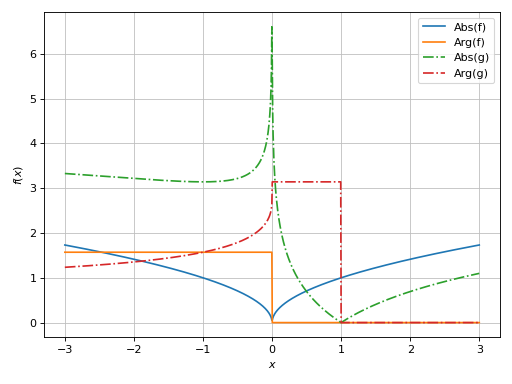
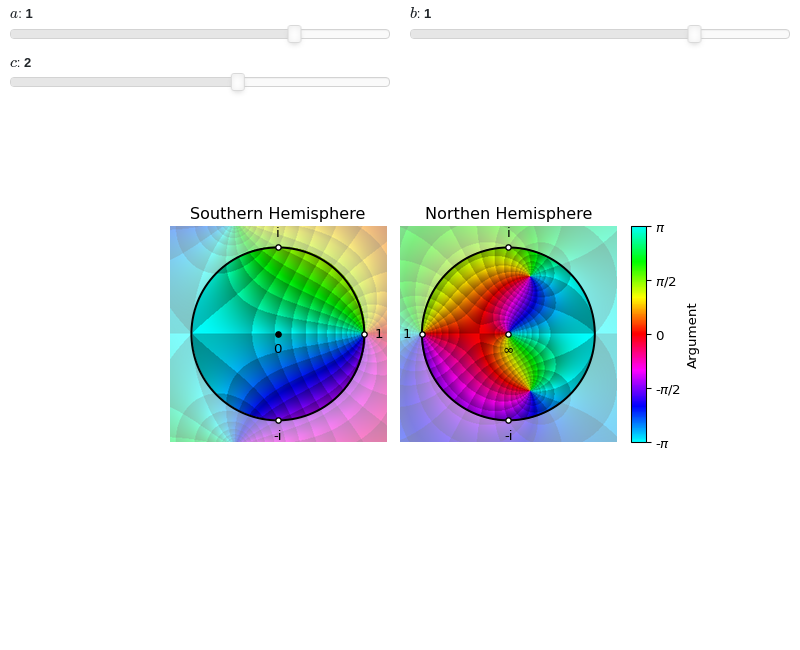
The saturated disks represents the hemispheres. The black circle is the equator. Also, a few important points are displayed to make the plot easier to understand.
Note the orientation of the Northen Hemisphere: it has been rotated around the point at infinity by an angle pi and flipped about the real axis. This is convenient because:
we can now imagine to fold the two charts so that the points 1, i, -i are overlayed, glue the equator and blow it up to obtain a sphere.
imagine bringing the two discs closer so that they touch at the point 1. Now, roll the two discs together: assuming there are no branch cuts, there is continuity of argument and absolute value across the equator: what is outside of the disc in the left plot, is inside of the disk in the second plot, and vice-versa.
From the above plots, the zero located at \(z=1\) is clearly visible, as well as the two poles located at \(z = -\frac{1}{2} - i \frac{\sqrt{7}}{2}\) and \(z = -\frac{1}{2} + i \frac{\sqrt{7}}{2}\). Not obvious at first, there is a zero located at \(z=\infty\). We can tell its a zero by looking at ordering of colors around it in comparison to the poles. Alternatively, we can use some enhanced color scheme, for example one which brings poles to white:
plot_riemann_sphere(expr, coloring="m", n=800)
(
Source code,png)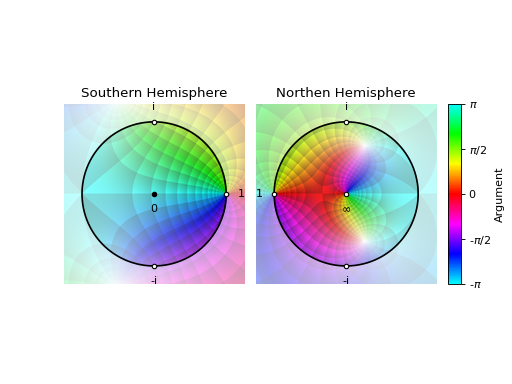
Examples
Standard output:
from sympy import symbols, Rational, I
from spb import *
z = symbols("z")
expr = 1 / (2 * z**2) + z
plot_riemann_sphere(expr, coloring="b", n=800)
(
Source code,png)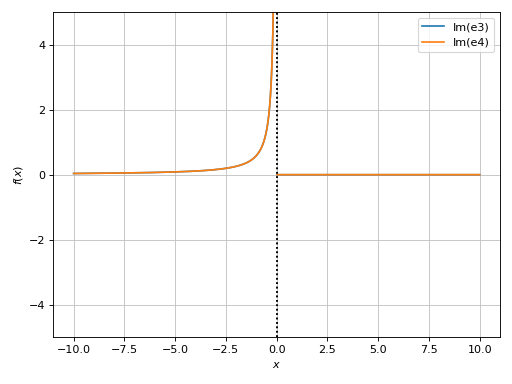
Hide annotations:
plot_riemann_sphere(expr, coloring="b", n=800, annotate=False)
(
Source code,png)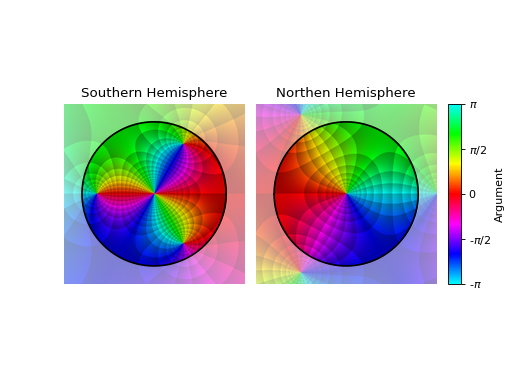
Hiding Riemann disk mask and annotations, set a custom domain, show axis (note that the right-most plot might be misleading because the center represents infinity), custom colormap, set the black level of contours, set titles.
import colorcet
expr = z**5 + Rational(1, 10)
l = 2
plot_riemann_sphere(
    expr, (z, -l-l*I, l+l*I), coloring="b", n=800,
    riemann_mask=False, axis=True, grid=False,
    cmap=colorcet.CET_C2, blevel=0.85,
    title=["Around zero", "Around infinity"])
(
Source code,png)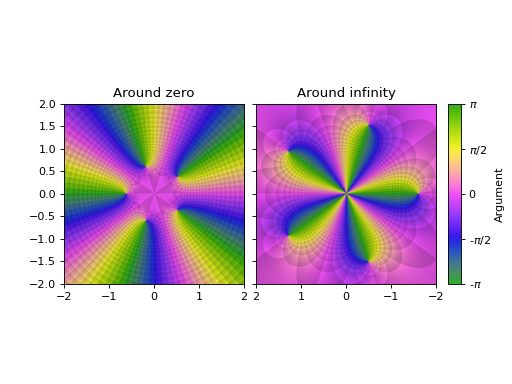
Interactive-widget plot. Refer to the interactive sub-module documentation to learn more about the
paramsdictionary. This plot illustrates the use of theparamsdictionary to specify sliders in their basic form: (default, min, max).from sympy import * from sympy.abc import a, b, c from spb import * z = symbols("z") expr = (z - 1) / (a * z**2 + b * z + c) plot_riemann_sphere( expr, coloring="b", n=300, params={ a: (1, -2, 2), b: (1, -2, 2), c: (2, -10, 10), } )
3D plot of a complex function on the Riemann sphere. Note, the higher the number of discretization points, the better the final results, but the higher memory consumption:
from sympy import *
from spb import *
z = symbols("z")
expr = (z - 1) / (z**2 + z + 1)
plot_riemann_sphere(expr, threed=True, n=150,
    coloring="b", backend=KB, legend=False, grid=False)


- spb.plot_functions.complex_analysis.plot_complex_list(*args, **kwargs)[source]
Plot lists of complex points. By default, the aspect ratio of the plot is set to
aspect="equal".Typical usage examples are in the followings:
Plotting a single list of complex numbers:
plot_complex_list(l1, **kwargs)
Plotting multiple lists of complex numbers:
plot_complex_list(l1, l2, **kwargs)
Plotting multiple lists of complex numbers each one with a custom label and rendering options:
plot_complex_list(
   (l1, label1, rendering_kw1),
   (l2, label2, rendering_kw2), **kwargs)`
Refer to
complex_points()for a full list of keyword arguments to customize the appearances of lines.Refer to
graphics()for a full list of keyword arguments to customize the appearances of the figure (title, axis labels, …).- Parameters:
- numbers
Complex number, or a list of complex numbers.
- labelstr
Set the label associated to this series, which will be eventually shown on the legend or colorbar.
- aspectstr, tuple, list, dict
Set the aspect ratio.
Possible values for Matplotlib (only works for a 2D plot):
"auto": Matplotlib will fit the plot in the vibile area."equal": sets equal spacing.tuple containing 2 float numbers, from which the aspect ratio is computed. This only works for 2D plots.
Possible values for Plotly:
"equal": sets equal spacing on the axis of a 2D plot.For 3D plots:
"cube": fix the ratio to be a cube"data": draw axes in proportion of their ranges"auto": automatically produce something that is well proportioned using ‘data’ as the default.manually set the aspect ratio by providing a dictionary. For example:
dict(x=1, y=1, z=2)forces the z-axis to appear twice as big as the other two.
Possible values for Bokeh:
"equal": sets equal spacing.
- ax
An existing Matplotlib’s Axes over which the symbolic expressions will be plotted.
- axisbool
Show the axis in the figure. Default value: True.
- axis_centerstr, tuple
Set the location of the intersection between the horizontal and vertical axis in a 2D plot. It only works with Matplotlib and it can receive the following values:
None: traditional layout, with the horizontal axis fixed on the bottom and the vertical axis fixed on the left. This is the default value.a tuple
(x, y)specifying the exact intersection point.'center': center of the current plot area.'auto': the intersection point is automatically computed.
- camera
Set the camera position for 3D plots.
For Matplotlib, it can be a dictionary of keyword arguments that will be passed to the
Axes3D.view_initmethod. Refer to the following link for more information: https://matplotlib.org/stable/api/_as_gen/mpl_toolkits.mplot3d.axes3d.Axes3D.html#mpl_toolkits.mplot3d.axes3d.Axes3D.view_initFor Plotly, it can be a dictionary of keyword arguments that will be passed to the layout’s
scene_camera. Refer to the following link for more information: https://plotly.com/python/3d-camera-controls/For K3D-Jupyter, it is list of 9 numbers, namely:
x_cam, y_cam, z_cam: the position of the camera in the scenex_tar, y_tar, z_tar: the position of the target of the camerax_up, y_up, z_up: components of the up vector
- color_funccallable
A color function to be applied to the numerical data. It can be:
None: no color function.
callable: a function accepting two arguments, the real and imaginary parts of the complex coordinates, and returning numerical data.
- colorbarbool
Toggle the visibility of the colorbar associated to the current data series. Note that a colorbar is only visible if
use_cm=Trueandcolor_funcis not None. Default value: True.- colorbar_ticks_formattertick_formatter_multiples_of
An object of type
tick_formatter_multiples_ofwhich will be used to place tick values on the colorbar at each multiple of a specified quantity. This only works when use_cm=True.- colorlooplist, tuple
List of colors to be used in line plots or solid color surfaces.
- colormapslist, tuple
List of color maps to render surfaces.
- cyclic_colormapslist, tuple
List of cyclic color maps to render complex series (the phase/argument ranges over [-pi, pi]).
- fig
Get or set the figure where to plot into.
- gridbool, dict
Toggle the visibility of major grid lines. A dictionary of keyword arguments can be passed to customized the appearance of the grid lines:
- hookslist
List of functions expecting one argument, the current plot object, which allows users to further customize the appearance of the plot before it is shown on the screen. The hooks are executed:
after the figure has been initialized and populated with numerical data.
after the existing renderers update the visualization because the user interacted with some widget.
Note: let
pbe the plot object. Then, the user can access the figure withp.fig. In case ofspb.backends.matplotlib.MatplotlibBackend, the user can also retrieve the axes in which data was added withp.ax.- is_filledbool
Whether scatter’s markers are filled or void. Default value: True.
- is_scatterbool
If True it represent a scatter plot, otherwise a continuous line. Default value: False.
- legendbool
Toggle the visibility of the legend. If None, the backend will automatically determine if it is appropriate to show it. Default value: None.
- line_color
For back-compatibility with old sympy.plotting. Use
rendering_kwin order to fully customize the appearance of the line/scatter.- minor_gridbool, dict
Toggle the visibility of minor grid lines. A dictionary of keyword arguments can be passed to customized the appearance of the grid lines:
- paramsdict, optional
A dictionary mapping symbols to parameters. If provided, this dictionary enables the interactive-widgets plot.
When calling a plotting function, the parameter can be specified with:
a widget from the
ipywidgetsmodule.a widget from the
panelmodule.- a tuple of the form:
(default, min, max, N, tick_format, label, spacing), which will instantiate a
ipywidgets.widgets.widget_float.FloatSlideror aipywidgets.widgets.widget_float.FloatLogSlider, depending on the spacing strategy. In particular:- default, min, maxfloat
Default value, minimum value and maximum value of the slider, respectively. Must be finite numbers. The order of these 3 numbers is not important: the module will figure it out which is what.
- Nint, optional
Number of steps of the slider.
- tick_formatstr or None, optional
Provide a formatter for the tick value of the slider. Default to
".2f".
- label: str, optional
Custom text associated to the slider.
- spacingstr, optional
Specify the discretization spacing. Default to
"linear", can be changed to"log".
Notes:
parameters cannot be linked together (ie, one parameter cannot depend on another one).
If a widget returns multiple numerical values (like
panel.widgets.slider.RangeSlideroripywidgets.widgets.widget_float.FloatRangeSlider), then a corresponding number of symbols must be provided.
Here follows a couple of examples. If
imodule="panel":import panel as pn params = { a: (1, 0, 5), # slider from 0 to 5, with default value of 1 b: pn.widgets.FloatSlider(value=1, start=0, end=5), # same slider as above (c, d): pn.widgets.RangeSlider(value=(-1, 1), start=-3, end=3, step=0.1) }
Or with
imodule="ipywidgets":import ipywidgets as w params = { a: (1, 0, 5), # slider from 0 to 5, with default value of 1 b: w.FloatSlider(value=1, min=0, max=5), # same slider as above (c, d): w.FloatRangeSlider(value=(-1, 1), min=-3, max=3, step=0.1) }
When instantiating a data series directly,
paramsmust be a dictionary mapping symbols to numerical values.Let
seriesbe any data series. Thenseries.paramsreturns a dictionary mapping symbols to numerical values.- polar_axisbool
If True, the backend will attempt to use polar axis, otherwise it uses cartesian axis. This is only supported for 2D plots. Default value: False.
- rendering_kwdict
A dictionary of keyword arguments to be passed to the renderers in order to further customize the appearance of the line. Here are some useful links for the supported plotting libraries:
Matplotlib:
for solid lines: https://matplotlib.org/stable/api/_as_gen/matplotlib.pyplot.plot.html
for colormap-based lines: https://matplotlib.org/stable/api/collections_api.html#matplotlib.collections.LineCollection
for scatters: https://matplotlib.org/stable/api/_as_gen/matplotlib.pyplot.scatter.html
Bokeh:
- show_in_legendbool
Toggle the visibility of the data series on the legend. Default value: True.
- size
Set the size of the plot, (width, height). For Matplotlib, the size is measured in inches. For Bokeh, Plotly and K3D-Jupyter, the size is in pixel.
- themestr
Theme to be used to style the figure. Depending on the backend being used, several themes may be available.
- title
Title of the plot. It can be:
a string.
a callable receiving a single argument, use_latex, which must return a string.
a tuple of the form (format_str, symbol 1, symbol 2, etc.), which creates an output string when parameters symbol 1, symbol 2, etc. receive numerical values from the widgets. This operation mode only works when creating interactive data series (ie, specifying the
paramsdictionary).
- txcallable
Numerical transformation function to be applied to the data on the x-axis.
- tycallable
Numerical transformation function to be applied to the data on the y-axis.
- update_eventbool
If True and the backend supports such functionality, events like drag and zoom will trigger a recompute of the data series within the new axis limits. Default value: False.
- use_cmbool
Toggle the use of a colormap. By default, some series might use a colormap to display the necessary data. Setting this attribute to False will inform the associated renderer to use solid color. Related parameters:
color_func. Default value: False.- use_latexbool
Turn on/off the rendering of latex labels. If the backend doesn’t support latex, it will render the string representations instead. Default value: True.
- x_ticks_formattertick_formatter_multiples_of
An object of type
tick_formatter_multiples_ofwhich will be used to place tick values at each multiple of a specified quantity, along the x-axis.- xlabel
Label of the x-axis. It can be:
a string.
a callable receiving a single argument, use_latex, which must return a string.
a tuple of the form (format_str, symbol 1, symbol 2, etc.), which creates an output string when parameters symbol 1, symbol 2, etc. receive numerical values from the widgets. This operation mode only works when creating interactive data series (ie, specifying the
paramsdictionary).
- xlim
Limit the figure’s x-axis to the specified range. The tuple must be in the form (min_val, max_val).
- xscaleNoneType, str
If the backend supports it, the x-direction will use the specified scale. Note that none of the backends support logarithmic scale for 3D plots. Possible options: [‘linear’, ‘log’, None] Default value: ‘linear’.
- y_ticks_formattertick_formatter_multiples_of
An object of type
tick_formatter_multiples_ofwhich will be used to place tick values at each multiple of a specified quantity, along the y-axis.- ylabel
Label of the y-axis. It can be:
a string.
a callable receiving a single argument, use_latex, which must return a string.
a tuple of the form (format_str, symbol 1, symbol 2, etc.), which creates an output string when parameters symbol 1, symbol 2, etc. receive numerical values from the widgets. This operation mode only works when creating interactive data series (ie, specifying the
paramsdictionary).
- ylim
Limit the figure’s y-axis to the specified range. The tuple must be in the form (min_val, max_val).
- yscaleNoneType, str
If the backend supports it, the y-direction will use the specified scale. Note that none of the backends support logarithmic scale for 3D plots. Possible options: [‘linear’, ‘log’, None] Default value: ‘linear’.
- zlabel
Label of the z-axis. It can be:
a string.
a callable receiving a single argument, use_latex, which must return a string.
a tuple of the form (format_str, symbol 1, symbol 2, etc.), which creates an output string when parameters symbol 1, symbol 2, etc. receive numerical values from the widgets. This operation mode only works when creating interactive data series (ie, specifying the
paramsdictionary).
- zlim
Limit the figure’s z-axis to the specified range. The tuple must be in the form (min_val, max_val).
- zscaleNoneType, str
If the backend supports it, the z-direction will use the specified scale. Note that none of the backends support logarithmic scale for 3D plots. Possible options: [‘linear’, ‘log’, None] Default value: ‘linear’.
See also
Examples
>>> from sympy import I, symbols, exp, sqrt, cos, sin, pi, gamma
>>> from spb import plot_complex_list
>>> x, y, z = symbols('x, y, z')
Plot individual complex points:
>>> plot_complex_list(3 + 2 * I, 4 * I, 2)
Plot object containing:
[0]: complex points: (3 + 2*I,)
[1]: complex points: (4*I,)
[2]: complex points: (2,)
(
Source code,png)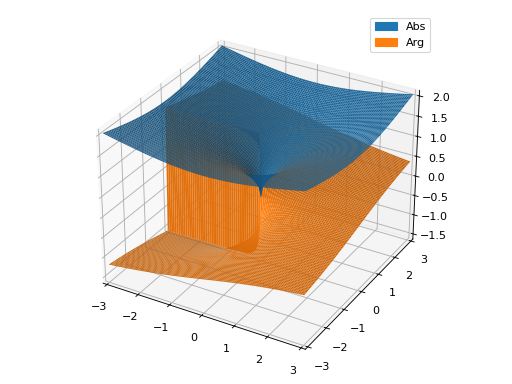
Plot two lists of complex points and assign to them custom labels:
>>> expr1 = z * exp(2 * pi * I * z)
>>> expr2 = 2 * expr1
>>> n = 15
>>> l1 = [expr1.subs(z, t / n) for t in range(n)]
>>> l2 = [expr2.subs(z, t / n) for t in range(n)]
>>> plot_complex_list((l1, "f1"), (l2, "f2"))
Plot object containing:
[0]: complex points: (0.0, 0.0666666666666667*exp(0.133333333333333*I*pi), 0.133333333333333*exp(0.266666666666667*I*pi), 0.2*exp(0.4*I*pi), 0.266666666666667*exp(0.533333333333333*I*pi), 0.333333333333333*exp(0.666666666666667*I*pi), 0.4*exp(0.8*I*pi), 0.466666666666667*exp(0.933333333333333*I*pi), 0.533333333333333*exp(1.06666666666667*I*pi), 0.6*exp(1.2*I*pi), 0.666666666666667*exp(1.33333333333333*I*pi), 0.733333333333333*exp(1.46666666666667*I*pi), 0.8*exp(1.6*I*pi), 0.866666666666667*exp(1.73333333333333*I*pi), 0.933333333333333*exp(1.86666666666667*I*pi))
[1]: complex points: (0, 0.133333333333333*exp(0.133333333333333*I*pi), 0.266666666666667*exp(0.266666666666667*I*pi), 0.4*exp(0.4*I*pi), 0.533333333333333*exp(0.533333333333333*I*pi), 0.666666666666667*exp(0.666666666666667*I*pi), 0.8*exp(0.8*I*pi), 0.933333333333333*exp(0.933333333333333*I*pi), 1.06666666666667*exp(1.06666666666667*I*pi), 1.2*exp(1.2*I*pi), 1.33333333333333*exp(1.33333333333333*I*pi), 1.46666666666667*exp(1.46666666666667*I*pi), 1.6*exp(1.6*I*pi), 1.73333333333333*exp(1.73333333333333*I*pi), 1.86666666666667*exp(1.86666666666667*I*pi))
(
Source code,png)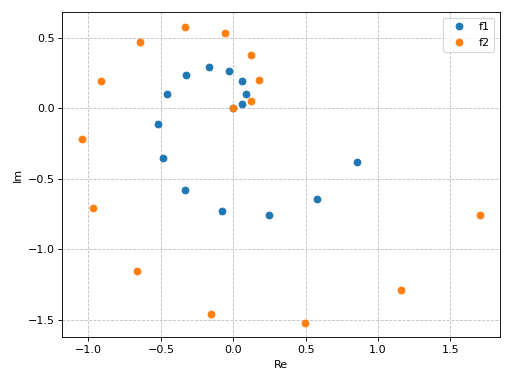
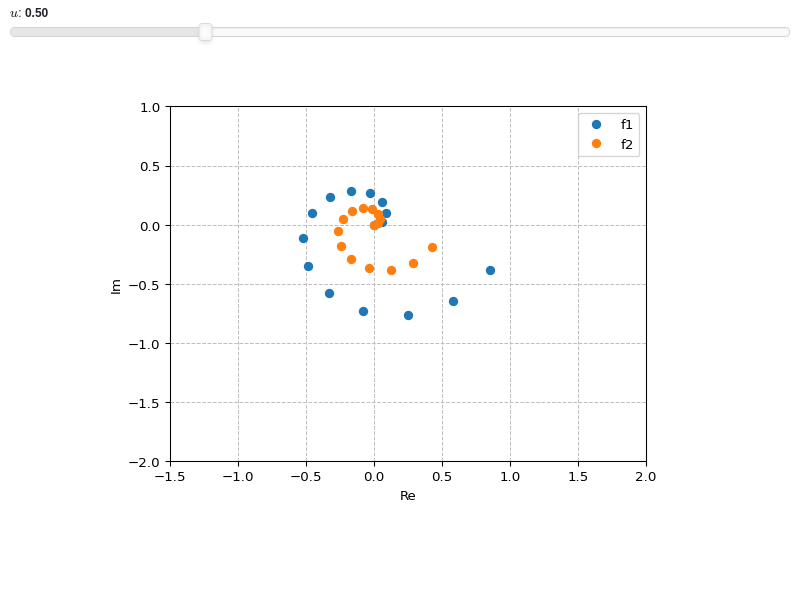
Interactive-widget plot. Refer to the interactive sub-module documentation to learn more about the
paramsdictionary.from sympy import * from spb import * z, u = symbols("z u") expr1 = z * exp(2 * pi * I * z) expr2 = u * expr1 n = 15 l1 = [expr1.subs(z, t / n) for t in range(n)] l2 = [expr2.subs(z, t / n) for t in range(n)] plot_complex_list( (l1, "f1"), (l2, "f2"), params={u: (0.5, 0, 2)}, xlim=(-1.5, 2), ylim=(-2, 1))


- spb.plot_functions.complex_analysis.plot_real_imag(*args, **kwargs)[source]
Plot the real and imaginary parts, the absolute value and the argument of a complex function. By default, only the real and imaginary parts will be plotted. Use keyword argument to be more specific. By default, the aspect ratio of 2D plots is set to
aspect="equal".Depending on the provided expression, this function will produce different types of plots:
line plot over the reals.
surface plot over the complex plane if threed=True.
contour plot over the complex plane if threed=False.
Typical usage examples are in the followings:
Plotting a single expression with the default range (-10, 10):
plot_real_imag(expr, **kwargs)
Plotting multiple expressions with a single range:
plot_real_imag(expr1, expr2, ..., range, **kwargs)
Plotting multiple expressions with multiple ranges, custom labels and rendering options:
plot_real_imag(
   (expr1, range1, label1 [opt], rendering_kw1 [opt]),
   (expr2, range2, label2 [opt], rendering_kw2 [opt]), ..., **kwargs)
- Parameters:
- realboolean, optional
Show/hide the real part. Default to True (visible).
- imagboolean, optional
Show/hide the imaginary part. Default to True (visible).
- absboolean, optional
Show/hide the absolute value. Default to False (hidden).
- argboolean, optional
Show/hide the argument. Default to False (hidden).
See also
Examples
>>> from sympy import I, symbols, exp, sqrt, cos, sin, pi, gamma
>>> from spb import plot_real_imag
>>> x, y, z = symbols('x, y, z')
Plot the real and imaginary parts of a function over reals:
>>> plot_real_imag(sqrt(x), (x, -3, 3))
Plot object containing:
[0]: cartesian line: re(sqrt(x)) for x over (-3, 3)
[1]: cartesian line: im(sqrt(x)) for x over (-3, 3)
(
Source code,png)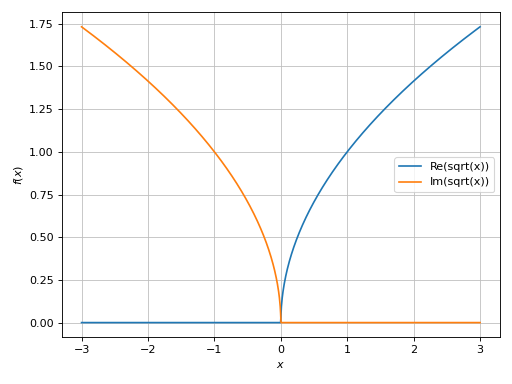
Plot only the real part:
>>> plot_real_imag(sqrt(x), (x, -3, 3), imag=False)
Plot object containing:
[0]: cartesian line: re(sqrt(x)) for x over (-3, 3)
(
Source code,png)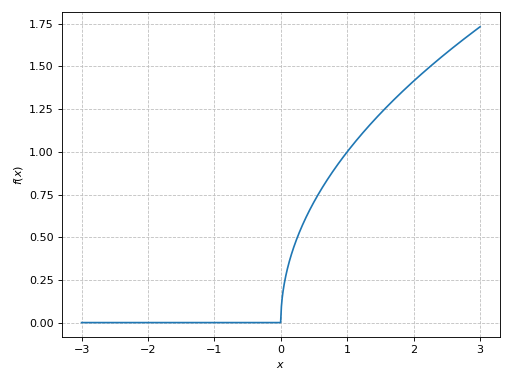
Plot only the imaginary part:
>>> plot_real_imag(sqrt(x), (x, -3, 3), real=False)
Plot object containing:
[0]: cartesian line: im(sqrt(x)) for x over (-3, 3)
(
Source code,png)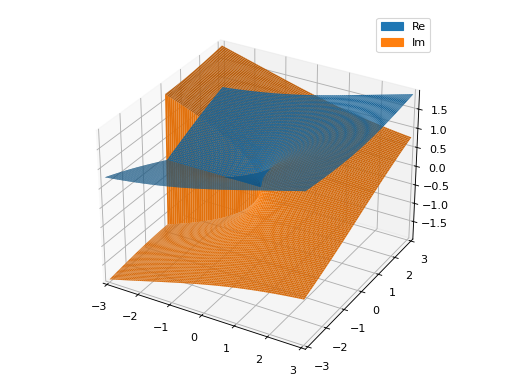
Plot only the absolute value and argument:
>>> plot_real_imag(
...     sqrt(x), (x, -3, 3), real=False, imag=False, abs=True, arg=True)
Plot object containing:
[0]: cartesian line: abs(sqrt(x)) for x over (-3, 3)
[1]: cartesian line: arg(sqrt(x)) for x over (-3, 3)
(
Source code,png)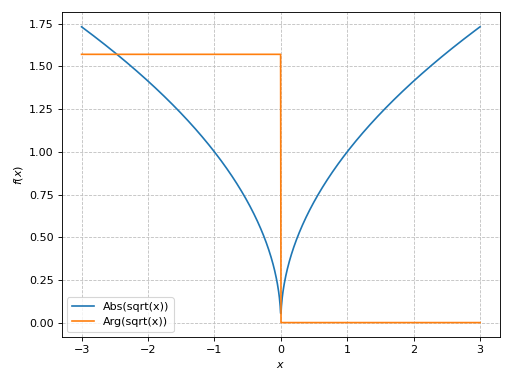
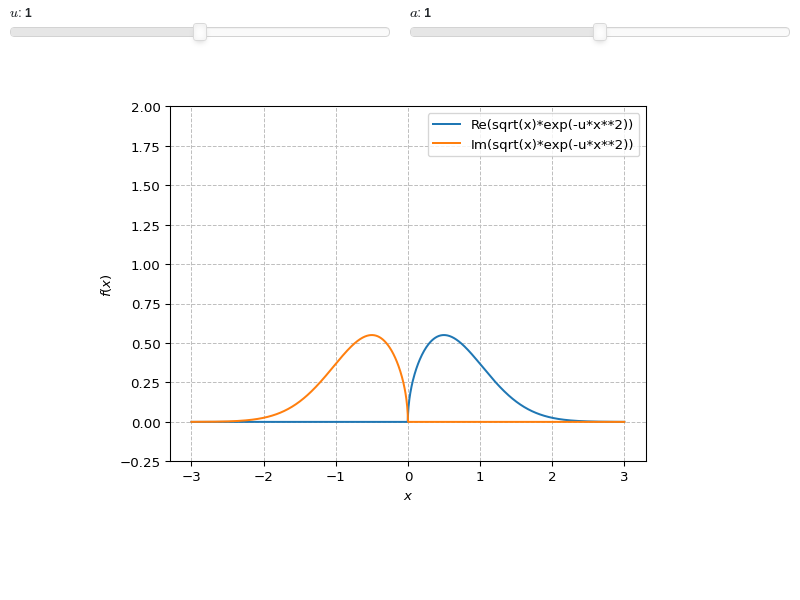
Interactive-widget plot. Refer to the interactive sub-module documentation to learn more about the
paramsdictionary. This plot illustrates:the use of
prange(parametric plotting range).for 1D
plot_real_imag, symbols going intoprangemust be real.the use of the
paramsdictionary to specify sliders in their basic form: (default, min, max).
from sympy import *
from spb import *
x, u = symbols("x, u")
a = symbols("a", real=True)
plot_real_imag(sqrt(x) * exp(-u * x**2), prange(x, -3*a, 3*a),
    params={u: (1, 0, 2), a: (1, 0, 2)},
    ylim=(-0.25, 2))
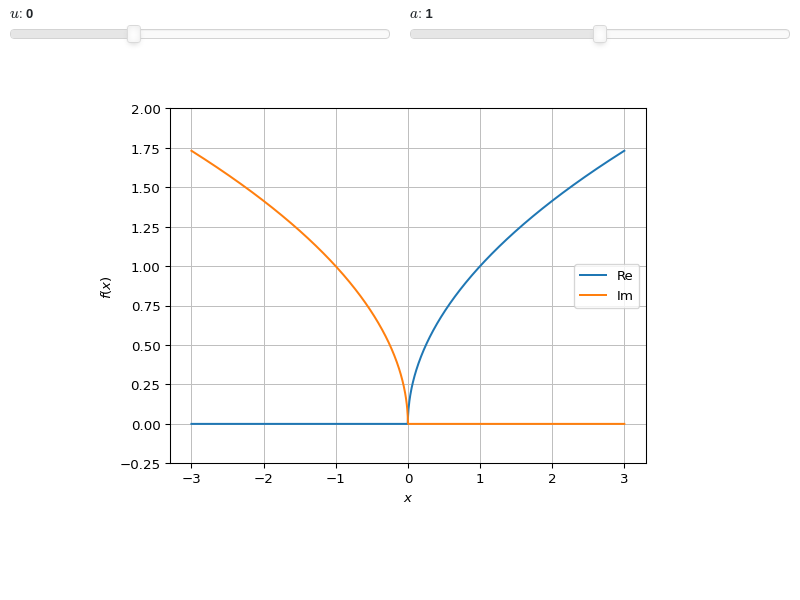
3D plot of the real and imaginary part of the principal branch of a function over a complex range. Note the jump in the imaginary part: that’s a branch cut. The rectangular discretization is unable to properly capture it, hence the near vertical wall. Refer to
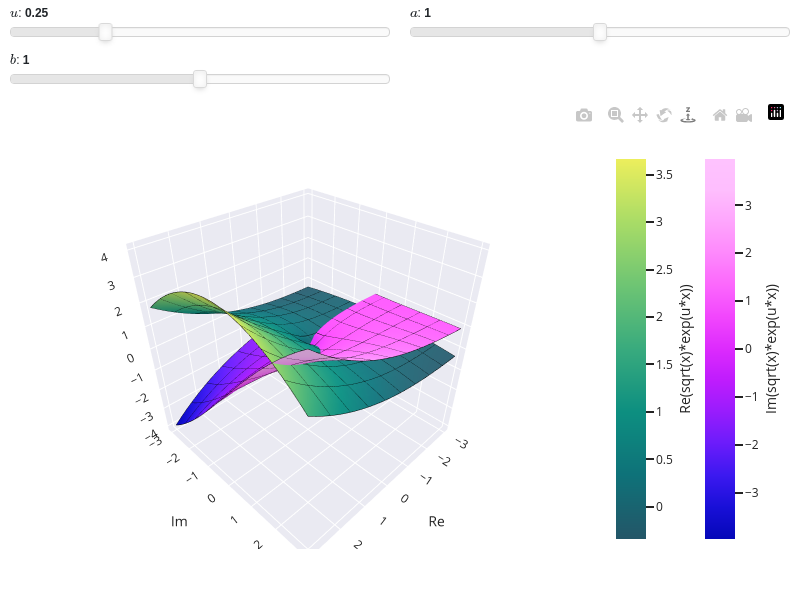
plot3d_parametric_surfacefor an example about plotting Riemann surfaces and properly capture the branch cuts.>>> plot_real_imag(sqrt(x), (x, -3-3j, 3+3j), n=100, threed=True, ... use_cm=True) Plot object containing: [0]: complex cartesian surface: re(sqrt(x)) for re(x) over (-3.0, 3.0) and im(x) over (-3.0, 3.0) [1]: complex cartesian surface: im(sqrt(x)) for re(x) over (-3.0, 3.0) and im(x) over (-3.0, 3.0)
(
Source code,png)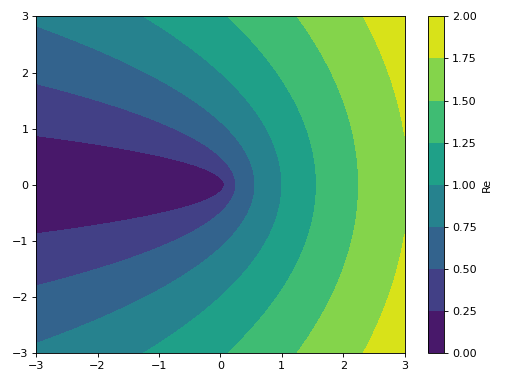
3D plot of the absolute value of a function over a complex range:
>>> plot_real_imag(sqrt(x), (x, -3-3j, 3+3j),
...     n=100, real=False, imag=False, abs=True, threed=True)
Plot object containing:
[0]: complex cartesian surface: abs(sqrt(x)) for re(x) over (-3.0, 3.0) and im(x) over (-3.0, 3.0)
(
Source code,png)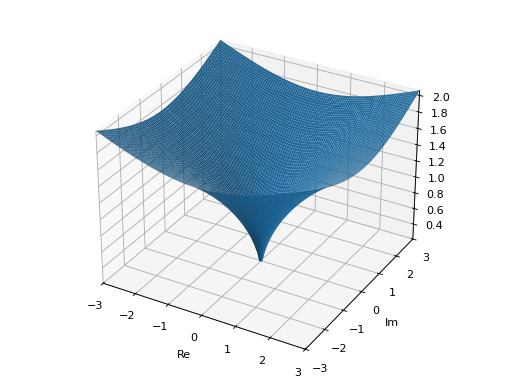
Interactive-widget plot. Refer to the interactive sub-module documentation to learn more about the
paramsdictionary. This plot illustrates:the use of
prange(parametric plotting range).the use of the
paramsdictionary to specify sliders in their basic form: (default, min, max).
from sympy import *
from spb import *
x, u, a, b = symbols("x, u, a, b")
plot_real_imag(
    sqrt(x) * exp(u * x), prange(x, -3*a-b*3j, 3*a+b*3j),
    backend=PB, aspect="cube",
    wireframe=True, wf_rendering_kw={"line_width": 1},
    params={
        u: (0.25, 0, 1),
        a: (1, 0, 2),
        b: (1, 0, 2)
    }, n=25, threed=True, use_cm=True)


- spb.plot_functions.complex_analysis.plot_complex_vector(*args, **kwargs)[source]
Plot the vector field [re(f), im(f)] for a complex function f over the specified complex domain. By default, the aspect ratio of 2D plots is set to
aspect="equal".Typical usage examples are in the followings:
Plotting a vector field of a complex function:
plot_complex_vector(expr, range, **kwargs)
Plotting multiple vector fields with different ranges and custom labels:
plot_complex_vector(
   (expr1, range1, label1 [optional]),
   (expr2, range2, label2 [optional]), **kwargs)
- Parameters:
- exprExpr
Represent the complex function.
- range_ctuple
A 3-element tuples denoting the range of the variables. For example
(z, -5 - 3*I, 5 + 3*I). Note that we can specify the range by using standard Python complex numbers, for example(z, -5-3j, 5+3j).- labelstr
Set the label associated to this series, which will be eventually shown on the legend or colorbar.
- aspectstr, tuple, list, dict
Set the aspect ratio.
Possible values for Matplotlib (only works for a 2D plot):
"auto": Matplotlib will fit the plot in the vibile area."equal": sets equal spacing.tuple containing 2 float numbers, from which the aspect ratio is computed. This only works for 2D plots.
Possible values for Plotly:
"equal": sets equal spacing on the axis of a 2D plot.For 3D plots:
"cube": fix the ratio to be a cube"data": draw axes in proportion of their ranges"auto": automatically produce something that is well proportioned using ‘data’ as the default.manually set the aspect ratio by providing a dictionary. For example:
dict(x=1, y=1, z=2)forces the z-axis to appear twice as big as the other two.
Possible values for Bokeh:
"equal": sets equal spacing.
- ax
An existing Matplotlib’s Axes over which the symbolic expressions will be plotted.
- axisbool
Show the axis in the figure. Default value: True.
- axis_centerstr, tuple
Set the location of the intersection between the horizontal and vertical axis in a 2D plot. It only works with Matplotlib and it can receive the following values:
None: traditional layout, with the horizontal axis fixed on the bottom and the vertical axis fixed on the left. This is the default value.a tuple
(x, y)specifying the exact intersection point.'center': center of the current plot area.'auto': the intersection point is automatically computed.
- camera
Set the camera position for 3D plots.
For Matplotlib, it can be a dictionary of keyword arguments that will be passed to the
Axes3D.view_initmethod. Refer to the following link for more information: https://matplotlib.org/stable/api/_as_gen/mpl_toolkits.mplot3d.axes3d.Axes3D.html#mpl_toolkits.mplot3d.axes3d.Axes3D.view_initFor Plotly, it can be a dictionary of keyword arguments that will be passed to the layout’s
scene_camera. Refer to the following link for more information: https://plotly.com/python/3d-camera-controls/For K3D-Jupyter, it is list of 9 numbers, namely:
x_cam, y_cam, z_cam: the position of the camera in the scenex_tar, y_tar, z_tar: the position of the target of the camerax_up, y_up, z_up: components of the up vector
- color_func
Define the quiver/streamlines color mapping when
use_cm=True. It can either be:A numerical function supporting vectorization. The arity must be:
f(x, y, u, v). Further,scalar=Falsemust be set in order to hide the contour plot so that a colormap is applied to quivers/streamlines.A symbolic expression having at most as many free symbols as
u, v. This only works for quivers plot.None: the default value, which will map colors according to the magnitude of the vector field.
- colorbarbool
Toggle the visibility of the colorbar associated to the current data series. Note that a colorbar is only visible if
use_cm=Trueandcolor_funcis not None. Default value: True.- colorlooplist, tuple
List of colors to be used in line plots or solid color surfaces.
- colormapslist, tuple
List of color maps to render surfaces.
- cyclic_colormapslist, tuple
List of cyclic color maps to render complex series (the phase/argument ranges over [-pi, pi]).
- fig
Get or set the figure where to plot into.
- force_real_evalbool
By default, numerical evaluation is performed over complex numbers, which is slower but produces correct results. However, when the symbolic expression is converted to a numerical function with lambdify, the resulting function may not like to be evaluated over complex numbers. In such cases, forcing the evaluation to be performed over real numbers might be a good choice. The plotting module should be able to detect such occurences and automatically activate this option. If that is not the case, or evaluation performance is of paramount importance, set this parameter to True, but be aware that it might produce wrong results. Default value: False.
- gridbool, dict
Toggle the visibility of major grid lines. A dictionary of keyword arguments can be passed to customized the appearance of the grid lines:
- hookslist
List of functions expecting one argument, the current plot object, which allows users to further customize the appearance of the plot before it is shown on the screen. The hooks are executed:
after the figure has been initialized and populated with numerical data.
after the existing renderers update the visualization because the user interacted with some widget.
Note: let
pbe the plot object. Then, the user can access the figure withp.fig. In case ofspb.backends.matplotlib.MatplotlibBackend, the user can also retrieve the axes in which data was added withp.ax.- is_streamlinesbool
If True shows the streamlines, otherwise visualize the vector field with quivers. Default value: False.
- legendbool
Toggle the visibility of the legend. If None, the backend will automatically determine if it is appropriate to show it. Default value: None.
- minor_gridbool, dict
Toggle the visibility of minor grid lines. A dictionary of keyword arguments can be passed to customized the appearance of the grid lines:
- modules
Specify the evaluation modules to be used by lambdify. If not specified, the evaluation will be done with NumPy/SciPy.
- n1int
Number of discretization points along the x-axis to be used in the evaluation. Related parameters:
xscale. Default value: 25.- n2int
Number of discretization points along the y-axis to be used in the evaluation. Related parameters:
yscale. Default value: 25.- normalizebool
If True, the vector field will be normalized, resulting in quivers having the same length. If
use_cm=True, the backend will color the quivers by the (pre-normalized) vector field’s magnitude. Note: only quivers will be affected by this option.Default value: False.
- only_integersbool
Discretize the domain using only integer numbers. When this parameter is True, the number of discretization points is choosen by the algorithm. Default value: False.
- paramsdict, optional
A dictionary mapping symbols to parameters. If provided, this dictionary enables the interactive-widgets plot.
When calling a plotting function, the parameter can be specified with:
a widget from the
ipywidgetsmodule.a widget from the
panelmodule.- a tuple of the form:
(default, min, max, N, tick_format, label, spacing), which will instantiate a
ipywidgets.widgets.widget_float.FloatSlideror aipywidgets.widgets.widget_float.FloatLogSlider, depending on the spacing strategy. In particular:- default, min, maxfloat
Default value, minimum value and maximum value of the slider, respectively. Must be finite numbers. The order of these 3 numbers is not important: the module will figure it out which is what.
- Nint, optional
Number of steps of the slider.
- tick_formatstr or None, optional
Provide a formatter for the tick value of the slider. Default to
".2f".
- label: str, optional
Custom text associated to the slider.
- spacingstr, optional
Specify the discretization spacing. Default to
"linear", can be changed to"log".
Notes:
parameters cannot be linked together (ie, one parameter cannot depend on another one).
If a widget returns multiple numerical values (like
panel.widgets.slider.RangeSlideroripywidgets.widgets.widget_float.FloatRangeSlider), then a corresponding number of symbols must be provided.
Here follows a couple of examples. If
imodule="panel":import panel as pn params = { a: (1, 0, 5), # slider from 0 to 5, with default value of 1 b: pn.widgets.FloatSlider(value=1, start=0, end=5), # same slider as above (c, d): pn.widgets.RangeSlider(value=(-1, 1), start=-3, end=3, step=0.1) }
Or with
imodule="ipywidgets":import ipywidgets as w params = { a: (1, 0, 5), # slider from 0 to 5, with default value of 1 b: w.FloatSlider(value=1, min=0, max=5), # same slider as above (c, d): w.FloatRangeSlider(value=(-1, 1), min=-3, max=3, step=0.1) }
When instantiating a data series directly,
paramsmust be a dictionary mapping symbols to numerical values.Let
seriesbe any data series. Thenseries.paramsreturns a dictionary mapping symbols to numerical values.- polar_axisbool
If True, the backend will attempt to use polar axis, otherwise it uses cartesian axis. This is only supported for 2D plots. Default value: False.
- rendering_kwdict
A dictionary of keyword arguments to be passed to the renderers in order to further customize the appearance of the quivers or streamlines. Here are some useful links for the supported plotting libraries:
Matplotlib:
Plotly:
2D quivers: https://plotly.com/python/quiver-plots/
2D streamlines: https://plotly.com/python/streamline-plots/
- show_in_legendbool
Toggle the visibility of the data series on the legend. Default value: True.
- size
Set the size of the plot, (width, height). For Matplotlib, the size is measured in inches. For Bokeh, Plotly and K3D-Jupyter, the size is in pixel.
- sum_boundint
When plotting sums, the expression will be pre-processed in order to replace lower/upper bounds set to +/- infinity with this +/- numerical value. Note: the higher this number, the slower the evaluation, but the more accurate the plot. It must be: 0 ≤ sum_bound < ∞. Default value: 1000.
- themestr
Theme to be used to style the figure. Depending on the backend being used, several themes may be available.
- title
Title of the plot. It can be:
a string.
a callable receiving a single argument, use_latex, which must return a string.
a tuple of the form (format_str, symbol 1, symbol 2, etc.), which creates an output string when parameters symbol 1, symbol 2, etc. receive numerical values from the widgets. This operation mode only works when creating interactive data series (ie, specifying the
paramsdictionary).
- txcallable
Numerical transformation function to be applied to the data on the x-axis.
- tycallable
Numerical transformation function to be applied to the data on the y-axis.
- update_eventbool
If True and the backend supports such functionality, events like drag and zoom will trigger a recompute of the data series within the new axis limits. Default value: False.
- use_cmbool
Toggle the use of a colormap. By default, some series might use a colormap to display the necessary data. Setting this attribute to False will inform the associated renderer to use solid color. Related parameters:
color_func. Default value: False.- use_latexbool
Turn on/off the rendering of latex labels. If the backend doesn’t support latex, it will render the string representations instead. Default value: True.
- x_ticks_formattertick_formatter_multiples_of
An object of type
tick_formatter_multiples_ofwhich will be used to place tick values at each multiple of a specified quantity, along the x-axis.- xlabel
Label of the x-axis. It can be:
a string.
a callable receiving a single argument, use_latex, which must return a string.
a tuple of the form (format_str, symbol 1, symbol 2, etc.), which creates an output string when parameters symbol 1, symbol 2, etc. receive numerical values from the widgets. This operation mode only works when creating interactive data series (ie, specifying the
paramsdictionary).
- xlim
Limit the figure’s x-axis to the specified range. The tuple must be in the form (min_val, max_val).
- xscaleNoneType, str
If the backend supports it, the x-direction will use the specified scale. Note that none of the backends support logarithmic scale for 3D plots. Possible options: [‘linear’, ‘log’, None] Default value: ‘linear’.
- y_ticks_formattertick_formatter_multiples_of
An object of type
tick_formatter_multiples_ofwhich will be used to place tick values at each multiple of a specified quantity, along the y-axis.- ylabel
Label of the y-axis. It can be:
a string.
a callable receiving a single argument, use_latex, which must return a string.
a tuple of the form (format_str, symbol 1, symbol 2, etc.), which creates an output string when parameters symbol 1, symbol 2, etc. receive numerical values from the widgets. This operation mode only works when creating interactive data series (ie, specifying the
paramsdictionary).
- ylim
Limit the figure’s y-axis to the specified range. The tuple must be in the form (min_val, max_val).
- yscaleNoneType, str
If the backend supports it, the y-direction will use the specified scale. Note that none of the backends support logarithmic scale for 3D plots. Possible options: [‘linear’, ‘log’, None] Default value: ‘linear’.
- zlabel
Label of the z-axis. It can be:
a string.
a callable receiving a single argument, use_latex, which must return a string.
a tuple of the form (format_str, symbol 1, symbol 2, etc.), which creates an output string when parameters symbol 1, symbol 2, etc. receive numerical values from the widgets. This operation mode only works when creating interactive data series (ie, specifying the
paramsdictionary).
- zlim
Limit the figure’s z-axis to the specified range. The tuple must be in the form (min_val, max_val).
- zscaleNoneType, str
If the backend supports it, the z-direction will use the specified scale. Note that none of the backends support logarithmic scale for 3D plots. Possible options: [‘linear’, ‘log’, None] Default value: ‘linear’.
See also
plot_real_imag,plot_complex,plot_complex_list,plot_vector
Examples
>>> from sympy import I, symbols, gamma, latex, log
>>> from spb import plot_complex_vector, plot_complex
>>> z = symbols('z')
Quivers plot with normalize lengths and a contour plot in background representing the vector’s magnitude (a scalar field).
>>> expr = z**2 + 2
>>> plot_complex_vector(expr, (z, -5 - 5j, 5 + 5j),
...     quiver_kw=dict(color="orange"), normalize=True, grid=False)
Plot object containing:
[0]: contour: sqrt(4*(re(_x) - im(_y))**2*(re(_y) + im(_x))**2 + ((re(_x) - im(_y))**2 - (re(_y) + im(_x))**2 + 2)**2) for _x over (-5.00000000000000, 5.00000000000000) and _y over (-5.00000000000000, 5.00000000000000)
[1]: 2D vector series: [(re(_x) - im(_y))**2 - (re(_y) + im(_x))**2 + 2, 2*(re(_x) - im(_y))*(re(_y) + im(_x))] over (_x, -5.0, 5.0), (_y, -5.0, 5.0)
(
Source code,png)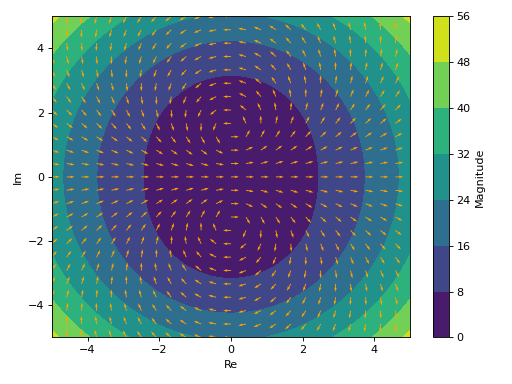
Only quiver plot with normalized lengths and solid color.
>>> plot_complex_vector(expr, (z, -5 - 5j, 5 + 5j),
...     scalar=False, use_cm=False, normalize=True)
Plot object containing:
[0]: 2D vector series: [(re(_x) - im(_y))**2 - (re(_y) + im(_x))**2 + 2, 2*(re(_x) - im(_y))*(re(_y) + im(_x))] over (_x, -5.0, 5.0), (_y, -5.0, 5.0)
(
Source code,png)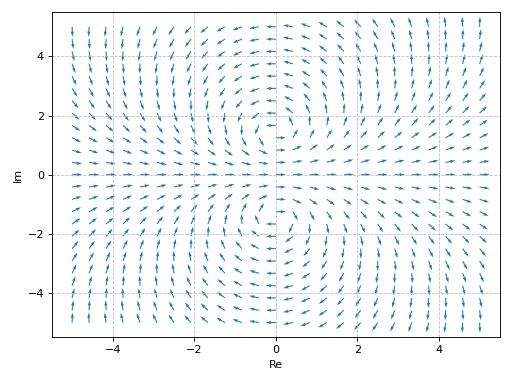
Only streamlines plot.
>>> plot_complex_vector(expr, (z, -5 - 5j, 5 + 5j),
...     "Magnitude of $%s$" % latex(expr),
...     scalar=False, streamlines=True)
Plot object containing:
[0]: 2D vector series: [(re(_x) - im(_y))**2 - (re(_y) + im(_x))**2 + 2, 2*(re(_x) - im(_y))*(re(_y) + im(_x))] over (_x, -5.0, 5.0), (_y, -5.0, 5.0)
(
Source code,png)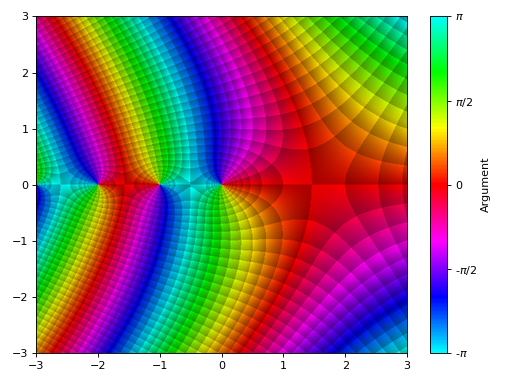
Overlay the quiver plot to a domain coloring plot. By setting
n=26(even number) in the complex vector plot, the quivers won’t to cross the branch cut.>>> expr = z * log(2 * z) + 3 >>> p1 = plot_complex(expr, (z, -2-2j, 2+2j), grid=False, show=False, ... legend=False) >>> p2 = plot_complex_vector(expr, (z, -2-2j, 2+2j), ... n=26, grid=False, scalar=False, use_cm=False, normalize=True, ... quiver_kw={"color": "k", "pivot": "tip"}, show=False) >>> (p1 + p2).show() >>> (p1 + p2) Plot object containing: [0]: complex domain coloring: z*log(2*z) + 3 for re(z) over (-2.0, 2.0) and im(z) over (-2.0, 2.0) [1]: 2D vector series: [(re(_x) - im(_y))*log(Abs(2*_x + 2*_y*I)) - (re(_y) + im(_x))*arg(_x + _y*I) + 3, (re(_x) - im(_y))*arg(_x + _y*I) + (re(_y) + im(_x))*log(Abs(2*_x + 2*_y*I))] over (_x, -2.0, 2.0), (_y, -2.0, 2.0)
(
Source code,png)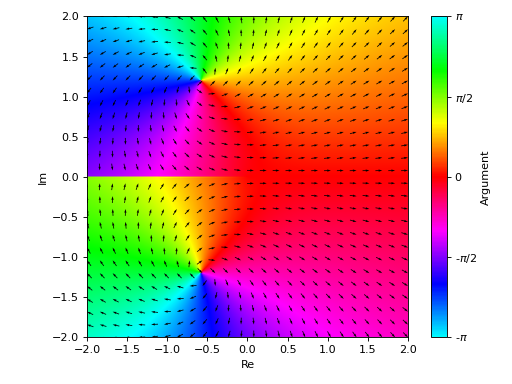
Interactive-widget plot. Refer to the interactive sub-module documentation to learn more about the
paramsdictionary. This plot illustrates:the use of
prange(parametric plotting range).the use of the
paramsdictionary to specify sliders in their basic form: (default, min, max).
from sympy import *
from spb import *
z, u, a, b = symbols("z u a b")
plot_complex_vector(
    log(gamma(u * z)), prange(z, -5*a - b*5j, 5*a + b*5j),
    params={
        u: (1, 0, 2),
        a: (1, 0, 2),
        b: (1, 0, 2)
    }, n=20, grid=False,
    quiver_kw=dict(color="orange", headwidth=4))